
Join the Conversation
- Find Answers
- :
- Using Splunk
- :
- Dashboards & Visualizations
- :
- Re: Not able to remove entries from table row
- Subscribe to RSS Feed
- Mark Topic as New
- Mark Topic as Read
- Float this Topic for Current User
- Bookmark Topic
- Subscribe to Topic
- Mute Topic
- Printer Friendly Page
- Mark as New
- Bookmark Message
- Subscribe to Message
- Mute Message
- Subscribe to RSS Feed
- Permalink
- Report Inappropriate Content

Hi,
We have a jenkins pipeline and I am writing a query to visualize duration of various stages across different builds. When using jenkins splunk plugin, its giving some values which arent actually stage names.
If I try to remove those out in search itself, it returns empty data as all stages seem to be in a single statistics raw event. If i later try to use where on it that too doesnt work. Sort also doesnt work on numerice duration values
Query I am using is :
index=dx_campaign_utf_jenkins_statistics host="<hostname>" event_tag=job_event type=completed job_name=orchestration-pipeline "stages{}.name"="*"
| rename stages{}.duration as stageduration
| rename stages{}.name as stageName
| table stageName, stageduration, build_number
Query returns result like :
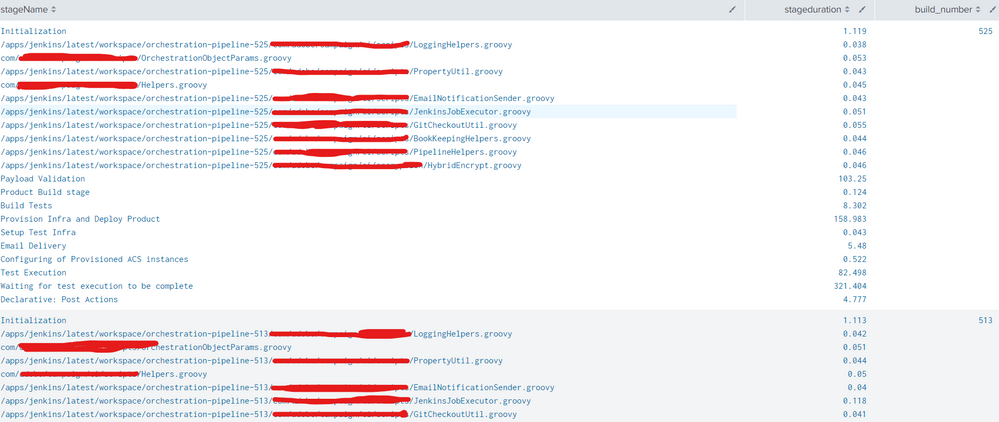
How do i remove stages like /apps, com ones ?
- Mark as New
- Bookmark Message
- Subscribe to Message
- Mute Message
- Subscribe to RSS Feed
- Permalink
- Report Inappropriate Content
Hi @richgalloway
This was giving syntax error. Did you mean mvfilter(match(stageName, "\/apps")?
I wasn't aware of multi fields, after your reply I tried on multiple multi field options and ended up using a combination of mvexpand, table and spath :
index=dx_campaign_utf_jenkins_statistics host="<hostname>" event_tag=job_event type=completed job_name=orchestration-pipeline "stages{}.name"="*"
| spath output=stagesmf path=stages{}
| table stagesmf, build_number
| mvexpand stagesmf
| rename stagesmf as _raw
| spath path=duration | spath path=name | spath path=start_time
| table name, duration, start_time, build_number
| where NOT like(name, "%.groovy")
problem with working with multi fields was that any filter only removed values from one column, so i had to separate these out early to get filtering to work
- Mark as New
- Bookmark Message
- Subscribe to Message
- Mute Message
- Subscribe to RSS Feed
- Permalink
- Report Inappropriate Content


Try using mvfilter to remove the undesired bits.
index=dx_campaign_utf_jenkins_statistics host="<hostname>" event_tag=job_event type=completed job_name=orchestration-pipeline "stages{}.name"="*"
| rename stages{}.duration as stageduration
| rename stages{}.name as stageName
| eval stageName=mvfilter(stageName, "\/apps")
| table stageName, stageduration, build_number
If this reply helps you, Karma would be appreciated.
- Mark as New
- Bookmark Message
- Subscribe to Message
- Mute Message
- Subscribe to RSS Feed
- Permalink
- Report Inappropriate Content
Hi @richgalloway
This was giving syntax error. Did you mean mvfilter(match(stageName, "\/apps")?
I wasn't aware of multi fields, after your reply I tried on multiple multi field options and ended up using a combination of mvexpand, table and spath :
index=dx_campaign_utf_jenkins_statistics host="<hostname>" event_tag=job_event type=completed job_name=orchestration-pipeline "stages{}.name"="*"
| spath output=stagesmf path=stages{}
| table stagesmf, build_number
| mvexpand stagesmf
| rename stagesmf as _raw
| spath path=duration | spath path=name | spath path=start_time
| table name, duration, start_time, build_number
| where NOT like(name, "%.groovy")
problem with working with multi fields was that any filter only removed values from one column, so i had to separate these out early to get filtering to work
- Mark as New
- Bookmark Message
- Subscribe to Message
- Mute Message
- Subscribe to RSS Feed
- Permalink
- Report Inappropriate Content
If your problem is resolved, please accept one of the replies to help future readers.
If this reply helps you, Karma would be appreciated.

Join the Splunk Community Slack to learn, troubleshoot, and make connections with fellow Splunk practitioners in real time!
Join Splunk User Groups to connect and learn in-person by region or remotely by topic or industry.
May 2026 Splunk Expert Sessions: Security & Observability
Network to App: Observability Unlocked [May & June Series]
SPL2 Deep Dives, AppDynamics Integrations, SAML Made Simple and Much More on Splunk ...
