
Join the Conversation
- Find Answers
- :
- Using Splunk
- :
- Splunk Search
- :
- Re: how to join two charts
- Subscribe to RSS Feed
- Mark Topic as New
- Mark Topic as Read
- Float this Topic for Current User
- Bookmark Topic
- Subscribe to Topic
- Mute Topic
- Printer Friendly Page
- Mark as New
- Bookmark Message
- Subscribe to Message
- Mute Message
- Subscribe to RSS Feed
- Permalink
- Report Inappropriate Content

- Mark as New
- Bookmark Message
- Subscribe to Message
- Mute Message
- Subscribe to RSS Feed
- Permalink
- Report Inappropriate Content


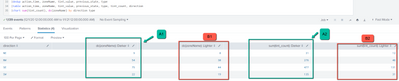
Try this - replace your last chart statement with these two lines - the chart just is renaming the fields and the foreach is doing the calc, i.e. Ratio=TintCount/Zones
| chart sum(tint_count) as TintCount dc(zonename) as Zones by direction type
| foreach TintCount* [ eval "Ratio<<MATCHSTR>>"='<<FIELD>>'/'Zones<<MATCHSTR>>' ]
- Mark as New
- Bookmark Message
- Subscribe to Message
- Mute Message
- Subscribe to RSS Feed
- Permalink
- Report Inappropriate Content
Can you provide the query you are using? What happens when you tried what you tried?
- Mark as New
- Bookmark Message
- Subscribe to Message
- Mute Message
- Subscribe to RSS Feed
- Permalink
- Report Inappropriate Content
Just found I can directly add sum(___) and dc(___) inside chart command which solved my previous problem lol! Thanks for looking into it though. Now I have a follow up quesion about my post-analysis for adding calculated fileds into the same chart...
- Mark as New
- Bookmark Message
- Subscribe to Message
- Mute Message
- Subscribe to RSS Feed
- Permalink
- Report Inappropriate Content
Try this - replace your last chart statement with these two lines - the chart just is renaming the fields and the foreach is doing the calc, i.e. Ratio=TintCount/Zones
| chart sum(tint_count) as TintCount dc(zonename) as Zones by direction type
| foreach TintCount* [ eval "Ratio<<MATCHSTR>>"='<<FIELD>>'/'Zones<<MATCHSTR>>' ]
- Mark as New
- Bookmark Message
- Subscribe to Message
- Mute Message
- Subscribe to RSS Feed
- Permalink
- Report Inappropriate Content
Thanks for the suggestion! But it doesn't seem to work

Is the foreach command supposed to insert a new column called Ratio in this case?
- Mark as New
- Bookmark Message
- Subscribe to Message
- Mute Message
- Subscribe to RSS Feed
- Permalink
- Report Inappropriate Content
Oops thanks @ITWhisperer pointing out the typo
- Mark as New
- Bookmark Message
- Subscribe to Message
- Mute Message
- Subscribe to RSS Feed
- Permalink
- Report Inappropriate Content

dc(zonename) should be dc(zoneName)


Join the Splunk Community Slack to learn, troubleshoot, and make connections with fellow Splunk practitioners in real time!
Join Splunk User Groups to connect and learn in-person by region or remotely by topic or industry.
A Four-Part Event Series: Full Stack Observability For the AI Era
SOC4Kafka - New Kafka Connector Powered by OpenTelemetry
Event Series: Level up your SOC: Advancing with Splunk Enterprise Security
