
Join the Conversation
- Find Answers
- :
- Using Splunk
- :
- Splunk Search
- :
- field extraction using regex - removing curly brac...
- Subscribe to RSS Feed
- Mark Topic as New
- Mark Topic as Read
- Float this Topic for Current User
- Bookmark Topic
- Subscribe to Topic
- Mute Topic
- Printer Friendly Page
- Mark as New
- Bookmark Message
- Subscribe to Message
- Mute Message
- Subscribe to RSS Feed
- Permalink
- Report Inappropriate Content

I wonder if anybody can help me with a regex to break this field into single lines
CustomResults="{pcap_filter_result {72038003 Ok (0x00000000)}} {pcap_filter_result {1769863 Ok (0x00000000)}} {pcap_filter_result {10879463 Ok (0x00000000)}} {pcap_filter_result {1962188 Ok (0x00000000)}} {pcap_filter_result {69603350 Ok (0x00000000)}} {pcap_filter_result {22006889 Ok
I am only interested to have : 72055288 Ok (0x00000000)
is there any way I can see it match line by line with any other field? like
field 1 field 2 72055288 Ok (0x00000000)
field 1 field 2 72055289 Ok (0x00000000)
field 1 field 2 72055210 Ok (0x00000000)
this one field has all this data together and looking for the best way to break it
thanks so much
- Mark as New
- Bookmark Message
- Subscribe to Message
- Mute Message
- Subscribe to RSS Feed
- Permalink
- Report Inappropriate Content


| rex max_match=0 "\{pcap_filter_result\s{(?<filter>[^\}]+)\}\}"
| mvexpand filter- Mark as New
- Bookmark Message
- Subscribe to Message
- Mute Message
- Subscribe to RSS Feed
- Permalink
- Report Inappropriate Content
| rex max_match=0 "\{pcap_filter_result\s{(?<filter>[^\}]+)\}\}"
| mvexpand filter- Mark as New
- Bookmark Message
- Subscribe to Message
- Mute Message
- Subscribe to RSS Feed
- Permalink
- Report Inappropriate Content
thank you this one worked!
- Mark as New
- Bookmark Message
- Subscribe to Message
- Mute Message
- Subscribe to RSS Feed
- Permalink
- Report Inappropriate Content

Hi,
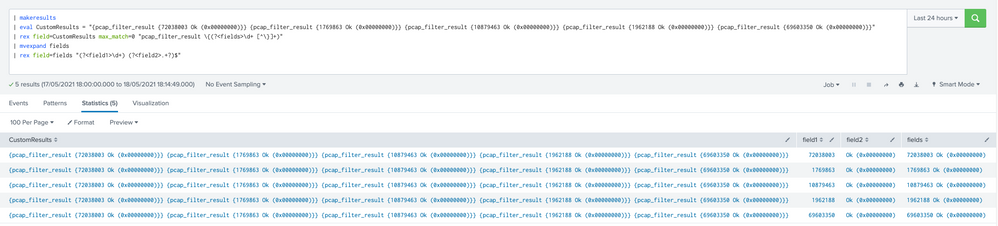
There are several ways to achieve this. Assuming I understood your question correctly, the following SPL should do the job:
| makeresults
| eval CustomResults = "{pcap_filter_result {72038003 Ok (0x00000000)}} {pcap_filter_result {1769863 Ok (0x00000000)}} {pcap_filter_result {10879463 Ok (0x00000000)}} {pcap_filter_result {1962188 Ok (0x00000000)}} {pcap_filter_result {69603350 Ok (0x00000000)}}"
| rex field=CustomResults max_match=0 "pcap_filter_result \{(?<fields>\d+ [^\}]+)"
| mvexpand fields
| rex field=fields "(?<field1>\d+) (?<field2>.+?)$"
Example from my lab:


Join the Splunk Community Slack to learn, troubleshoot, and make connections with fellow Splunk practitioners in real time!
Join Splunk User Groups to connect and learn in-person by region or remotely by topic or industry.
SOC4Kafka - New Kafka Connector Powered by OpenTelemetry
Event Series: Level up your SOC: Advancing with Splunk Enterprise Security
Announcing Modern Navigation: A New Era of Splunk User Experience
