
Join the Conversation
- Find Answers
- :
- Using Splunk
- :
- Splunk Search
- :
- Why is CSV data showing up as hexadecimal?
- Subscribe to RSS Feed
- Mark Topic as New
- Mark Topic as Read
- Float this Topic for Current User
- Bookmark Topic
- Subscribe to Topic
- Mute Topic
- Printer Friendly Page
- Mark as New
- Bookmark Message
- Subscribe to Message
- Mute Message
- Subscribe to RSS Feed
- Permalink
- Report Inappropriate Content

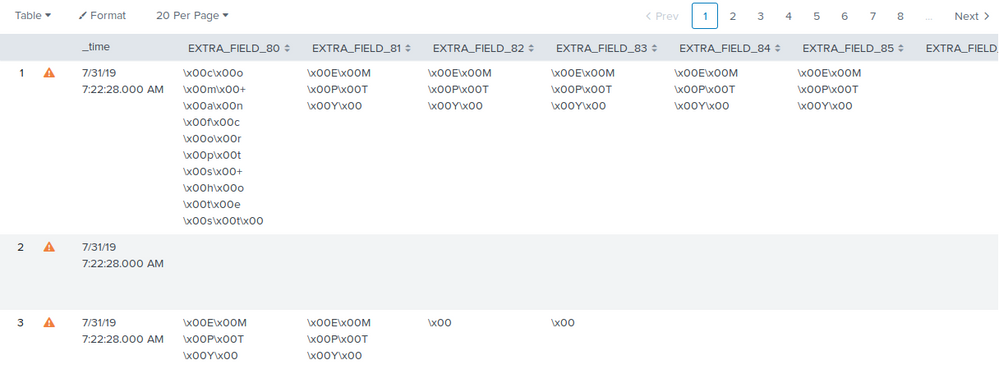
Please see the attached screenshot.
I have a uploaded CSV with valid data but when I upload the CSV, the GUI displays all of my column/rows as hex code.
Haven't had an issue with any other CSV uploads.

- Mark as New
- Bookmark Message
- Subscribe to Message
- Mute Message
- Subscribe to RSS Feed
- Permalink
- Report Inappropriate Content


Hi jordanking1992,
you have to find the correct charset, the only way is to ingest your csv file using the guided ingestion [Settings -- Data Inputs -- Files and Directories -- New Local File & Directory].
In this way you can try different CHARSETs and find the correct one.
Anyway, where does your csv come from?
Bye.
Giuseppe
- Mark as New
- Bookmark Message
- Subscribe to Message
- Mute Message
- Subscribe to RSS Feed
- Permalink
- Report Inappropriate Content
Hi jordanking1992,
you have to find the correct charset, the only way is to ingest your csv file using the guided ingestion [Settings -- Data Inputs -- Files and Directories -- New Local File & Directory].
In this way you can try different CHARSETs and find the correct one.
Anyway, where does your csv come from?
Bye.
Giuseppe
- Mark as New
- Bookmark Message
- Subscribe to Message
- Mute Message
- Subscribe to RSS Feed
- Permalink
- Report Inappropriate Content
That was the issue. But when i change it to AUTO, the body of the CSV is now readable but the columns are still in hex. Its coming from a windows server and i believe the csv is generated by a powershell script.
- Mark as New
- Bookmark Message
- Subscribe to Message
- Mute Message
- Subscribe to RSS Feed
- Permalink
- Report Inappropriate Content
IS this resolved for you? I am also facing similar issue . Any insights will be helpful.
CHARSET is already AUTO but still data is showing as hexadecimal .
- Mark as New
- Bookmark Message
- Subscribe to Message
- Mute Message
- Subscribe to RSS Feed
- Permalink
- Report Inappropriate Content
Did you guys found any solution, even I am facing the same issue please let me know if there is any solution

Join the Splunk Community Slack to learn, troubleshoot, and make connections with fellow Splunk practitioners in real time!
Join Splunk User Groups to connect and learn in-person by region or remotely by topic or industry.
Announcing Modern Navigation: A New Era of Splunk User Experience
Modernize your Splunk Apps – Introducing Python 3.13 in Splunk
Step into “Hunt the Insider: An Splunk ES Premier Mystery” to catch a cybercriminal ...
