
Join the Conversation
- Find Answers
- :
- Using Splunk
- :
- Splunk Search
- :
- Re: How do I exclude fields with certain values fr...
- Subscribe to RSS Feed
- Mark Topic as New
- Mark Topic as Read
- Float this Topic for Current User
- Bookmark Topic
- Subscribe to Topic
- Mute Topic
- Printer Friendly Page
- Mark as New
- Bookmark Message
- Subscribe to Message
- Mute Message
- Subscribe to RSS Feed
- Permalink
- Report Inappropriate Content

Hi,
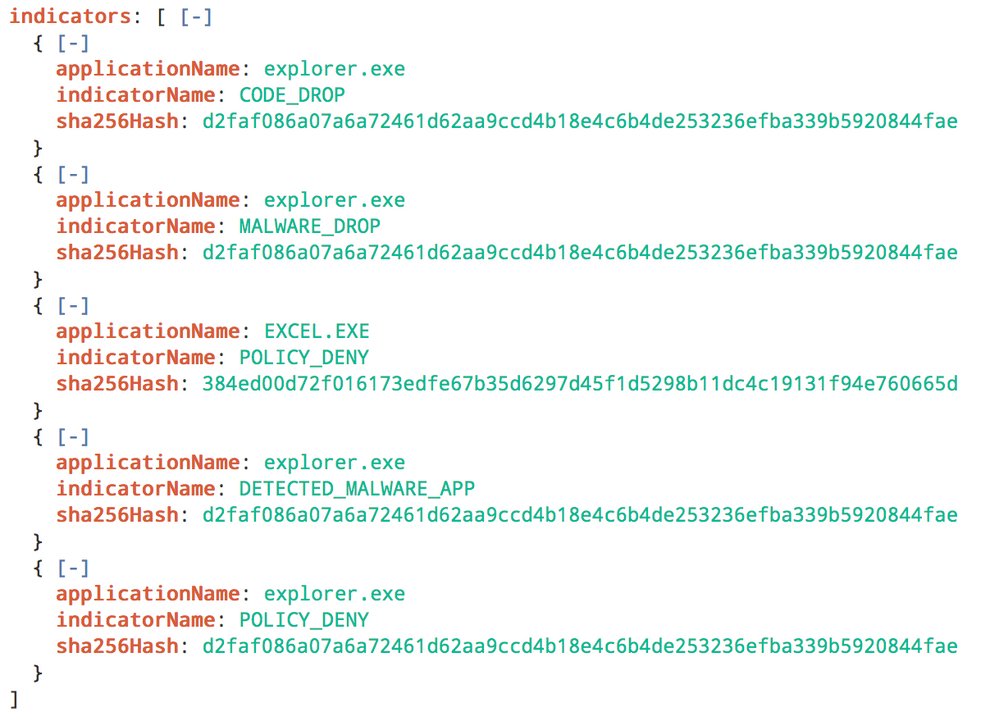
As the title says. Refer to the screenshot below too;
The above is the log for the event. as you can see, there are multiple indicatorName in a single event.
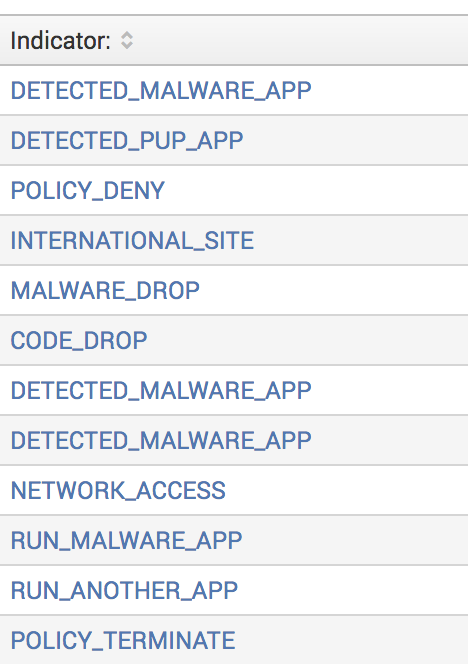
And this is the table when I do a top. However, I only want certain values to show. E.g. Only show indicatorName: DETECTED_MALWARE_APP and not indicatorName: CODE_DROP.
- Mark as New
- Bookmark Message
- Subscribe to Message
- Mute Message
- Subscribe to RSS Feed
- Permalink
- Report Inappropriate Content

If you are trying to eliminate just the words from the multivalue field, then use mvfilter().
| eval Indicator=mvfilter(NOT match(Indicator,"^(POLICY_TERMINATE|MALWARE_DROP)$"))
The doc is on this page...
http://docs.splunk.com/Documentation/Splunk/7.0.0/SearchReference/MultivalueEvalFunctions
And here are a couple of related answers...
https://answers.splunk.com/answers/346961/remove-multiple-values-from-a-multi-value-field.html
- Mark as New
- Bookmark Message
- Subscribe to Message
- Mute Message
- Subscribe to RSS Feed
- Permalink
- Report Inappropriate Content
If you are trying to eliminate just the words from the multivalue field, then use mvfilter().
| eval Indicator=mvfilter(NOT match(Indicator,"^(POLICY_TERMINATE|MALWARE_DROP)$"))
The doc is on this page...
http://docs.splunk.com/Documentation/Splunk/7.0.0/SearchReference/MultivalueEvalFunctions
And here are a couple of related answers...
https://answers.splunk.com/answers/346961/remove-multiple-values-from-a-multi-value-field.html
- Mark as New
- Bookmark Message
- Subscribe to Message
- Mute Message
- Subscribe to RSS Feed
- Permalink
- Report Inappropriate Content
I tried it with eval threatInfo.indicators{}.indicatorName=mvfilter(match(threatInfo.indicators{}.indicatorName, "DETECTED_MALWARE_APP")) but it's throwing Error in 'eval' command: The expression is malformed. Expected ).
- Mark as New
- Bookmark Message
- Subscribe to Message
- Mute Message
- Subscribe to RSS Feed
- Permalink
- Report Inappropriate Content
Nevermind, found out the issue. Splunk doesn't like it when my field name is threatInfo.indicators{}.indicatorName. Had to rename it to something else and then it worked. Thank you! Will mark your answer as correct now.




Join the Splunk Community Slack to learn, troubleshoot, and make connections with fellow Splunk practitioners in real time!
Join Splunk User Groups to connect and learn in-person by region or remotely by topic or industry.
Painting a Clearer Picture: Unifying Your Investigations with Cisco AI Canvas
Hello POJO, meet nocode
Announcing Modern Navigation: A New Era of Splunk User Experience
