
Join the Conversation
- Find Answers
- :
- Using Splunk
- :
- Splunk Search
- :
- Re: CSS partially not working
- Subscribe to RSS Feed
- Mark Topic as New
- Mark Topic as Read
- Float this Topic for Current User
- Bookmark Topic
- Subscribe to Topic
- Mute Topic
- Printer Friendly Page
- Mark as New
- Bookmark Message
- Subscribe to Message
- Mute Message
- Subscribe to RSS Feed
- Permalink
- Report Inappropriate Content

I am trying to hide RED, GREEN and YELLOW, but the xml css is not working for me.
<form>
<row>
<panel>
<html>
<style>
#tbl_Summary tbody td div.multivalue-subcell[data-mv-index="1"]
{display: none;}
</style>
</html>

<table id="tbl_Summary">
<title>Summary</title>
<search>
<query>
index=*xyz
| eval calsuc=case(match('code',"1"), "SUCCESS", match('code',"2"), "WARNING", match('code',"1"), "FAILURE")
| dedup requestId
| eval APPLICATION=case(like('apn',"/PROFILE"),"PROFILE")
| stats Count as "Total Count" count(eval(calsuc="SUCCESS")) as "TotalSuccess" count(eval(calsuc="WARNING")) as "TotalWarning" count(eval(calsuc="FAILURE")) as "TotalFailure"
| rename TotalSuccess as S, TotalWarning as W, TotalFailure as F
| eval SuccessPerc=round(((S)/(S+W+F)),100,2)
| eval sign=round(SuccessPerc, 0)
| eval colorCd= if(sign>=95,"GREEN",if(95>sign AND sign>=80,"YELLOW", "RED"))
| eval ApplicationName=APPLICATION."|".'colorCd'
</query>
<earliest>$sltd_tm.earliest$</earliest>
<latest>$sltd_tm.latest$</earliest>
</search>
<option name="count">20</option>
<option name="drilldown">row</option>
<format type="color">
<colorPalette type="expression">
case (match(value,"RED"), "#DC4E41", match(value,"YELLOW"),"#F88E34",match(value,"GREEN"),"#53A051")
</colorPalette>
</format>
</table>
</panel>
</row>
</form>

- Mark as New
- Bookmark Message
- Subscribe to Message
- Mute Message
- Subscribe to RSS Feed
- Permalink
- Report Inappropriate Content


For this technique to work, you missed an essential detail. The colour has to be in a multivalue field
Change
| eval ApplicationName=APPLICATION."|".'colorCd'to
| eval ApplicationName=mvappend(APPLICATION,colorCd)- Mark as New
- Bookmark Message
- Subscribe to Message
- Mute Message
- Subscribe to RSS Feed
- Permalink
- Report Inappropriate Content
For this technique to work, you missed an essential detail. The colour has to be in a multivalue field
Change
| eval ApplicationName=APPLICATION."|".'colorCd'to
| eval ApplicationName=mvappend(APPLICATION,colorCd)- Mark as New
- Bookmark Message
- Subscribe to Message
- Mute Message
- Subscribe to RSS Feed
- Permalink
- Report Inappropriate Content
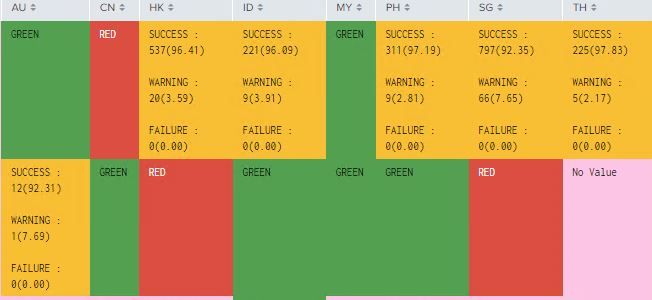
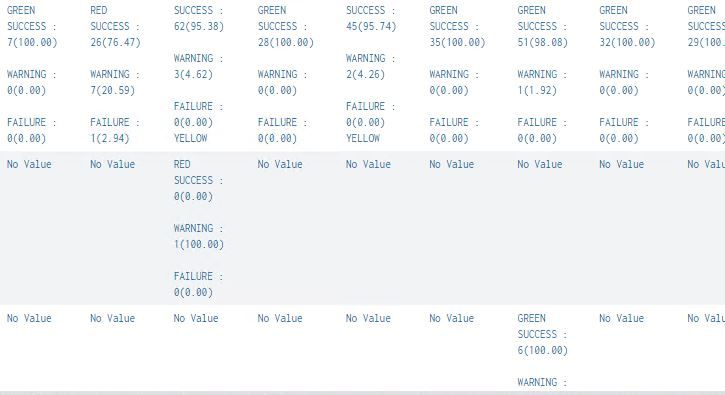
Dear @ITWhisperer , It is working for the above mentioned table. But when I use the same in another table, the data inside the cell is getting hidden.
Here is the below code and screenshot.
<row>
<panel>
<html>
<style>
#highlight tbody td div.multivalue-subcell[data-mv-index="1"]
{display: none;}
</style>
</html>
<table id="highlight">
<title>Profile</title>
<search>
<query>
index=*xyz apn IN (/PROFILE)
| eval calsuc=case(match('code',"1"), "SUCCESS", match('code',"2"), "WARNING", match('code',"1"), "FAILURE")
| dedup requestId
| stats count(eval(calsuc="SUCCESS")) as "TotalSuccess" count(eval(calsuc="WARNING")) as "TotalWarning" count(eval(calsuc="FAILURE")) as "TotalFailure"
| rename TotalSuccess as S, TotalWarning as W, TotalFailure as F
| eval SuccessPerc=round(((S)/(S+W+F)),100,2)
| eval WarningPerc=round(((W)/(S+W+F)),100,2)
| eval FailurePerc=round(((F)/(S+W+F)),100,2)
| eval sign=round(SuccessPerc, 2)
| eval colorCd= if(sign>=95,"GREEN",if(95>sign AND sign>=80,"YELLOW", "RED"))
| eval TotalCount=mvappend("SUCCESS "+" : "+'SUCCESS' +"("+'SuccessPerc'+")", "WARNING"+" : "+'WARNING' +"("+'WarningPerc'+")", "FAILURE"+" : "+'FAILURE' +"("+'FailurePerc'+")")
| eval status=mvjoin(Totalcount," ")
| eval statusNew=mvappend(status, colorCd)
| chart values(statusNew) as tot by flowNm Country
| fillnull value="No Value"
</query>
<earliest>$sltd_tm.earliest$</earliest>
<latest>$sltd_tm.latest$</earliest>
</search>
<option name="count">20</option>
<option name="drilldown">row</option>
<format type="color">
<colorPalette type="expression">
case (match(value,"RED"), "#DC4E41", match(value,"YELLOW"),"#F88E34",match(value,"GREEN"),"#53A051")
</colorPalette>
</format>
</table>
</panel>
</row>
- Mark as New
- Bookmark Message
- Subscribe to Message
- Mute Message
- Subscribe to RSS Feed
- Permalink
- Report Inappropriate Content
Try changing
| chart values(statusNew) as tot by flowNm Countryto
| chart list(statusNew) as tot by flowNm CountryThis is because values() puts the values in (lexicographically) sorted order whereas list() does not sort. YELLOW comes after SUCCESS, so is at index 1, whereas GREEN and RED come before SUCCESS so end up at index 0.
- Mark as New
- Bookmark Message
- Subscribe to Message
- Mute Message
- Subscribe to RSS Feed
- Permalink
- Report Inappropriate Content
Dear @ITWhisperer ,
It works perfectly fine now. Thank you so much.


Join the Splunk Community Slack to learn, troubleshoot, and make connections with fellow Splunk practitioners in real time!
Join Splunk User Groups to connect and learn in-person by region or remotely by topic or industry.
Supercharging Windows Security Detection Performance: Introducing Hybrid Field ...
Enriching Signals with the OTel Lookup Processor
Meet the .conf26 AI Agent Buildathon Winners
