
Join the Conversation
- Find Answers
- :
- Splunk Products
- :
- Splunk Enterprise Security
- :
- Re: Splunk time parse
- Subscribe to RSS Feed
- Mark Topic as New
- Mark Topic as Read
- Float this Topic for Current User
- Bookmark Topic
- Subscribe to Topic
- Mute Topic
- Printer Friendly Page
- Mark as New
- Bookmark Message
- Subscribe to Message
- Mute Message
- Subscribe to RSS Feed
- Permalink
- Report Inappropriate Content
Splunk time parse

Hi,
Splunk usually takes the log time event (_time) and parse it to:
date_hour, date_mday, date_minute, date_month, date_second, date_wday, date_year
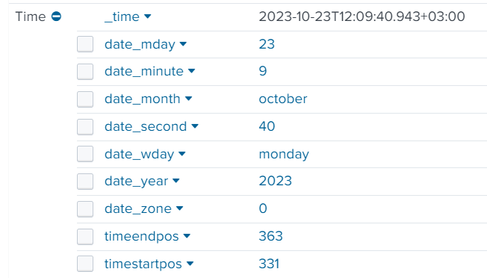
I have found that some of our indexes does not contain this parse only the _time field.
What may cause this issue?
In addition, I am not sure but I have found something related to "DATETIME_CONFIG = /etc/datetime.xml" might be a good point not much on the internet that explain pretty well how to resolve this.
Would appreciate your help here 🙂
- Mark as New
- Bookmark Message
- Subscribe to Message
- Mute Message
- Subscribe to RSS Feed
- Permalink
- Report Inappropriate Content


Adding to what has already been said - I would advise _against_ using those fields.
Their contents may be misleading, especially if you ingest data from different timezones and searching by them can be additionally skewed vs. what you expect if you're yet in another timezone.
Quoting the docs:
[...]
If an event has a date_* field, it represents the value of time/date directly from the event itself. If you have specified any timezone conversions or changed the value of the time/date at indexing or input time (for example, by setting the timestamp to be the time at index or input time), these fields will not represent that.
[...]
- Mark as New
- Bookmark Message
- Subscribe to Message
- Mute Message
- Subscribe to RSS Feed
- Permalink
- Report Inappropriate Content

Those fields are not present in every event. See https://docs.splunk.com/Documentation/Splunk/latest/Knowledge/Usedefaultfields
If this reply helps you, Karma would be appreciated.
- Mark as New
- Bookmark Message
- Subscribe to Message
- Mute Message
- Subscribe to RSS Feed
- Permalink
- Report Inappropriate Content

If
ADD_EXTRA_TIME_FIELDS = true
then why wouldn't those fields be present in every event?
How could we ensure that those fields are present in every event?
- Mark as New
- Bookmark Message
- Subscribe to Message
- Mute Message
- Subscribe to RSS Feed
- Permalink
- Report Inappropriate Content
An event that does not have a timestamp will not have date_* fields. That includes events where DATETIME_CONFIG=current or DATETIME_CONFIG=none.
If this reply helps you, Karma would be appreciated.
- Mark as New
- Bookmark Message
- Subscribe to Message
- Mute Message
- Subscribe to RSS Feed
- Permalink
- Report Inappropriate Content

This is defined in props.conf for the sourcetype, see the
ADD_EXTRA_TIME_FIELDS
setting in this documentation


Join the Splunk Community Slack to learn, troubleshoot, and make connections with fellow Splunk practitioners in real time!
Join Splunk User Groups to connect and learn in-person by region or remotely by topic or industry.
Supercharging Windows Security Detection Performance: Introducing Hybrid Field ...
Ditch the Manual Grind: Building AI Agents with Splunk
Cisco Data Fabric from Architecture to Investigation, Better SOC Visibility, and More ...
