
Join the Conversation
- Find Answers
- :
- Splunk Administration
- :
- Getting Data In
- :
- Re: how to split multiline JSON events/ Group mul...
- Subscribe to RSS Feed
- Mark Topic as New
- Mark Topic as Read
- Float this Topic for Current User
- Bookmark Topic
- Subscribe to Topic
- Mute Topic
- Printer Friendly Page
- Mark as New
- Bookmark Message
- Subscribe to Message
- Mute Message
- Subscribe to RSS Feed
- Permalink
- Report Inappropriate Content

HI,
Log File
[ {
  "name" : "TraderCurrency",
  "type" : "RiskBreakdown",
  "duration" : 1173,
  "count" : 1,
  "average" : 1173.0
}, {
  "name" : "CounterpartyPreSettlement",
  "type" : "RiskBreakdown",
  "duration" : 312934,
  "count" : 1,
  "average" : 312934.0
}, {
  "name" : "CounterpartyNotional",
  "type" : "RiskBreakdown",
  "duration" : 406789,
  "count" : 1,
  "average" : 406789.0
} ]
I can remove "[ ] ," using sed to make it correct json.
props.conf
[reset_profiler]
SEDCMD-remove_bracket = s/\[|\]//g
SEDCMD-remove_coma = s/\},/}\n/g
KV_MODE = json
NO_BINARY_CHECK = true
BREAK_ONLY_BEFORE  = \{
Thanks
- Mark as New
- Bookmark Message
- Subscribe to Message
- Mute Message
- Subscribe to RSS Feed
- Permalink
- Report Inappropriate Content


Hi @agoyal,
I have tried with this json and able to make it.
[{"name": "TraderCurrency","type": "RiskBreakdown","duration": 1173,"count": 1,"average": 1173.0}, {"name": "CounterpartyPreSettlement","type": "RiskBreakdown","duration": 312934,"count": 1,"average": 312934.0}, {"name": "CounterpartyNotional","type": "RiskBreakdown","duration": 406789,"count": 1,"average": 406789.0}]
Can you please try this?
props.conf
[reset_profiler]
NO_BINARY_CHECK=true
BREAK_ONLY_BEFORE=([\{])
MUST_BREAK_AFTER=([\},])
SEDCMD-remove_bracket=s/\[|\]//g
LINE_BREAKER=(,\s)
KV_MODE=json
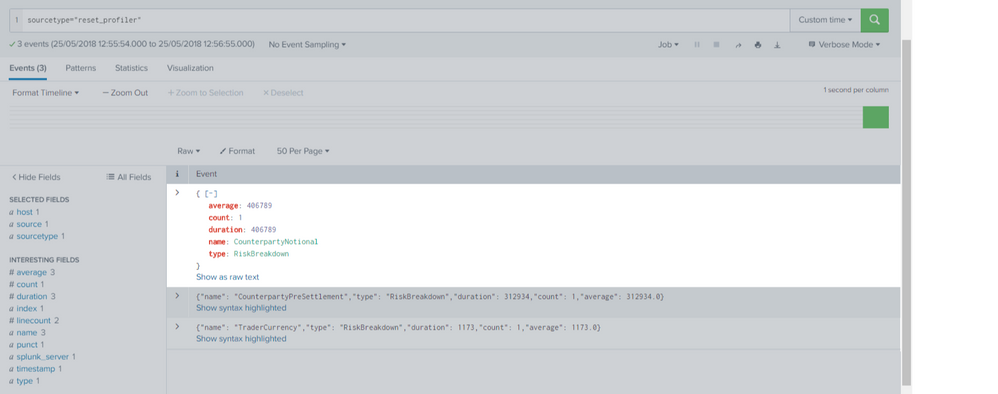
You can extract events like below:

- Mark as New
- Bookmark Message
- Subscribe to Message
- Mute Message
- Subscribe to RSS Feed
- Permalink
- Report Inappropriate Content
Hi @agoyal,
I have tried with this json and able to make it.
[{"name": "TraderCurrency","type": "RiskBreakdown","duration": 1173,"count": 1,"average": 1173.0}, {"name": "CounterpartyPreSettlement","type": "RiskBreakdown","duration": 312934,"count": 1,"average": 312934.0}, {"name": "CounterpartyNotional","type": "RiskBreakdown","duration": 406789,"count": 1,"average": 406789.0}]
Can you please try this?
props.conf
[reset_profiler]
NO_BINARY_CHECK=true
BREAK_ONLY_BEFORE=([\{])
MUST_BREAK_AFTER=([\},])
SEDCMD-remove_bracket=s/\[|\]//g
LINE_BREAKER=(,\s)
KV_MODE=json
You can extract events like below:
- Mark as New
- Bookmark Message
- Subscribe to Message
- Mute Message
- Subscribe to RSS Feed
- Permalink
- Report Inappropriate Content
@kamlesh_vaghela : thanks for reply. Are you using all data in single line ?
When i tried getting small issue that it's not recognize as json event because i guess " , " is removed at the end of every value.
Thats what I am getting
{
"name" : "matrixAddonCurrencySwap"
"type" : "Formula"
"duration" : 0
"count" : 15
"average" : 0.0
}
- Mark as New
- Bookmark Message
- Subscribe to Message
- Mute Message
- Subscribe to RSS Feed
- Permalink
- Report Inappropriate Content
@agoyal,
Yes, I'm using single line data. For multi-line event use below conf.
[reset_profiler]
NO_BINARY_CHECK=true
BREAK_ONLY_BEFORE=([\{])
MUST_BREAK_AFTER=([\},])
SEDCMD-remove_bracket=s/\[|\]//g
LINE_BREAKER=(, )
KV_MODE=json
I'm using following sample:
[{
        "name": "TraderCurrency",
        "type": "RiskBreakdown",
        "duration": 1173,
        "count": 1,
        "average": 1173.0
}, {
        "name": "CounterpartyPreSettlement",
        "type": "RiskBreakdown",
        "duration": 312934,
        "count": 1,
        "average": 312934.0
}, {
        "name": "CounterpartyNotional",
        "type": "RiskBreakdown",
        "duration": 406789,
        "count": 1,
        "average": 406789.0
}]
Happy Splunking
- Mark as New
- Bookmark Message
- Subscribe to Message
- Mute Message
- Subscribe to RSS Feed
- Permalink
- Report Inappropriate Content
@kamlesh_vaghela : That's Great !! Thank you very much !! 🙂 Happy Splunking
- Mark as New
- Bookmark Message
- Subscribe to Message
- Mute Message
- Subscribe to RSS Feed
- Permalink
- Report Inappropriate Content
@kamlesh_vaghela: Sorry, I forget to mention one case. one logfile having two blocks. In this case 2nd and 3rd event are not getting seprated. Not sure if possible to use multiple link breaker.
[{
"name": "TraderCurrency",
"type": "RiskBreakdown",
"duration": 1173,
"count": 1,
"average": 1173.0
},{
"name": "TraderCurrency",
"type": "RiskBreakdown",
"duration": 1173,
"count": 1,
"average": 1173.0
} ]
[ {
"name": "CounterpartyPreSettlement",
"type": "Formula",
"duration": 312934,
"count": 1,
"average": 312934.0
}, {
"name": "CounterpartyNotional",
"type": "Formula",
"duration": 406789,
"count": 1,
"average": 406789.0
}]

Join the Splunk Community Slack to learn, troubleshoot, and make connections with fellow Splunk practitioners in real time!
Join Splunk User Groups to connect and learn in-person by region or remotely by topic or industry.
[Puzzles] Solve, Learn, Repeat: Classic British Rock Bands
New to the Community? Join Us for an Exclusive Post .conf26 Welcome Session (Plus a ...
Accelerate Splunk App Development with AI
