
Join the Conversation
- Find Answers
- :
- Splunk Administration
- :
- Getting Data In
- :
- Re: Splunk date going backwards?
- Subscribe to RSS Feed
- Mark Topic as New
- Mark Topic as Read
- Float this Topic for Current User
- Bookmark Topic
- Subscribe to Topic
- Mute Topic
- Printer Friendly Page
- Mark as New
- Bookmark Message
- Subscribe to Message
- Mute Message
- Subscribe to RSS Feed
- Permalink
- Report Inappropriate Content

Splunk noobie here - basic install on Centos 7, forwarding syslog from security device and the reported date seems to be going backwards, date in syslog message is correct (example below), where should I be looking/checking?

- Mark as New
- Bookmark Message
- Subscribe to Message
- Mute Message
- Subscribe to RSS Feed
- Permalink
- Report Inappropriate Content
Follow up resolution that seems to work - I didn't realize I needed to modify the props.conf file AND the inputs.conf files.
props.conf file
[splunk@localhost ~]$ cat /opt/splunk/etc/apps/search/local/props.conf
[sophos:syslog]
TIME_PREFIX = <..>
TIME_FORMAT = %Y:%m:%D-%H:%M:%S
MAX_TIMESTAMP_LOOKAHEAD = 19
inputs.conf file
[splunk@localhost ~]$ cat /opt/splunk/etc/apps/search/local/inputs.conf
[tcp://10.0.100.1:5114]
connection_host = ip
source = UTM Syslog
sourcetype = sophos:syslog
- Mark as New
- Bookmark Message
- Subscribe to Message
- Mute Message
- Subscribe to RSS Feed
- Permalink
- Report Inappropriate Content
Follow up resolution that seems to work - I didn't realize I needed to modify the props.conf file AND the inputs.conf files.
props.conf file
[splunk@localhost ~]$ cat /opt/splunk/etc/apps/search/local/props.conf
[sophos:syslog]
TIME_PREFIX = <..>
TIME_FORMAT = %Y:%m:%D-%H:%M:%S
MAX_TIMESTAMP_LOOKAHEAD = 19
inputs.conf file
[splunk@localhost ~]$ cat /opt/splunk/etc/apps/search/local/inputs.conf
[tcp://10.0.100.1:5114]
connection_host = ip
source = UTM Syslog
sourcetype = sophos:syslog
- Mark as New
- Bookmark Message
- Subscribe to Message
- Mute Message
- Subscribe to RSS Feed
- Permalink
- Report Inappropriate Content


If your problem is resolved, please accept an answer to help future readers.
If this reply helps you, Karma would be appreciated.
- Mark as New
- Bookmark Message
- Subscribe to Message
- Mute Message
- Subscribe to RSS Feed
- Permalink
- Report Inappropriate Content
Also as information this unique syslog is coming from a Sophos UTM security appliance.
- Mark as New
- Bookmark Message
- Subscribe to Message
- Mute Message
- Subscribe to RSS Feed
- Permalink
- Report Inappropriate Content
By default, Splunk displays the most recent events first. That's why dates appear to be going backwards.
However, you appear to have an odd timestamp format in your events. To ensure Splunk processes them properly and as a Best Practice, you should add the following to the [syslog] stanza of the appropriate props.conf file
TIME_PREFIX = >
TIME_FORMAT = %Y:%m%;d-%H:%M:%S
MAX_TIMESTAMP_LOOKAHEAD = 19
SHOULD_LINEMERGE = false
If this reply helps you, Karma would be appreciated.
- Mark as New
- Bookmark Message
- Subscribe to Message
- Mute Message
- Subscribe to RSS Feed
- Permalink
- Report Inappropriate Content
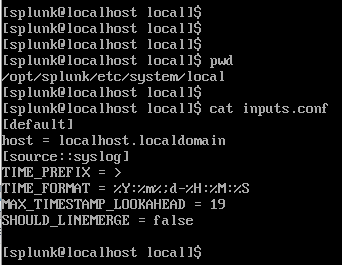
After making the change when I run splunk btool check --debug I get an error:
Invalid key in stanza [source::syslog] in /opt/splunk/etc/system/local/inputs.conf, line 4-7
Is this the correct location where I am supposed to modify props.conf?
Is this the correct way to specify a syslog stanza?



Join the Splunk Community Slack to learn, troubleshoot, and make connections with fellow Splunk practitioners in real time!
Join Splunk User Groups to connect and learn in-person by region or remotely by topic or industry.
Free Professional Services for .conf26 Attendees
Defend at Machine Speed: Your Guide to Security Sessions at .conf26
Where Innovation Takes Flight: The Splunk4Aviation Flight Sim Lands at .conf26
