
Join the Conversation
- Find Answers
- :
- Splunk Administration
- :
- Getting Data In
- :
- Re: Search, XPATH and XPATH namespaces
- Subscribe to RSS Feed
- Mark Topic as New
- Mark Topic as Read
- Float this Topic for Current User
- Bookmark Topic
- Subscribe to Topic
- Mute Topic
- Printer Friendly Page
- Mark as New
- Bookmark Message
- Subscribe to Message
- Mute Message
- Subscribe to RSS Feed
- Permalink
- Report Inappropriate Content
Search, XPATH and XPATH namespaces

I have an index populated with data from a Log4Net trace log. Each Splunk event in the index is a block of XML with an XML namespace:
<E2ETraceEvent xmlns="http://schemas.microsoft.com/2004/06/E2ETraceEvent">
	<System xmlns="http://schemas.microsoft.com/2004/06/windows/eventlog/system">
		<EventID>0</EventID>
		<Type>3</Type>
		<SubType Name="Information">0</SubType>
		<Level>8</Level>
		<TimeCreated SystemTime="04/22/2023 12:30:45.0456293Z"/>
		<Source Name="Bar"/>
		<Correlation ActivityID="{459d276d-8255-47be-be1d-9acd903fd3f0}"/>
		<Execution ProcessName="NA" ProcessID="1124" ThreadID="9"/>
		<Channel/>
		<Computer>NA</Computer>
	</System>
	<ApplicationData>
		<TraceData>
			<DataItem>
				<TraceRecord Severity="Information">
					<TraceIdentifier/>
					<Description><![CDATA[Start Operation: foo]]></Description>
					<Activity><![CDATA[Start Operation: foo]]></Activity>
					<Duration>0</Duration>
				</TraceRecord>
			</DataItem>
		</TraceData>
	</ApplicationData>
</E2ETraceEvent>
I am trying to search these events, and I want the contents of the "Description" XML element. Does Splunk's implementation of XPATH support namespaces? This search is returning no records:
index="lmstracelogs" xpath "//E2ETraceEvent/ApplicationData/TraceData/DataItem/TraceRecord/Description"
Almost every example I've found for working with XML suggests regular expressions, which seems inelegant.
- Mark as New
- Bookmark Message
- Subscribe to Message
- Mute Message
- Subscribe to RSS Feed
- Permalink
- Report Inappropriate Content


You can't match any events this way since you're trying to find "xpath" as a literal term included in your event.
- Mark as New
- Bookmark Message
- Subscribe to Message
- Mute Message
- Subscribe to RSS Feed
- Permalink
- Report Inappropriate Content

Hi @DWRoelands,
This may not be the most elegant, but to avoid regex you can use:
| xpath outfield=description "/*[name()='E2ETraceEvent' and namespace-uri()='http://schemas.microsoft.com/2004/06/E2ETraceEvent' ]/*[name()='ApplicationData']/*[name()='TraceData']/*[name()='DataItem']/*[name()='TraceRecord']/*[name()='Description']"That creates a description field with the correct text:
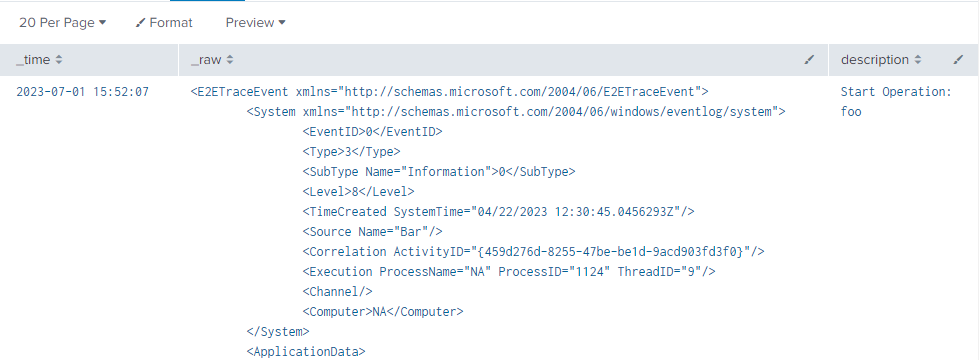
It does obey the namespace, but it's not the easiest to read.
Falling back to regex, if you run a sedcmd you can strip the namespaces and use your original xpath:
| rex mode=sed "s/xmlns=\"[^\"]+\"//g"
| xpath outfield=description "//E2ETraceEvent/ApplicationData/TraceData/DataItem/TraceRecord/Description"
Cheers,
Daniel
- Mark as New
- Bookmark Message
- Subscribe to Message
- Mute Message
- Subscribe to RSS Feed
- Permalink
- Report Inappropriate Content
Alternatively, just run:
| spath path="E2ETraceEvent.ApplicationData.TraceData.DataItem.TraceRecord.Description" output=description
Join the Splunk Community Slack to learn, troubleshoot, and make connections with fellow Splunk practitioners in real time!
Join Splunk User Groups to connect and learn in-person by region or remotely by topic or industry.
Meet the .conf26 AI Agent Buildathon Winners
Trusted Autonomy in the SOC: A Maturity Journey
Supercharging Windows Security Detection Performance: Introducing Hybrid Field ...
