
Join the Conversation
- Find Answers
- :
- Splunk Administration
- :
- Getting Data In
- :
- How to find the difference or delta in the two tim...
- Subscribe to RSS Feed
- Mark Topic as New
- Mark Topic as Read
- Float this Topic for Current User
- Bookmark Topic
- Subscribe to Topic
- Mute Topic
- Printer Friendly Page
- Mark as New
- Bookmark Message
- Subscribe to Message
- Mute Message
- Subscribe to RSS Feed
- Permalink
- Report Inappropriate Content

I am trying to find a way to produce a column in a table to show the difference between the recieved_time and the remediation_time. Currently the Diff_in_Time field and TotalDiff_in_Time fields return empty. Any
index=someapplication sourcetype=some_log subject="*" "folder_locations{}"="*" from_address="*" remediation_timestamp="*" received_time="*" recipient_address="*" to_addresses="*"
| eval rectime=received_time
| eval remtime=remediation_timestamp
| eval Diff_in_Time=strptime(rectime, "%Y-%m-%d %H:%M:%S.%3N")-strptime(remtime, "%Y-%m-%d %H:%M:%S.%3N")
| eventstats sum(Diff_in_Time) as TotalDiff_in_Time
| table rectime remtime Diff_in_Time TotalDiff_in_Time- Mark as New
- Bookmark Message
- Subscribe to Message
- Mute Message
- Subscribe to RSS Feed
- Permalink
- Report Inappropriate Content

Hi @Souletting ,
Thanks for sharing the sample data format.
Please use the following search, as per the shared data format,
index=someapplication sourcetype=some_log subject="*" "folder_locations{}"="*" from_address="*" remediation_timestamp="*" received_time="*" recipient_address="*" to_addresses="*"
| eval rectime=received_time
| eval remtime=remediation_timestamp
| eval Diff_in_Time=strptime(remtime,"%Y-%m-%d %H:%M:%S") - strptime(rectime,"%Y-%m-%d %H:%M:%S")
| eventstats sum(Diff_in_Time) as TotalDiff_in_Time
| table rectime remtime Diff_in_Time TotalDiff_in_Time
Kindly support the answer, if found helpful.
- Mark as New
- Bookmark Message
- Subscribe to Message
- Mute Message
- Subscribe to RSS Feed
- Permalink
- Report Inappropriate Content
Thank you that worked.
- Mark as New
- Bookmark Message
- Subscribe to Message
- Mute Message
- Subscribe to RSS Feed
- Permalink
- Report Inappropriate Content
Hi @Souletting ,
Here, in the following search, I am taking an example by makeresult command, for verifying the above search,
| makeresults
| eval rec_time="05/Feb/2023:03:12:03"
| eval rem_time="05/Feb/2023:03:13:03"
| eval Diff_in_Time=strptime(rem_time,"%d/%b/%Y:%H:%M:%S") - strptime(rec_time,"%d/%b/%Y:%H:%M:%S")
| eventstats sum(Diff_in_Time) as TotalDiff_in_Time
| table rec_time rem_time Diff_in_Time TotalDiff_in_Time
The output of the above search is as follows,

So, the search seems to be working fine, the issue seems to be in the time-format used in your search.
Kindly upvote if found useful.
Happy Splunking!
- Mark as New
- Bookmark Message
- Subscribe to Message
- Mute Message
- Subscribe to RSS Feed
- Permalink
- Report Inappropriate Content
What you say makes sense but the rec_time and rem_time aren't static results. They will be different for each row. Is there a variable that can be used to pull those in and see the difference of time in each row.
- Mark as New
- Bookmark Message
- Subscribe to Message
- Mute Message
- Subscribe to RSS Feed
- Permalink
- Report Inappropriate Content
Hi @Souletting ,
The real data is suppose to be different with new rows, but here just to check the search, we have used the example of sample values for rec_time and rem_time.
Also, this helps in verifying that if it works for the sample format of data, then it will work for the real data as well.
Hope this explains!
- Mark as New
- Bookmark Message
- Subscribe to Message
- Mute Message
- Subscribe to RSS Feed
- Permalink
- Report Inappropriate Content


That query looks right. Can you share some sample events so we can verify the SPL is correct for the data?
If this reply helps you, Karma would be appreciated.
- Mark as New
- Bookmark Message
- Subscribe to Message
- Mute Message
- Subscribe to RSS Feed
- Permalink
- Report Inappropriate Content
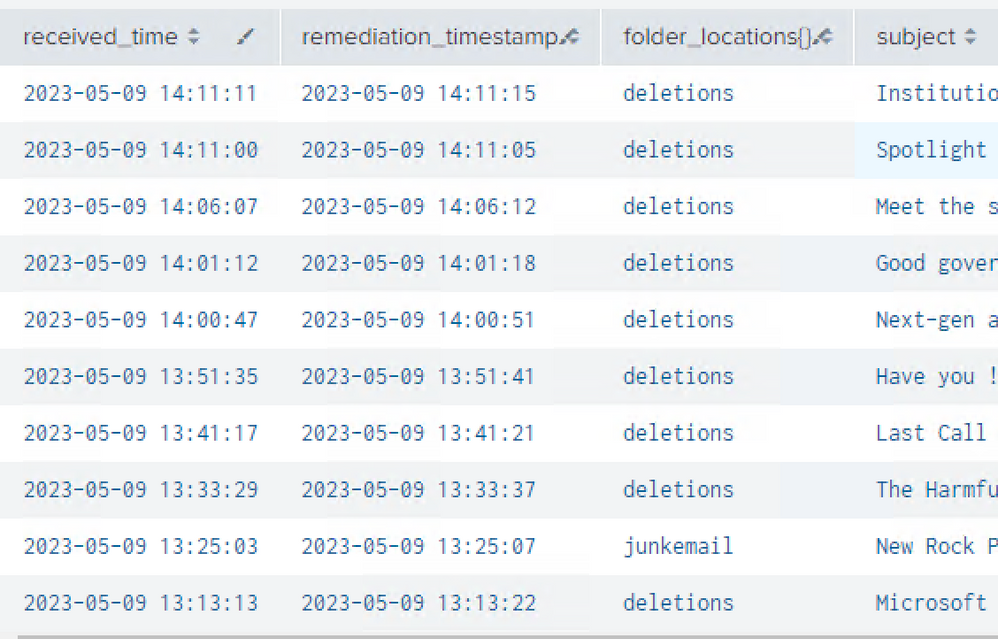
This is a sample of what I am looking at. I would like to have a column to show the difference in time between the received time and remediatated time. When I try to use the syntax above I only get a blank column.
- Mark as New
- Bookmark Message
- Subscribe to Message
- Mute Message
- Subscribe to RSS Feed
- Permalink
- Report Inappropriate Content
Hi @Souletting ,
Thanks for sharing the sample data format.
Please use the following search, as per the shared data format,
index=someapplication sourcetype=some_log subject="*" "folder_locations{}"="*" from_address="*" remediation_timestamp="*" received_time="*" recipient_address="*" to_addresses="*"
| eval rectime=received_time
| eval remtime=remediation_timestamp
| eval Diff_in_Time=strptime(remtime,"%Y-%m-%d %H:%M:%S") - strptime(rectime,"%Y-%m-%d %H:%M:%S")
| eventstats sum(Diff_in_Time) as TotalDiff_in_Time
| table rectime remtime Diff_in_Time TotalDiff_in_Time
Kindly support the answer, if found helpful.


Join the Splunk Community Slack to learn, troubleshoot, and make connections with fellow Splunk practitioners in real time!
Join Splunk User Groups to connect and learn in-person by region or remotely by topic or industry.
test 2
test
Join the Hackathon at .conf26 and build a No-Code AI agent
