
Join the Conversation
- Find Answers
- :
- Splunk Administration
- :
- Getting Data In
- :
- Re: Host value not being used as set during ingest...
- Subscribe to RSS Feed
- Mark Topic as New
- Mark Topic as Read
- Float this Topic for Current User
- Bookmark Topic
- Subscribe to Topic
- Mute Topic
- Printer Friendly Page
- Mark as New
- Bookmark Message
- Subscribe to Message
- Mute Message
- Subscribe to RSS Feed
- Permalink
- Report Inappropriate Content

Hi All,
I have set up a continuous monitor of the /var/log directory and set the host to "vps"
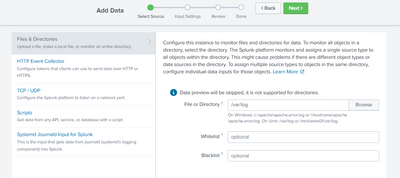
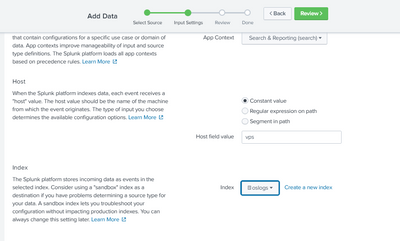
Now when I am searching the oslogs index, I'm expecting all the logs to have the host value to be set as "vps" but that is not the case, instead of having one host "vps" I have two hosts "vps" and "ip-172-31-17-23" which is the hostname of my machine. There is no additional input for the oslogs index, this is the only one that I've set.
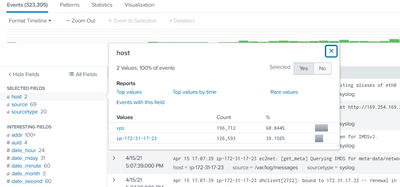
What explains this anomaly and how can this be rectified ?
Thanks.
- Mark as New
- Bookmark Message
- Subscribe to Message
- Mute Message
- Subscribe to RSS Feed
- Permalink
- Report Inappropriate Content


Hi,
Since you are using a default sourcetype syslog which comes with default configuration to extract a host from _raw data.
[syslog]
pulldown_type = true
maxDist = 3
TIME_FORMAT = %b %d %H:%M:%S
MAX_TIMESTAMP_LOOKAHEAD = 32
TRANSFORMS = syslog-host
REPORT-syslog = syslog-extractions
SHOULD_LINEMERGE = False
category = Operating System
description = Output produced by many syslog daemons, as described in RFC3164 by the IETF
Path of default config - /opt/splunk/etc/system/default/props.conf
-------------------------------------
An upvote would be appreciated if it helps!
- Mark as New
- Bookmark Message
- Subscribe to Message
- Mute Message
- Subscribe to RSS Feed
- Permalink
- Report Inappropriate Content
Hi,
Since you are using a default sourcetype syslog which comes with default configuration to extract a host from _raw data.
[syslog]
pulldown_type = true
maxDist = 3
TIME_FORMAT = %b %d %H:%M:%S
MAX_TIMESTAMP_LOOKAHEAD = 32
TRANSFORMS = syslog-host
REPORT-syslog = syslog-extractions
SHOULD_LINEMERGE = False
category = Operating System
description = Output produced by many syslog daemons, as described in RFC3164 by the IETF
Path of default config - /opt/splunk/etc/system/default/props.conf
-------------------------------------
An upvote would be appreciated if it helps!


Join the Splunk Community Slack to learn, troubleshoot, and make connections with fellow Splunk practitioners in real time!
Join Splunk User Groups to connect and learn in-person by region or remotely by topic or industry.
SOC4Kafka - New Kafka Connector Powered by OpenTelemetry
Event Series: Level up your SOC: Advancing with Splunk Enterprise Security
Announcing Modern Navigation: A New Era of Splunk User Experience
