
Join the Conversation
- Find Answers
- :
- Using Splunk
- :
- Dashboards & Visualizations
- :
- Re: Results displayed by day
- Subscribe to RSS Feed
- Mark Topic as New
- Mark Topic as Read
- Float this Topic for Current User
- Bookmark Topic
- Subscribe to Topic
- Mute Topic
- Printer Friendly Page
- Mark as New
- Bookmark Message
- Subscribe to Message
- Mute Message
- Subscribe to RSS Feed
- Permalink
- Report Inappropriate Content

Hi there,
I have a dashboard which splits the results by day of the week, to see for example the amount of events by Days (Monday, Tuesday, ...)
My request is like that:
myrequest | convert timeformat="%A" ctime(_time) AS Day | chart count by Day | rename count as "SENT" | eval wd=lower(Day) | eval sort_field=case(wd=="monday",1, wd=="tuesday",2, wd=="wednesday",3, wd=="thursday",4, wd=="friday",5, wd=="saturday",6 ,wd=="sunday",7) | sort sort_field | fields - sort_field, wd
Only problem with the request is that sometimes a day or two could be missing in the histogram (0 entries), and I wanted to have always the 7 days displayed (even with 0 results).
Any way to do this ? Any help appreciated! (like a left join in SQL)
- Mark as New
- Bookmark Message
- Subscribe to Message
- Mute Message
- Subscribe to RSS Feed
- Permalink
- Report Inappropriate Content


It looks like my query is producing the zeros you wanted, but has more than one entry for each day. I think we can correct that with stats.
index=_internal
| timechart span=1d count
| convert timeformat="%A" ctime(_time) AS Day
| stats sum(count) as count by Day
| rename count as "SENT"
| eval wd=lower(Day)
| eval sort_field=case(wd=="monday",1, wd=="tuesday",2, wd=="wednesday",3, wd=="thursday",4, wd=="friday",5, wd=="saturday",6 ,wd=="sunday",7)
| sort sort_field
| fields - sort_field, wd
| table Day SENTIf this reply helps you, Karma would be appreciated.
- Mark as New
- Bookmark Message
- Subscribe to Message
- Mute Message
- Subscribe to RSS Feed
- Permalink
- Report Inappropriate Content
This works for me.
index=_internal
| timechart span=1d count
| convert timeformat="%A" ctime(_time) AS Day
| rename count as "SENT" | eval wd=lower(Day)
| eval sort_field=case(wd=="monday",1, wd=="tuesday",2, wd=="wednesday",3, wd=="thursday",4, wd=="friday",5, wd=="saturday",6 ,wd=="sunday",7)
| sort sort_field
| fields - sort_field, wd
| table Day SENTIf this reply helps you, Karma would be appreciated.
- Mark as New
- Bookmark Message
- Subscribe to Message
- Mute Message
- Subscribe to RSS Feed
- Permalink
- Report Inappropriate Content
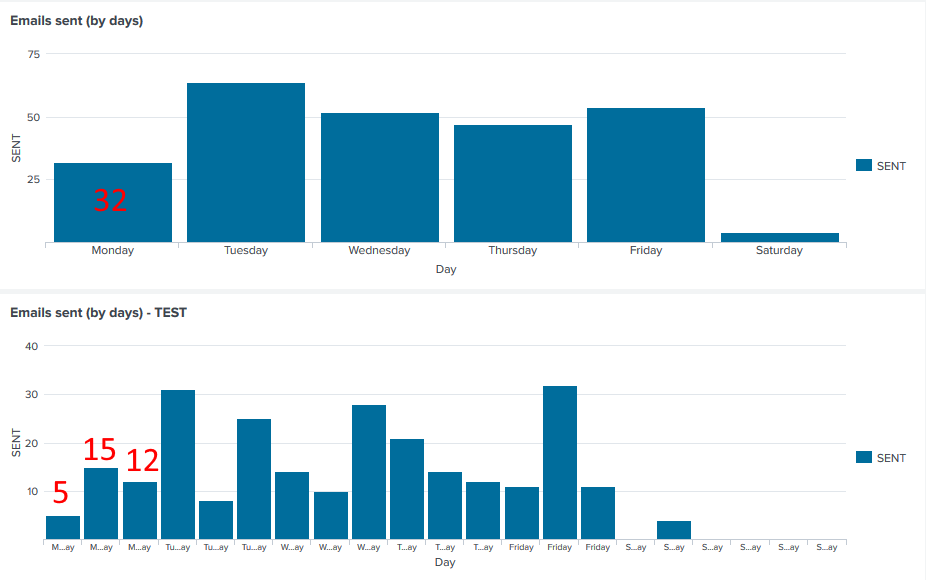
Hmmm nope, here is my first attempt (with my query, I miss the Sunday = 0 event), and also comparison with your query (below)
- Mark as New
- Bookmark Message
- Subscribe to Message
- Mute Message
- Subscribe to RSS Feed
- Permalink
- Report Inappropriate Content
It looks like my query is producing the zeros you wanted, but has more than one entry for each day. I think we can correct that with stats.
index=_internal
| timechart span=1d count
| convert timeformat="%A" ctime(_time) AS Day
| stats sum(count) as count by Day
| rename count as "SENT"
| eval wd=lower(Day)
| eval sort_field=case(wd=="monday",1, wd=="tuesday",2, wd=="wednesday",3, wd=="thursday",4, wd=="friday",5, wd=="saturday",6 ,wd=="sunday",7)
| sort sort_field
| fields - sort_field, wd
| table Day SENTIf this reply helps you, Karma would be appreciated.
- Mark as New
- Bookmark Message
- Subscribe to Message
- Mute Message
- Subscribe to RSS Feed
- Permalink
- Report Inappropriate Content
Thanks, it works almost flawlessly ! 🙂
Just a problem when I put "Since start of week", Saturday is missing.. dont know why..
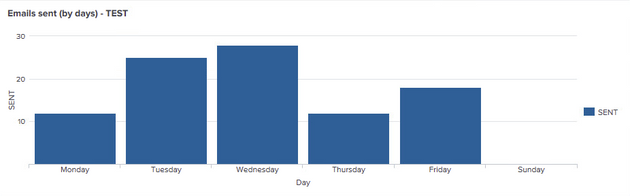
I would have thought that I should miss Saturday & Sunday (because I put start of week and both days are not in the request at all)
- Mark as New
- Bookmark Message
- Subscribe to Message
- Mute Message
- Subscribe to RSS Feed
- Permalink
- Report Inappropriate Content
"Start of week" is Sunday. Saturday was tomorrow so timechart thinks you only care about Sun-Fri. Try using latest=+1w@w.
If this reply helps you, Karma would be appreciated.
- Mark as New
- Bookmark Message
- Subscribe to Message
- Mute Message
- Subscribe to RSS Feed
- Permalink
- Report Inappropriate Content
Maybe I just find a way to limit the timepicker to 7 days range minimum (but did not find how), or I just do not display the panel if the range is less than 7 days
Both case I do not know how to do, but will try to find 🙂 (2nd optionis better, to hide the panel if range too short)

Join the Splunk Community Slack to learn, troubleshoot, and make connections with fellow Splunk practitioners in real time!
Join Splunk User Groups to connect and learn in-person by region or remotely by topic or industry.
[Puzzles] Solve, Learn, Repeat: Character substitutions with Regular Expressions
Splunk Community Badges!
[Puzzles] Solve, Learn, Repeat: Matching cron expressions
