
Join the Conversation
- Find Answers
- :
- Using Splunk
- :
- Dashboards & Visualizations
- :
- How to exclude field name from visualization?
- Subscribe to RSS Feed
- Mark Topic as New
- Mark Topic as Read
- Float this Topic for Current User
- Bookmark Topic
- Subscribe to Topic
- Mute Topic
- Printer Friendly Page
- Mark as New
- Bookmark Message
- Subscribe to Message
- Mute Message
- Subscribe to RSS Feed
- Permalink
- Report Inappropriate Content

Hello, I have a problem where my graphs on the dashboard are showing the field name as a counted type. (i.e. ROUTE) See picture.
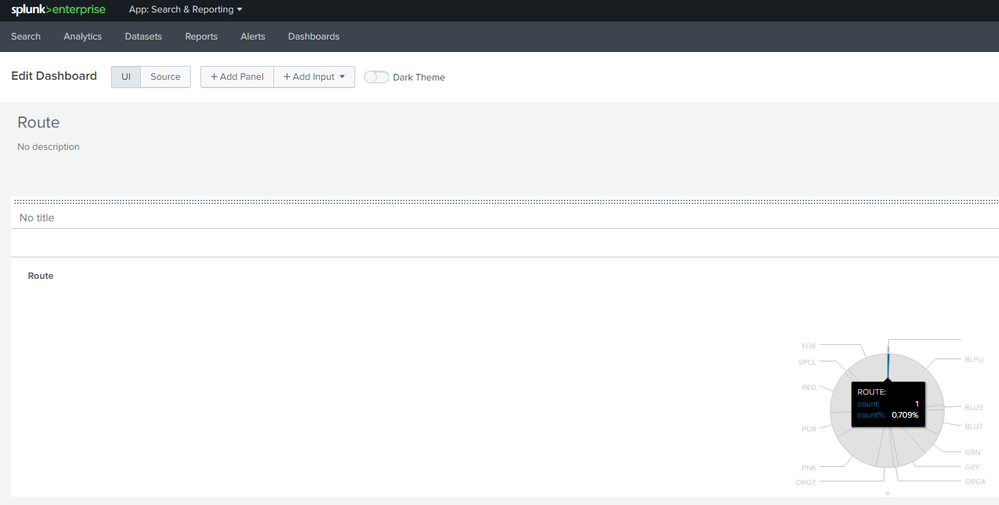
There is no line that contains 'ROUTE:' in my data as I am using a CSV without headers. My headers are defined in my custom source type.
My search is: source="C:\QS1\WF_LD.CSV" | stats count by "ROUTE"
How can I remove this from the visualization?
Thanks!

- Mark as New
- Bookmark Message
- Subscribe to Message
- Mute Message
- Subscribe to RSS Feed
- Permalink
- Report Inappropriate Content

source="C:\\QS1\\WF_LD.CSV" | stats count by "ROUTE"
|where isnotnull(ROUTE)

OR

|where ROUTE!=""
hi, @rxtawell
At last, why not remove the line?
and Do you check the statistics ? what's the results?
- Mark as New
- Bookmark Message
- Subscribe to Message
- Mute Message
- Subscribe to RSS Feed
- Permalink
- Report Inappropriate Content
Hi,
Could you please provide the sample data for this.
Also, please try the below SPL
Please try and update us whether this works.
| source="C:\\QS1\\WF_LD.CSV"
|table ROUTE
|where isnotnull(ROUTE)
|stats count as route_count by ROUTE
- Mark as New
- Bookmark Message
- Subscribe to Message
- Mute Message
- Subscribe to RSS Feed
- Permalink
- Report Inappropriate Content
source="C:\\QS1\\WF_LD.CSV" | stats count by "ROUTE"
|where isnotnull(ROUTE)

OR

|where ROUTE!=""
hi, @rxtawell
At last, why not remove the line?
and Do you check the statistics ? what's the results?
- Mark as New
- Bookmark Message
- Subscribe to Message
- Mute Message
- Subscribe to RSS Feed
- Permalink
- Report Inappropriate Content
Thank you, it was as simple as |where ROUTE!=""
- Mark as New
- Bookmark Message
- Subscribe to Message
- Mute Message
- Subscribe to RSS Feed
- Permalink
- Report Inappropriate Content


You told Splunk to count the literal string "ROUTE" so that is what it did.
Try source="C:\\QS1\\WF_LD.CSV" | stats count by ROUTE
If this reply helps you, Karma would be appreciated.
- Mark as New
- Bookmark Message
- Subscribe to Message
- Mute Message
- Subscribe to RSS Feed
- Permalink
- Report Inappropriate Content
Thank you for this. I tried this change but I get the same results.

Join the Splunk Community Slack to learn, troubleshoot, and make connections with fellow Splunk practitioners in real time!
Join Splunk User Groups to connect and learn in-person by region or remotely by topic or industry.
Persistent Queue at TcpOut — One of Splunk's Most Practical Features
Catalog Is Now Generally Available on Splunk Cloud Platform
Your Path to AgenticOps: AI Experiences for Every Splunk Practitioner
