
Join the Conversation
- Find Answers
- :
- Using Splunk
- :
- Dashboards & Visualizations
- :
- How to display string values containing numbers as...
- Subscribe to RSS Feed
- Mark Topic as New
- Mark Topic as Read
- Float this Topic for Current User
- Bookmark Topic
- Subscribe to Topic
- Mute Topic
- Printer Friendly Page
- Mark as New
- Bookmark Message
- Subscribe to Message
- Mute Message
- Subscribe to RSS Feed
- Permalink
- Report Inappropriate Content

I extract with rex a field that contains numeric values, often with leading zeros. I want to display the values as strings, left aligned without getting leading zeros truncated.
Example values: 00123, 22222, 12345_67
When showing these values in a dashboard table, the String values are interpreted as numbers, where possible, and I get
123
22222
12345_67
Is there a way to get string values correctly displayed as such in a dashboard table?
I tried also the dirty way as proposed here, prefixing the strings with space or non-breaking-space, but it does not work (I'm on Splunk 9.0.4). It works when adding a visible char (e.g. "x"), but that makes the table unusable.
- Mark as New
- Bookmark Message
- Subscribe to Message
- Mute Message
- Subscribe to RSS Feed
- Permalink
- Report Inappropriate Content


Hi @Dominik,
I'm delaying the use of Dashboard Studio as long as I can just for this reason: it still has some issue.
Anyway, using my search have you the same issue?
Ciao.
Giuseppe
- Mark as New
- Bookmark Message
- Subscribe to Message
- Mute Message
- Subscribe to RSS Feed
- Permalink
- Report Inappropriate Content
Thank you @gcusello for the reply..
Probably my question was not precise enough. The data is ok and the sample produces exactly what I have, but Dashboard Studio seems to have a problem.
Using the data from above in a table widget as data source, I can reproduce the problem.
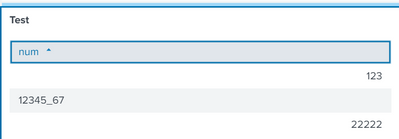
leading zeros cut off and colums formatted differently per row.
Playing around with this, I found a completely wired feature of the table widget. With a greater Result set, switching pages, it looks like the widget 'thinks' about the data and if the majority of lines cannot be misinterpreted as numbers, the whole page is correctly displayed as left-aligned strings. Otherwise the data ist misinterpreted as numbers and changed (leading zeros cut off).. Setting the Column formatting to string does not change anything.
In my untersanding, this is everything else than correct behavior for a display widget. But I'm a complete Splunk newbie and not sure if this is worth a bug report. Can you confirm that this is really bad?
- Mark as New
- Bookmark Message
- Subscribe to Message
- Mute Message
- Subscribe to RSS Feed
- Permalink
- Report Inappropriate Content
Hi @Dominik,
I'm delaying the use of Dashboard Studio as long as I can just for this reason: it still has some issue.
Anyway, using my search have you the same issue?
Ciao.
Giuseppe
- Mark as New
- Bookmark Message
- Subscribe to Message
- Mute Message
- Subscribe to RSS Feed
- Permalink
- Report Inappropriate Content
I take "delaying the use of Dashboard Studio as long as I can" as good solution.
Widgets that change data values are inacceptable. 😞
Worth a bug report?
- Mark as New
- Bookmark Message
- Subscribe to Message
- Mute Message
- Subscribe to RSS Feed
- Permalink
- Report Inappropriate Content
Yes, as written above. This is your example data. The data is perfect, the result fatal.
- Mark as New
- Bookmark Message
- Subscribe to Message
- Mute Message
- Subscribe to RSS Feed
- Permalink
- Report Inappropriate Content
Hi @Dominik,
using your data I didn't find any problem:
| makeresults
| eval _raw="00123, 22222, 12345_67"
| rex max_match=0 "(?<num>[^,\n]+)"
| mvexpand num
| eval num=tostring(trim(num))
| table num
could you share some full log sample to test the regex?
Ciao.
Giuseppe


Join the Splunk Community Slack to learn, troubleshoot, and make connections with fellow Splunk practitioners in real time!
Join Splunk User Groups to connect and learn in-person by region or remotely by topic or industry.
A Four-Part Event Series: Full Stack Observability For the AI Era
SOC4Kafka - New Kafka Connector Powered by OpenTelemetry
Event Series: Level up your SOC: Advancing with Splunk Enterprise Security
