
Join the Conversation
- Find Answers
- :
- Apps & Add-ons
- :
- All Apps and Add-ons
- :
- All Apps and Add-ons
- :
- Re: Checkpoint Add-on for Check Point OPSEC LEA: W...
- Subscribe to RSS Feed
- Mark Topic as New
- Mark Topic as Read
- Float this Topic for Current User
- Bookmark Topic
- Subscribe to Topic
- Mute Topic
- Printer Friendly Page
- Mark as New
- Bookmark Message
- Subscribe to Message
- Mute Message
- Subscribe to RSS Feed
- Permalink
- Report Inappropriate Content

I am installing a fresh Splunk 6.3.3 as heavy forwarder and installing the Splunk Add-on for CheckPoint OPSEC LEA on a Linux RedHat machine.
I just installed the add-on and all requirements listed in the app page, but when I open the app, it shows "Manage Connection" and a loading icon that never stops. If I click on "New Connection" button, it also do not open anything. Follow a screenshot of the loading page:
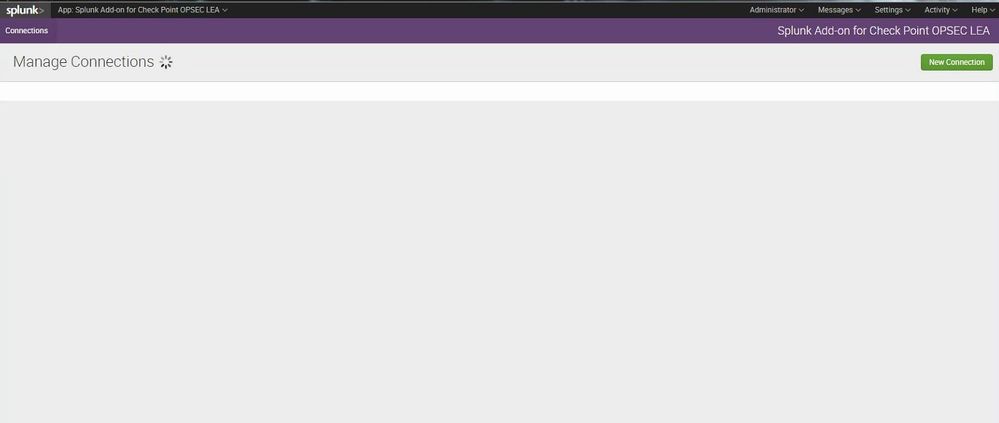
Has anyone have seen this problem before?
I saw this guy who had the same issue, but his solution did not solve my problem: https://answers.splunk.com/answers/329369/splunk-add-on-for-check-point-opsec-lea-connection.html.

- Mark as New
- Bookmark Message
- Subscribe to Message
- Mute Message
- Subscribe to RSS Feed
- Permalink
- Report Inappropriate Content
Hi,
I had the same problem and found out that, in version 3.1.0, the app expects to be installed on an indexer and therefore looks for a list of search peers via the REST API. My workaround was to change the file remote.py to use localhost if no search peers can be found:
--- Splunk_TA_opseclea_linux22/appserver/controllers/remote.py.orig     2015-11-25 13:43:21.000000000 +0100
+++ Splunk_TA_opseclea_linux22/appserver/controllers/remote.py  2015-11-25 16:04:14.000000000 +0100
@@ -43,11 +43,17 @@
         controllers.BaseController.__init__(self, *args, **kwargs)
         self.peer_cache = PeerCache(cache_age=60)


     def get_all_peers(self, sessionKey):
-        peers = en.getEntities("search/distributed/peers", sessionKey=sessionKey)
+        try:
+            peers = en.getEntities("search/distributed/peers", sessionKey=sessionKey)
+        except:
+            filtered_hosts = [ { "status": "available", "peer": "localhost" } ]
+            return filtered_hosts
+
+
         peerHosts = []
         server_info_path = "/services/server/info"

         for name in peers:
             peer = peers[name]
I hope this helps.
- Mark as New
- Bookmark Message
- Subscribe to Message
- Mute Message
- Subscribe to RSS Feed
- Permalink
- Report Inappropriate Content
Just for future reference - I had the same issue, none of the above solutions seemed to work but when troubleshooting, I found it was an issue with DNS on my server rather than a splunk related issue. After I fixed my DNS resolution everything worked perfectly.
- Mark as New
- Bookmark Message
- Subscribe to Message
- Mute Message
- Subscribe to RSS Feed
- Permalink
- Report Inappropriate Content


Do you by chance have FIPSs mode enabled? There is a known issue with FIPs mode.
OPSEC-398 When FIPs is enabled in a distributed Spunk Enterprise environment, the Manage Connections page cannot be accessed on the search head, even after restarting the Splunk platform.
- Mark as New
- Bookmark Message
- Subscribe to Message
- Mute Message
- Subscribe to RSS Feed
- Permalink
- Report Inappropriate Content
FIPS mode ist not enabled.
The app is also not installed on a search head, but on a forwarder.
- Mark as New
- Bookmark Message
- Subscribe to Message
- Mute Message
- Subscribe to RSS Feed
- Permalink
- Report Inappropriate Content
Hi,
I had the same problem and found out that, in version 3.1.0, the app expects to be installed on an indexer and therefore looks for a list of search peers via the REST API. My workaround was to change the file remote.py to use localhost if no search peers can be found:
--- Splunk_TA_opseclea_linux22/appserver/controllers/remote.py.orig     2015-11-25 13:43:21.000000000 +0100
+++ Splunk_TA_opseclea_linux22/appserver/controllers/remote.py  2015-11-25 16:04:14.000000000 +0100
@@ -43,11 +43,17 @@
         controllers.BaseController.__init__(self, *args, **kwargs)
         self.peer_cache = PeerCache(cache_age=60)


     def get_all_peers(self, sessionKey):
-        peers = en.getEntities("search/distributed/peers", sessionKey=sessionKey)
+        try:
+            peers = en.getEntities("search/distributed/peers", sessionKey=sessionKey)
+        except:
+            filtered_hosts = [ { "status": "available", "peer": "localhost" } ]
+            return filtered_hosts
+
+
         peerHosts = []
         server_info_path = "/services/server/info"

         for name in peers:
             peer = peers[name]
I hope this helps.
- Mark as New
- Bookmark Message
- Subscribe to Message
- Mute Message
- Subscribe to RSS Feed
- Permalink
- Report Inappropriate Content

Thanks it worked for me too, Splunk should really update the app to fix this issue, if they want users to move to latest versions their supported apps should be compatible.
- Mark as New
- Bookmark Message
- Subscribe to Message
- Mute Message
- Subscribe to RSS Feed
- Permalink
- Report Inappropriate Content
Data is being indexed, but no update to the GUI for the connections.
- Mark as New
- Bookmark Message
- Subscribe to Message
- Mute Message
- Subscribe to RSS Feed
- Permalink
- Report Inappropriate Content

Still same, Any other workarounds..
- Mark as New
- Bookmark Message
- Subscribe to Message
- Mute Message
- Subscribe to RSS Feed
- Permalink
- Report Inappropriate Content
Did you check to see if data was being indexed after the workaround? When I applied the workaround the GUI didn't change but data started flowing again.
- Mark as New
- Bookmark Message
- Subscribe to Message
- Mute Message
- Subscribe to RSS Feed
- Permalink
- Report Inappropriate Content
Hi sha1020, I'm going to try this. Thanks!
- Mark as New
- Bookmark Message
- Subscribe to Message
- Mute Message
- Subscribe to RSS Feed
- Permalink
- Report Inappropriate Content
It worked, thanks!
- Mark as New
- Bookmark Message
- Subscribe to Message
- Mute Message
- Subscribe to RSS Feed
- Permalink
- Report Inappropriate Content
Did you add the two libraries listed here:
http://docs.splunk.com/Documentation/OPSEC-LEA/latest/Install/Systemrequirements
GNU C library (glibc.i686 32-bit). Install using yum install glibc.i686
PAM shared libraries (pam.i686 32-bit). Install using yum install pam.i686
Last time i had an issue with that app it was I forgot to add these.
- Mark as New
- Bookmark Message
- Subscribe to Message
- Mute Message
- Subscribe to RSS Feed
- Permalink
- Report Inappropriate Content
Yes, I did install both. Follow the outputs of the commands:
[root@vl088 ~] yum list installed | grep glibc
glibc.i686 2.12-1.166.e16_7.3 @rhel-6-server-rpms
glibc.x86_64 2.12-1.166.e16_7.3 @rhel-6-server-rpms
glib-common.x86_64 2.12-1.166.e16_7.3 @rhel-6-server-rpms
[root@vl088 ~] yum list installed | grep pam
fprintd-pam.x86_64 0.1-22.git04fd09cfa.e16
pam.i686 1.1.1-20.e16_7.1 @rhel-6-server-rpms
pam.x86_64 1.1.1-20.e16_7.1 @rhel-6-server-rpms
pam_passwdqc.x86_64 1.10.5-8.e16 @anaconda-RedHatEnterpriseLinux-2015-7020259.x86_64/6.7
- Mark as New
- Bookmark Message
- Subscribe to Message
- Mute Message
- Subscribe to RSS Feed
- Permalink
- Report Inappropriate Content
Hello,
Which licence are you using on your heavy forwarder ?
Regards
- Mark as New
- Bookmark Message
- Subscribe to Message
- Mute Message
- Subscribe to RSS Feed
- Permalink
- Report Inappropriate Content
I'm using forwarder license

Join the Splunk Community Slack to learn, troubleshoot, and make connections with fellow Splunk practitioners in real time!
Join Splunk User Groups to connect and learn in-person by region or remotely by topic or industry.
May 2026 Splunk Expert Sessions: Security & Observability
Network to App: Observability Unlocked [May & June Series]
SPL2 Deep Dives, AppDynamics Integrations, SAML Made Simple and Much More on Splunk ...
