
Join the Conversation
- Find Answers
- :
- Using Splunk
- :
- Other Using Splunk
- :
- Alerting
- :
- Re: Unable to Remove Slack Alert From the Slack Al...
- Subscribe to RSS Feed
- Mark Topic as New
- Mark Topic as Read
- Float this Topic for Current User
- Bookmark Topic
- Subscribe to Topic
- Mute Topic
- Printer Friendly Page
- Mark as New
- Bookmark Message
- Subscribe to Message
- Mute Message
- Subscribe to RSS Feed
- Permalink
- Report Inappropriate Content

Hi,
I mistakenly cloned an alert to the "Slack Alerts" app instead of the normal "Search & Reporting" app.
This alert is functioning and sending Slack messages when triggered. But the alert is in the wrong app.
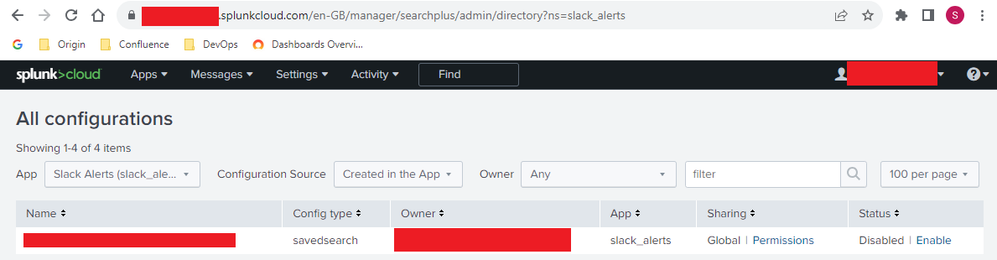
But worse is that the alert now appears in the "All Configurations" page.
I am able to disable the alert but not able to remove it and I really need to remove it from the "All Configurations" page. I'm also not able to edit the alert in any way.
Is it possible to remove the alert from the "All Configurations" page?
Thank you.
- Mark as New
- Bookmark Message
- Subscribe to Message
- Mute Message
- Subscribe to RSS Feed
- Permalink
- Report Inappropriate Content


Hi @Simon1
I feel there is not direct way to change the app context in UI also you are using splunk cloud.
otherway is go to searches reports and alerts from settings
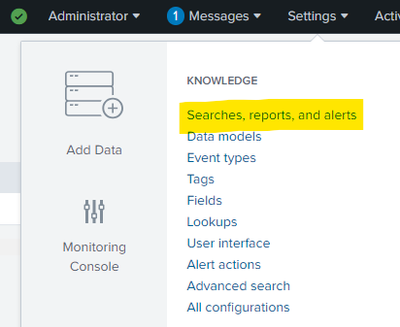
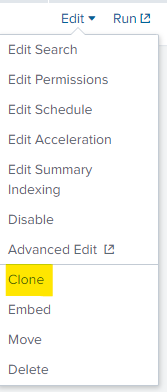
from their click on edit alet and clone
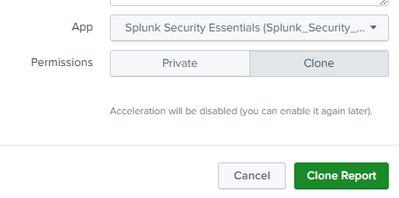
then you can change the app context and , once clone the alert delete the alert with app in slack context
- Mark as New
- Bookmark Message
- Subscribe to Message
- Mute Message
- Subscribe to RSS Feed
- Permalink
- Report Inappropriate Content
Hi @SanjayReddy ,
That worked!
I was able to go to Searches Reports & Alerts from settings and delete the alert from there.
Thank you so much for your help!
- Mark as New
- Bookmark Message
- Subscribe to Message
- Mute Message
- Subscribe to RSS Feed
- Permalink
- Report Inappropriate Content
Hi @Simon1
I feel there is not direct way to change the app context in UI also you are using splunk cloud.
otherway is go to searches reports and alerts from settings
from their click on edit alet and clone
then you can change the app context and , once clone the alert delete the alert with app in slack context


Join the Splunk Community Slack to learn, troubleshoot, and make connections with fellow Splunk practitioners in real time!
Join Splunk User Groups to connect and learn in-person by region or remotely by topic or industry.
A Four-Part Event Series: Full Stack Observability For the AI Era
SOC4Kafka - New Kafka Connector Powered by OpenTelemetry
Event Series: Level up your SOC: Advancing with Splunk Enterprise Security
