
Turn on suggestions
Auto-suggest helps you quickly narrow down your search results by suggesting possible matches as you type.
Alerting
×
Join the Conversation
Without signing in, you're just watching from the sidelines. Sign in or Register to connect, share, and be part of the Splunk Community.
- Find Answers
- :
- Using Splunk
- :
- Other Using Splunk
- :
- Alerting
- :
- Time format
Options
- Subscribe to RSS Feed
- Mark Topic as New
- Mark Topic as Read
- Float this Topic for Current User
- Bookmark Topic
- Subscribe to Topic
- Mute Topic
- Printer Friendly Page
- Mark as New
- Bookmark Message
- Subscribe to Message
- Mute Message
- Subscribe to RSS Feed
- Permalink
- Report Inappropriate Content

LogUx
Motivator
12-04-2023
08:53 PM
Please help me to get the time format for the below string in props.conf. I am confused with the last three patterns (533+00:00)
2023-12-05T04:21:21,533+00:00
Thanks in advance.
1 Solution
- Mark as New
- Bookmark Message
- Subscribe to Message
- Mute Message
- Subscribe to RSS Feed
- Permalink
- Report Inappropriate Content

azteksites
Explorer
12-04-2023
09:22 PM
You can try the following TIME_FORMAT value to parse the timestamp,
TIME_FORMAT = %Y-%m-%dT%H:%M:%S,%3N%z
- Mark as New
- Bookmark Message
- Subscribe to Message
- Mute Message
- Subscribe to RSS Feed
- Permalink
- Report Inappropriate Content
azteksites
Explorer
12-04-2023
09:22 PM
You can try the following TIME_FORMAT value to parse the timestamp,
TIME_FORMAT = %Y-%m-%dT%H:%M:%S,%3N%z
- Mark as New
- Bookmark Message
- Subscribe to Message
- Mute Message
- Subscribe to RSS Feed
- Permalink
- Report Inappropriate Content
LogUx
Motivator
12-04-2023
09:26 PM
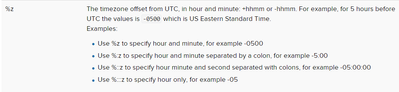
- Mark as New
- Bookmark Message
- Subscribe to Message
- Mute Message
- Subscribe to RSS Feed
- Permalink
- Report Inappropriate Content
azteksites
Explorer
12-04-2023
09:50 PM
00:00 is an offset from UTC. The %z value should parse this in -/+HHMM format.
- Mark as New
- Bookmark Message
- Subscribe to Message
- Mute Message
- Subscribe to RSS Feed
- Permalink
- Report Inappropriate Content

SanjayReddy

SplunkTrust
12-04-2023
09:09 PM
Hi @LogUx
it seems ,533 is milliseconds
2023-12-05T04:21:21,533+00:00
%Y-%m-%dT%H:%S,%3Q+00:00
- Mark as New
- Bookmark Message
- Subscribe to Message
- Mute Message
- Subscribe to RSS Feed
- Permalink
- Report Inappropriate Content
LogUx
Motivator
12-04-2023
09:15 PM
Thanks for the answer .
By the way have you missed %M ?
should be like this: %Y-%m-%dT%H:%M:%S,%3Q+00:00


Got questions? Get answers!
Join the Splunk Community Slack to learn, troubleshoot, and make connections with fellow Splunk practitioners in real time!
Meet up IRL or virtually!
Join Splunk User Groups to connect and learn in-person by region or remotely by topic or industry.
Get Updates on the Splunk Community!
test 2
test 222222
test
test
Join the Hackathon at .conf26 and build a No-Code AI agent
Join us for the AI Agent Buildathon, an in-person, three-hour hands-on Hackathon where you’ll use Splunk Agent ...
