
Turn on suggestions
Auto-suggest helps you quickly narrow down your search results by suggesting possible matches as you type.
Splunk Search
×
Join the Conversation
Without signing in, you're just watching from the sidelines. Sign in or Register to connect, share, and be part of the Splunk Community.
- Find Answers
- :
- Using Splunk
- :
- Splunk Search
- :
- show two different times for object per date
Options
- Subscribe to RSS Feed
- Mark Topic as New
- Mark Topic as Read
- Float this Topic for Current User
- Bookmark Topic
- Subscribe to Topic
- Mute Topic
- Printer Friendly Page
- Mark as New
- Bookmark Message
- Subscribe to Message
- Mute Message
- Subscribe to RSS Feed
- Permalink
- Report Inappropriate Content

dpatiladobe
Explorer
01-17-2020
10:50 AM
I am trying to extract 2 different time from extend event logs
1. Processing time taken by Server. ( "Finished processing the" OR EventClass=COMMAND_END )
2. Time taken by Seleect query ("TextData=*SELECT" )
First Query
index=xxx sourcetype=extendedevent ( "Finished processing the" OR EventClass=COMMAND_END ) DatabaseName="DbName" | eval ObjectName=if(isnull(ObjectName), "Full_Processing_time",ObjectName) | eval Date=strftime(_time,"%d/%m/%y") | eval Duration=round(tonumber(Duration)/1000/60,2) |chart limit=0 max(Duration) AS D BY ObjectName Date
Second Query
index=xxx sourcetype=extendedevent ( "TextData=*SELECT") DatabaseName="DbName" | eval Date=strftime(_time,"%d/%m/%y") | eval Duration=round(tonumber(Duration)/1000/60,2) |chart limit=0 max(Duration) AS D BY ObjectName Date
I want to show these 2 timings per object per day (7 or 30 day's of report.) I am not able to combine and show
What i have tried is
index=xxx sourcetype=extendedevent ( "Finished processing the" OR EventClass=COMMAND_END ) DatabaseName="DbName" | eval ObjectName=if(isnull(ObjectName), "Full_Processing_time",ObjectName) | eval Date=strftime(_time,"%d/%m/%y") | eval SSAS_Processing=round(tonumber(Duration)/1000/60,2) | append [ search index=xxx sourcetype=extendedevent ( "TextData=*SELECT") DatabaseName="DbName" | eval Date=strftime(_time,"%d/%m/%y") | eval Select_Query=round(tonumber(Duration)/1000/60,2) ] | chart max(SSAS_Processing) AS SSAS_Processing, max(Select_Query) AS Select_Query BY ObjectName ,Date
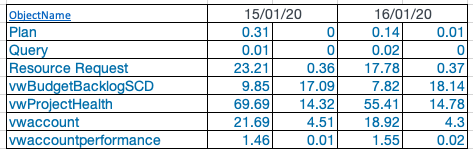
1 Solution
- Mark as New
- Bookmark Message
- Subscribe to Message
- Mute Message
- Subscribe to RSS Feed
- Permalink
- Report Inappropriate Content

to4kawa
Ultra Champion
01-17-2020
09:22 PM
index=xxx  (earliest=1579014000 latest=1579100400 ) OR (earliest=1579100400 latest=1579186800)
AND sourcetype=extendedevent DatabaseName="DbName"
AND (( "Finished processing the" OR EventClass=COMMAND_END ) OR "TextData=*SELECT")
| eval ObjectName=if(isnull(ObjectName), "Full_Processing_time",ObjectName)
| eval Date=strftime(_time,"%d/%m/%y")
| eval Select_Query=if(searchmatch("TextData=*SELECT"),round(tonumber(Duration)/1000/60,2),NULL)
| eval SSAS_Processing=if(NOT searchmatch("TextData=*SELECT"),round(tonumber(Duration)/1000/60,2),NULL)
| chart limit=0  max(SSAS_Processing) AS SSAS_Processing,  max(Select_Query) AS Select_Query BY ObjectName Date
append is searching twice, so I don't use it.
maybe, it works
Reordering field names can be difficult.
- Mark as New
- Bookmark Message
- Subscribe to Message
- Mute Message
- Subscribe to RSS Feed
- Permalink
- Report Inappropriate Content
to4kawa
Ultra Champion
01-17-2020
09:22 PM
index=xxx  (earliest=1579014000 latest=1579100400 ) OR (earliest=1579100400 latest=1579186800)
AND sourcetype=extendedevent DatabaseName="DbName"
AND (( "Finished processing the" OR EventClass=COMMAND_END ) OR "TextData=*SELECT")
| eval ObjectName=if(isnull(ObjectName), "Full_Processing_time",ObjectName)
| eval Date=strftime(_time,"%d/%m/%y")
| eval Select_Query=if(searchmatch("TextData=*SELECT"),round(tonumber(Duration)/1000/60,2),NULL)
| eval SSAS_Processing=if(NOT searchmatch("TextData=*SELECT"),round(tonumber(Duration)/1000/60,2),NULL)
| chart limit=0  max(SSAS_Processing) AS SSAS_Processing,  max(Select_Query) AS Select_Query BY ObjectName Date
append is searching twice, so I don't use it.
maybe, it works
Reordering field names can be difficult.



Got questions? Get answers!
Join the Splunk Community Slack to learn, troubleshoot, and make connections with fellow Splunk practitioners in real time!
Meet up IRL or virtually!
Join Splunk User Groups to connect and learn in-person by region or remotely by topic or industry.
Get Updates on the Splunk Community!
Announcing Modern Navigation: A New Era of Splunk User Experience
We are excited to introduce the Modern Navigation feature in the Splunk Platform, available to both cloud and ...
SOC4Kafka - New Kafka Connector Powered by OpenTelemetry
The new SOC4Kafka connector, built on OpenTelemetry, enables the collection of Kafka messages and forwards ...
Rounding off the Splunk Dashboard Contest
What does a contest-winning Splunk dashboard look like? In this case, it isn't in a browser tab at all. It ...
