
Join the Conversation
- Find Answers
- :
- Using Splunk
- :
- Splunk Search
- :
- Re: rename boolean value in a pie chart
- Subscribe to RSS Feed
- Mark Topic as New
- Mark Topic as Read
- Float this Topic for Current User
- Bookmark Topic
- Subscribe to Topic
- Mute Topic
- Printer Friendly Page
- Mark as New
- Bookmark Message
- Subscribe to Message
- Mute Message
- Subscribe to RSS Feed
- Permalink
- Report Inappropriate Content

- Mark as New
- Bookmark Message
- Subscribe to Message
- Mute Message
- Subscribe to RSS Feed
- Permalink
- Report Inappropriate Content

@thenormalone wrote:apologies but I should've mentioned that I tried that. After that if I do a stats command on it, the pie chart only shows one of the values
This is how you can illustrate your data and output in a sanitized fashion:
<your search>
| top 20 # limit output for illustration
| rename <your boolean field name> as boolean_field # rename to generic name
(because the field has only two generic values, no sanitization needed.) After this, you can use the generic field name to illustrate how the two pie charts differ. (Make sure to illustrate your generic test code.
On my side, I generate a generic data set with the following simulator
| makeresults count=50 # this part simulates data
| eval boolean_field = if((random() % 5 == 0 OR random() % 3 ==0), "false", "true")
Sample data look like this
| _time | boolean_field |
| 2021-06-07 09:34:58 | false |
| 2021-06-07 09:34:58 | false |
| 2021-06-07 09:34:58 | false |
| 2021-06-07 09:34:58 | false |
| 2021-06-07 09:34:58 | true |
| 2021-06-07 09:34:58 | true |
| 2021-06-07 09:34:58 | false |
| 2021-06-07 09:34:58 | true |
| 2021-06-07 09:34:58 | false |
| 2021-06-07 09:34:58 | false |
| 2021-06-07 09:34:58 | false |
| 2021-06-07 09:34:58 | false |
| 2021-06-07 09:34:58 | false |
| 2021-06-07 09:34:58 | true |
| 2021-06-07 09:34:58 | true |
| 2021-06-07 09:34:58 | true |
| 2021-06-07 09:34:58 | true |
| 2021-06-07 09:34:58 | false |
| 2021-06-07 09:34:58 | false |
| ... |
As expected, a simple piechart will show true and false
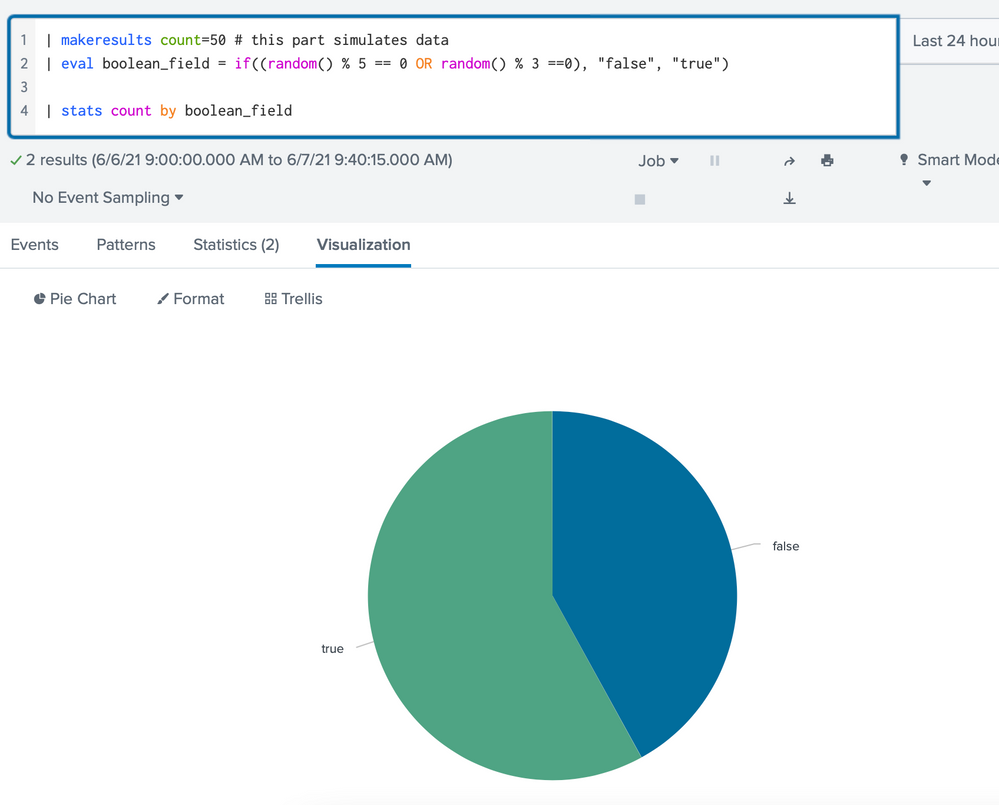
But if I rename my values using
| eval boolean_field = if(boolean_field == "true", "foo", "bar")
the piechart shows two values, foo and bar, not a single value. (Unless the input data happen to contain only one of true or false.)
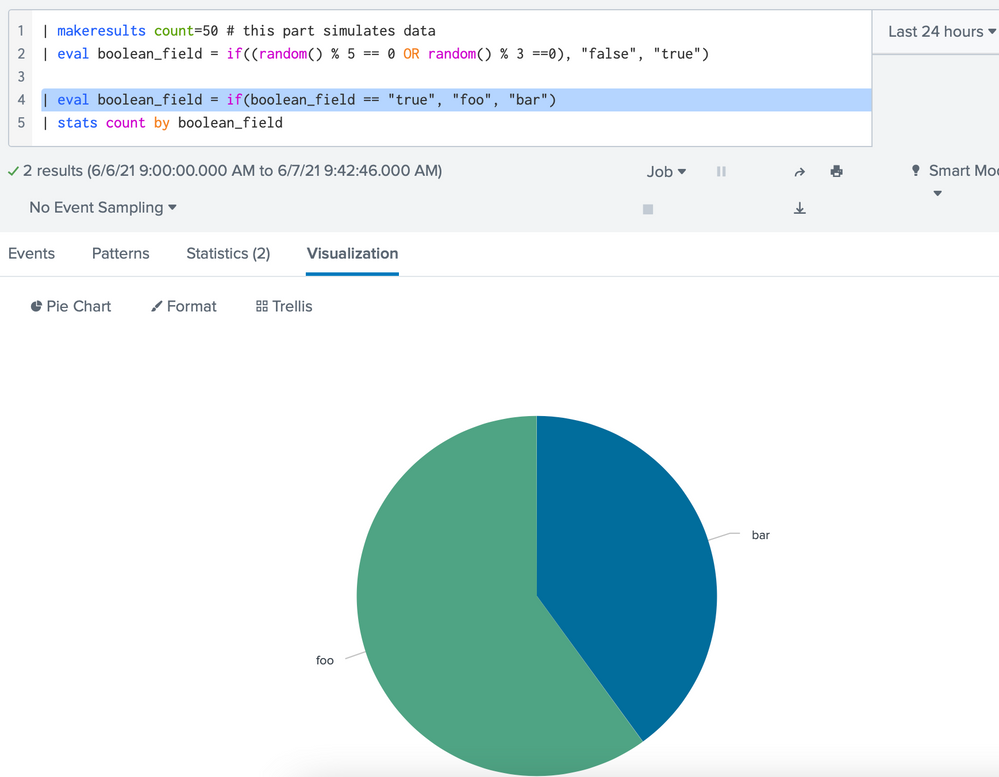
This can be corroborated by examining the "Statistics" tab under the search box.
| boolean_field | count |
| bar | 20 |
| foo | 30 |
- Mark as New
- Bookmark Message
- Subscribe to Message
- Mute Message
- Subscribe to RSS Feed
- Permalink
- Report Inappropriate Content
Something like
| eval boolean_field = if(boolean_field == "true", "true meaning", "false meaning")- Mark as New
- Bookmark Message
- Subscribe to Message
- Mute Message
- Subscribe to RSS Feed
- Permalink
- Report Inappropriate Content
apologies but I should've mentioned that I tried that. After that if I do a stats command on it, the pie chart only shows one of the values
- Mark as New
- Bookmark Message
- Subscribe to Message
- Mute Message
- Subscribe to RSS Feed
- Permalink
- Report Inappropriate Content
@thenormalone wrote:apologies but I should've mentioned that I tried that. After that if I do a stats command on it, the pie chart only shows one of the values
This is how you can illustrate your data and output in a sanitized fashion:
<your search>
| top 20 # limit output for illustration
| rename <your boolean field name> as boolean_field # rename to generic name
(because the field has only two generic values, no sanitization needed.) After this, you can use the generic field name to illustrate how the two pie charts differ. (Make sure to illustrate your generic test code.
On my side, I generate a generic data set with the following simulator
| makeresults count=50 # this part simulates data
| eval boolean_field = if((random() % 5 == 0 OR random() % 3 ==0), "false", "true")
Sample data look like this
| _time | boolean_field |
| 2021-06-07 09:34:58 | false |
| 2021-06-07 09:34:58 | false |
| 2021-06-07 09:34:58 | false |
| 2021-06-07 09:34:58 | false |
| 2021-06-07 09:34:58 | true |
| 2021-06-07 09:34:58 | true |
| 2021-06-07 09:34:58 | false |
| 2021-06-07 09:34:58 | true |
| 2021-06-07 09:34:58 | false |
| 2021-06-07 09:34:58 | false |
| 2021-06-07 09:34:58 | false |
| 2021-06-07 09:34:58 | false |
| 2021-06-07 09:34:58 | false |
| 2021-06-07 09:34:58 | true |
| 2021-06-07 09:34:58 | true |
| 2021-06-07 09:34:58 | true |
| 2021-06-07 09:34:58 | true |
| 2021-06-07 09:34:58 | false |
| 2021-06-07 09:34:58 | false |
| ... |
As expected, a simple piechart will show true and false
But if I rename my values using
| eval boolean_field = if(boolean_field == "true", "foo", "bar")
the piechart shows two values, foo and bar, not a single value. (Unless the input data happen to contain only one of true or false.)
This can be corroborated by examining the "Statistics" tab under the search box.
| boolean_field | count |
| bar | 20 |
| foo | 30 |


Join the Splunk Community Slack to learn, troubleshoot, and make connections with fellow Splunk practitioners in real time!
Join Splunk User Groups to connect and learn in-person by region or remotely by topic or industry.
A Four-Part Event Series: Full Stack Observability For the AI Era
SOC4Kafka - New Kafka Connector Powered by OpenTelemetry
Event Series: Level up your SOC: Advancing with Splunk Enterprise Security
