
Join the Conversation
- Find Answers
- :
- Using Splunk
- :
- Splunk Search
- :
- Re: index time with specific field is not working
- Subscribe to RSS Feed
- Mark Topic as New
- Mark Topic as Read
- Float this Topic for Current User
- Bookmark Topic
- Subscribe to Topic
- Mute Topic
- Printer Friendly Page
- Mark as New
- Bookmark Message
- Subscribe to Message
- Mute Message
- Subscribe to RSS Feed
- Permalink
- Report Inappropriate Content

We used the rest receivers simple api to send a body with some fields to index as a urlencoded form.
Among these there is a field time field containing a timestamp. We configure the sourcetype as in figure

The problem is that Splunk is indexing when it receives the data ( as if datetime was CURRENT or it found no fields with time information) .
An example of the data is
name=session_started¶ms=%7B%22request_id%22%3A+%220af2918a-0125-4573-9a27-bd1a6deef75d%22%2C+%22subject%22%3A+%22mmt-112%22%7D&time=2021-09-16T09%3A24%3A08.355865
we thought that the encoded data could be a problem so we changed the format of the body sent to splunk to json
{"name": "session_started", "params": "{\"request_id\": \"0af2918a-0125-4573-9a27-bd1a6deef75d\", \"subject\": \"mmt-112\"}", "time": "2021-09-16T09:24:08.355865"}
but the _time was again the time of recevieng.
We tried several tweaks but none of them had success:
- we checked the format of the strptime ("% Y-% m-% dT% H:% M:% S.% 6N") and it is correct, e.g. "2021-08-31T18: 15: 20.268841"
- we tried to explicitly set the timezone (our times are in UTC) but nothing has changed
- No error or warning in the internal log, even if we try to put a non-existent field instead of time.
- When searching using that sourcetype, the field time is parsed correctly, so the system is reading correctly.
Any suggestion? What to do? What to try?
A big thanks to the Splunk gurus that will help us!
- Mark as New
- Bookmark Message
- Subscribe to Message
- Mute Message
- Subscribe to RSS Feed
- Permalink
- Report Inappropriate Content

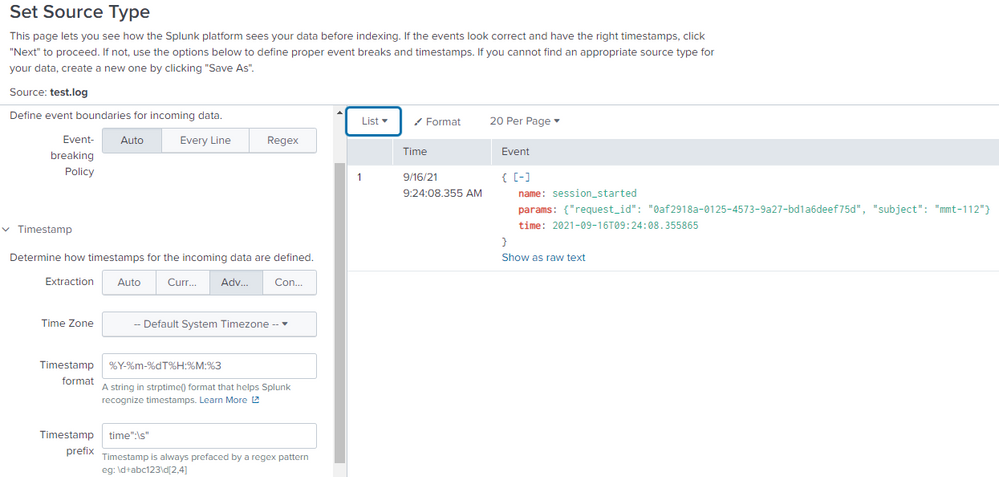
I used your event string as a test:
{"name": "session_started", "params": "{\"request_id\": \"0af2918a-0125-4573-9a27-bd1a6deef75d\", \"subject\": \"mmt-112\"}", "time": "2021-09-16T09:24:08.355865"}
When I tried
Timestamp Format %Y-%m-%dT%H:%M:%3
with
Timestamp Prefix time":\s"
it already parsed the correct date and time in splunk
- Mark as New
- Bookmark Message
- Subscribe to Message
- Mute Message
- Subscribe to RSS Feed
- Permalink
- Report Inappropriate Content
it works! thanks
- Mark as New
- Bookmark Message
- Subscribe to Message
- Mute Message
- Subscribe to RSS Feed
- Permalink
- Report Inappropriate Content
I used your event string as a test:
{"name": "session_started", "params": "{\"request_id\": \"0af2918a-0125-4573-9a27-bd1a6deef75d\", \"subject\": \"mmt-112\"}", "time": "2021-09-16T09:24:08.355865"}
When I tried
Timestamp Format %Y-%m-%dT%H:%M:%3
with
Timestamp Prefix time":\s"
it already parsed the correct date and time in splunk

Join the Splunk Community Slack to learn, troubleshoot, and make connections with fellow Splunk practitioners in real time!
Join Splunk User Groups to connect and learn in-person by region or remotely by topic or industry.
[Puzzles] Solve, Learn, Repeat: Character substitutions with Regular Expressions
Splunk Community Badges!
[Puzzles] Solve, Learn, Repeat: Matching cron expressions
