
Join the Conversation
- Find Answers
- :
- Using Splunk
- :
- Splunk Search
- :
- Re: empty fields in a table
- Subscribe to RSS Feed
- Mark Topic as New
- Mark Topic as Read
- Float this Topic for Current User
- Bookmark Topic
- Subscribe to Topic
- Mute Topic
- Printer Friendly Page
- Mark as New
- Bookmark Message
- Subscribe to Message
- Mute Message
- Subscribe to RSS Feed
- Permalink
- Report Inappropriate Content

- Mark as New
- Bookmark Message
- Subscribe to Message
- Mute Message
- Subscribe to RSS Feed
- Permalink
- Report Inappropriate Content


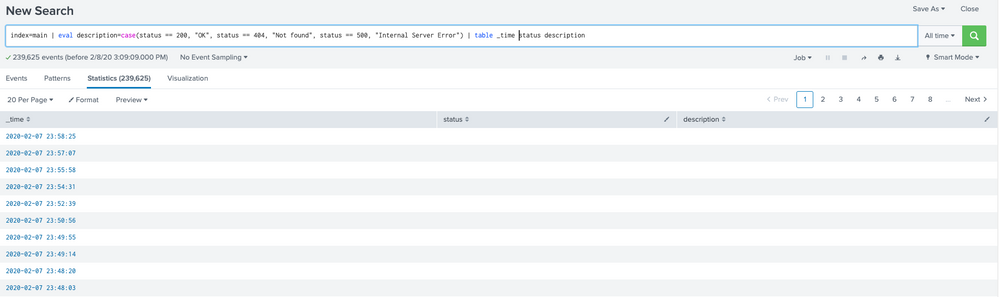
Cells in a table tend to be empty because either 1) the field has no value in the event; or 2) the event has no field by that name.
Run the search in Verbose Mode then look in the Events tab to see if the fields are indeed present and have values. Pay close attention to the spelling and capitalization of field names as Splunk cares about both. "status" is not the same as "Status", for example.
Pro tip: Add a default clause to your case functions to catch unexpected values. Something like eval description = case(status==200, "OK", ..., 1==1, "unknown").
If this reply helps you, Karma would be appreciated.
- Mark as New
- Bookmark Message
- Subscribe to Message
- Mute Message
- Subscribe to RSS Feed
- Permalink
- Report Inappropriate Content
Cells in a table tend to be empty because either 1) the field has no value in the event; or 2) the event has no field by that name.
Run the search in Verbose Mode then look in the Events tab to see if the fields are indeed present and have values. Pay close attention to the spelling and capitalization of field names as Splunk cares about both. "status" is not the same as "Status", for example.
Pro tip: Add a default clause to your case functions to catch unexpected values. Something like eval description = case(status==200, "OK", ..., 1==1, "unknown").
If this reply helps you, Karma would be appreciated.
- Mark as New
- Bookmark Message
- Subscribe to Message
- Mute Message
- Subscribe to RSS Feed
- Permalink
- Report Inappropriate Content

I'm also having this problem, already in verbose mode but I had to go into "XX more fields" to add these to my initial query. Am I better off attempting this as a dashboard or getting those fields automatically added to the search? @richgalloway
- Mark as New
- Bookmark Message
- Subscribe to Message
- Mute Message
- Subscribe to RSS Feed
- Permalink
- Report Inappropriate Content
If you're having a similar problem, but this solution doesn't help then you have a different problem and should post a new question.
If this reply helps you, Karma would be appreciated.
- Mark as New
- Bookmark Message
- Subscribe to Message
- Mute Message
- Subscribe to RSS Feed
- Permalink
- Report Inappropriate Content
Yes, you're right about mode. I tried Verbose mode, and it works as expected. Thank you
- Mark as New
- Bookmark Message
- Subscribe to Message
- Mute Message
- Subscribe to RSS Feed
- Permalink
- Report Inappropriate Content
But I face another issue: I have following a splunk query
source="maillog.log" host="mail_server" sourcetype="mail" | rex "(?\d{1,3}.\d{1,3}.\d{1,3}.\d{1,3})"
When I use top command
source="maillog.log" host="mail_server" sourcetype="mail" | rex "(?\d{1,3}.\d{1,3}.\d{1,3}.\d{1,3})" | top ip
it shows well. But when using table command it shows again field with null.
source="maillog.log" host="mail_server" sourcetype="mail" | rex "(?\d{1,3}.\d{1,3}.\d{1,3}.\d{1,3})" | table _time ip
I use Verbose mode and there are values in ip field.



Join the Splunk Community Slack to learn, troubleshoot, and make connections with fellow Splunk practitioners in real time!
Join Splunk User Groups to connect and learn in-person by region or remotely by topic or industry.
Event Series: Level up your SOC: Advancing with Splunk Enterprise Security
Announcing Modern Navigation: A New Era of Splunk User Experience
SOC4Kafka - New Kafka Connector Powered by OpenTelemetry
