
Join the Conversation
- Find Answers
- :
- Using Splunk
- :
- Splunk Search
- :
- Re: chart with multiple scales?
- Subscribe to RSS Feed
- Mark Topic as New
- Mark Topic as Read
- Float this Topic for Current User
- Bookmark Topic
- Subscribe to Topic
- Mute Topic
- Printer Friendly Page
- Mark as New
- Bookmark Message
- Subscribe to Message
- Mute Message
- Subscribe to RSS Feed
- Permalink
- Report Inappropriate Content
chart with multiple scales?

Can Splunk show (and if so, how?) different scales for each line in a line graph while auto-computing the correct scale for each (meaning the lines will auto-size their height based on the max value for each metric)?
more details: in a security-related view, I'd like to chart attempted logins/day and failed logins/day on the same line graph. But attempted logins will (hopefully!) outnumber failed logins by 100x or more. So I'd like to use different scales for each metric.
- Mark as New
- Bookmark Message
- Subscribe to Message
- Mute Message
- Subscribe to RSS Feed
- Permalink
- Report Inappropriate Content
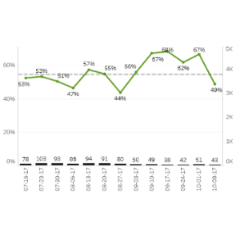
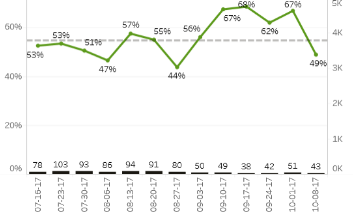


- Mark as New
- Bookmark Message
- Subscribe to Message
- Mute Message
- Subscribe to RSS Feed
- Permalink
- Report Inappropriate Content


@sxp5686, You're asking a new question in a thread that is more than 7 years old. For better chances at getting help, please post a new question.
If this reply helps you, Karma would be appreciated.
- Mark as New
- Bookmark Message
- Subscribe to Message
- Mute Message
- Subscribe to RSS Feed
- Permalink
- Report Inappropriate Content
I found that you can do this, at least in v6.1.
In the visualization editor...
- Select the "Chart Overlay" tab
- type in your alternate series (ie, the one to put on the right side y-axis) in the first field
- Set "View as Axis" to true
- Select a reasonable scale
That should do it.
- Mark as New
- Bookmark Message
- Subscribe to Message
- Mute Message
- Subscribe to RSS Feed
- Permalink
- Report Inappropriate Content
I am at a client that is requesting this functionality as well. They want to be able to plot the number of sessions opened (in the thousands) and the percentage of memory used on the same graph to show correlation.
Is this possible?
- Mark as New
- Bookmark Message
- Subscribe to Message
- Mute Message
- Subscribe to RSS Feed
- Permalink
- Report Inappropriate Content
looking at the other answers, it looks like (so far at least) no one has figured out how to do this.
- Mark as New
- Bookmark Message
- Subscribe to Message
- Mute Message
- Subscribe to RSS Feed
- Permalink
- Report Inappropriate Content
Have you tried applying a log scale to the graph? Seems like a good use case for graphing counts that are in the 10x or 100x difference.
I was hopeful that the Multiseries 'split' chart type would do this, but each of the series adhere to the same scale.
I also think this could be good seperated into two stacked graphs measuring the same time period. You would need to make a view that incorporated separate searches into it.
- Mark as New
- Bookmark Message
- Subscribe to Message
- Mute Message
- Subscribe to RSS Feed
- Permalink
- Report Inappropriate Content
If you are more interested in relative trends than actual counts you could try normalizing the data. It might be as simple as "| timechart loginCount/max(loginCount) failedCount/max(failedCount)"
That would give you a peak value of "1" for both (when you are the max for your search interval).
Multiple scale graphs are generally considered poor visualizations and should be avoided.

Join the Splunk Community Slack to learn, troubleshoot, and make connections with fellow Splunk practitioners in real time!
Join Splunk User Groups to connect and learn in-person by region or remotely by topic or industry.
May 2026 Splunk Expert Sessions: Security & Observability
Network to App: Observability Unlocked [May & June Series]
SPL2 Deep Dives, AppDynamics Integrations, SAML Made Simple and Much More on Splunk ...
