
Join the Conversation
- Find Answers
- :
- Using Splunk
- :
- Splunk Search
- :
- Re: Weird / Faulty (?) Behaviour when comparing nu...
- Subscribe to RSS Feed
- Mark Topic as New
- Mark Topic as Read
- Float this Topic for Current User
- Bookmark Topic
- Subscribe to Topic
- Mute Topic
- Printer Friendly Page
- Mark as New
- Bookmark Message
- Subscribe to Message
- Mute Message
- Subscribe to RSS Feed
- Permalink
- Report Inappropriate Content

Hello,
I am currently facing a weird behaviour when comparing two numeric fields in splunk.
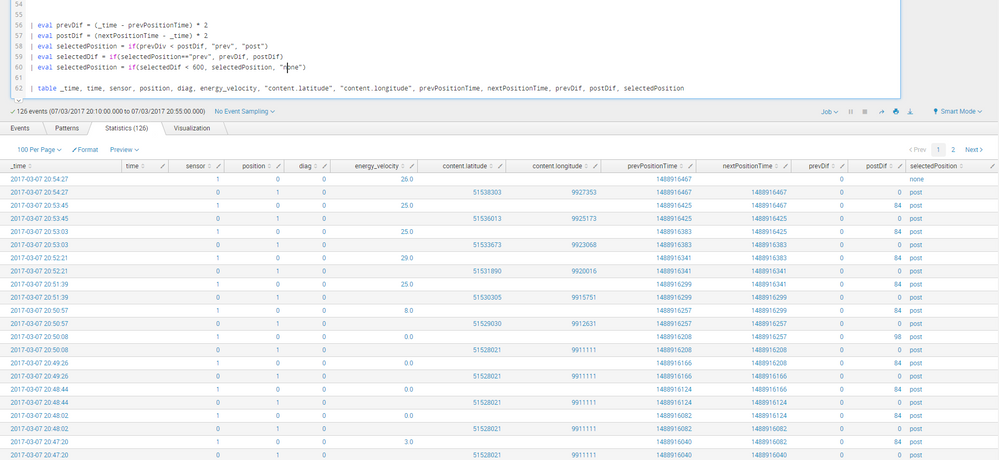
The attached screenshot shows the situation, where I want to compare the time difference to some previous and some subsequent event. The fields for the (correctly calculated) difference are prevDif and postDif. I compare them to gather a decision of which event should be taken (selectedPosition). I multiplied the prevDif and postDif by 2 after I encountered the error, to verify the fields are treated as numbers (and they are, postDif was 42 without the multiplication in most of the cases). So as 0 is clearly < 84 the selectedPosition should be "prev" but somehow the comparison fails and "post" is selected.
Can someone explain this behaviour or is this just a bug?
I would greatly appreciate any hints to why this does not work correctly!
- Mark as New
- Bookmark Message
- Subscribe to Message
- Mute Message
- Subscribe to RSS Feed
- Permalink
- Report Inappropriate Content

Typo. Change prevDiv to prevDif in line 58.
note - you can use *1.0 rather than *2 and the result would be numeric and unchanged.
- Mark as New
- Bookmark Message
- Subscribe to Message
- Mute Message
- Subscribe to RSS Feed
- Permalink
- Report Inappropriate Content
Typo. Change prevDiv to prevDif in line 58.
note - you can use *1.0 rather than *2 and the result would be numeric and unchanged.
- Mark as New
- Bookmark Message
- Subscribe to Message
- Mute Message
- Subscribe to RSS Feed
- Permalink
- Report Inappropriate Content
Thanks a lot, I was probably staring for too long at this problem to notice the obvious 😄
- Mark as New
- Bookmark Message
- Subscribe to Message
- Mute Message
- Subscribe to RSS Feed
- Permalink
- Report Inappropriate Content
@sh4kesbeer - It's always easier to catch those in other people's code. If we sat across the aisle from each other, you'd do it for me just as well.



Join the Splunk Community Slack to learn, troubleshoot, and make connections with fellow Splunk practitioners in real time!
Join Splunk User Groups to connect and learn in-person by region or remotely by topic or industry.
Vibe-coding, AI, and Splunkcraft: Highlights from the .conf26 Builder Bar
Thanks for the Memories: .conf26 Took Learning to New Heights
Best Practices: Splunk auto adjust pipeline queue
