
Join the Conversation
- Find Answers
- :
- Using Splunk
- :
- Splunk Search
- :
- Re: Unable to rex string containing "&"
- Subscribe to RSS Feed
- Mark Topic as New
- Mark Topic as Read
- Float this Topic for Current User
- Bookmark Topic
- Subscribe to Topic
- Mute Topic
- Printer Friendly Page
- Mark as New
- Bookmark Message
- Subscribe to Message
- Mute Message
- Subscribe to RSS Feed
- Permalink
- Report Inappropriate Content

I am trying to rex a URL string. Here is an example:
ManageAccount.do?ACTION=VIEW&id=27271905&acctViewType=transactions
My SPL is
\w+\.\w+\?ACTION=VIEW\&id=\d+\&acctViewType=\w+
which is about as specific as one can get. Thing is, this doesn't return results. I tried the following:
\w+\.\w+\?ACTION=.*
to try and generalize, but my result was "ManageAccount.do?ACTION=VIEW"
Has anyone heard of issues with & in a regex, and issues with it in Splunk?
- Mark as New
- Bookmark Message
- Subscribe to Message
- Mute Message
- Subscribe to RSS Feed
- Permalink
- Report Inappropriate Content
Thank you for all the assistance. The issue was actually the transforms file. When I gave the "URL" string, that was actually me looking at the _raw output and seeing it. When I did | table URL, what I actually saw was ManageAccount.do?ACTION=VIEW. We (read an admin from a long time ago) handrolled one of our sourcetypes, and the parsing is jacked on it.
My solution?
rex field=_raw "URL=(?[^;]*)"
Then real_uri is equivalent to what I thought URL was. sigh Well, there's a day of work wasted. Thanks again everyone!
- Mark as New
- Bookmark Message
- Subscribe to Message
- Mute Message
- Subscribe to RSS Feed
- Permalink
- Report Inappropriate Content
Thank you for all the assistance. The issue was actually the transforms file. When I gave the "URL" string, that was actually me looking at the _raw output and seeing it. When I did | table URL, what I actually saw was ManageAccount.do?ACTION=VIEW. We (read an admin from a long time ago) handrolled one of our sourcetypes, and the parsing is jacked on it.
My solution?
rex field=_raw "URL=(?[^;]*)"
Then real_uri is equivalent to what I thought URL was. sigh Well, there's a day of work wasted. Thanks again everyone!
- Mark as New
- Bookmark Message
- Subscribe to Message
- Mute Message
- Subscribe to RSS Feed
- Permalink
- Report Inappropriate Content


Hi kknopp,
I don't see any problem, maybe you need do use some capturing group in your regex like this:
sourcetype=syslog | head 1 | eval foo="ManageAccount.do?ACTION=VIEW&id=27271905&acctViewType=transactions" | rex field=foo "\w+\.\w+\?\w+=(?<ACTION>\w+)&id=(?<id>\d+)&acctViewType=(?<ViewType>\w+)" | table ACTION, id, ViewType
I used this on splunkstorm and it works perfectly - producing a result like this:
The sourcetype=syslog | head 1 | eval foo="ManageAccount.do?ACTION=VIEW&id=27271905&acctViewType=transactions" part is only to generate your event data, so you will not need to do it....simply do something like this:
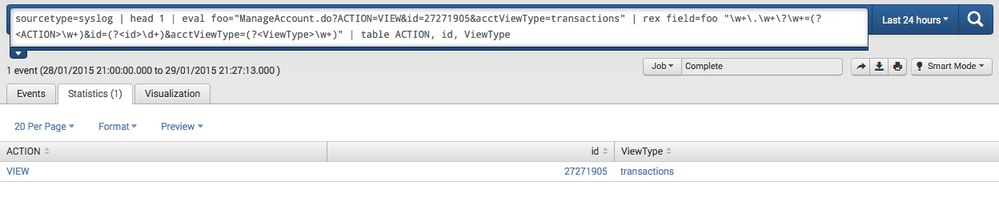
your base search here | rex "\w+\.\w+\?\w+=(?<ACTION>\w+)&id=(?<id>\d+)&acctViewType=(?<ViewType>\w+)" | table ACTION, id, ViewType
cheers, MuS

- Mark as New
- Bookmark Message
- Subscribe to Message
- Mute Message
- Subscribe to RSS Feed
- Permalink
- Report Inappropriate Content

Try double escaping like so: "\\w+\\.\\w+\\?ACTION=.*"
- Mark as New
- Bookmark Message
- Subscribe to Message
- Mute Message
- Subscribe to RSS Feed
- Permalink
- Report Inappropriate Content
I've also tried adding N{U+0026} to see if I could escape the Unicode character, but I got the error: "Regex: PCRE does not support L, l, N{name}, U, or u "
- Mark as New
- Bookmark Message
- Subscribe to Message
- Mute Message
- Subscribe to RSS Feed
- Permalink
- Report Inappropriate Content
I had no problem using & in a rex. Here is a test I tried and it returned a list of the strings after 'command=':
| rex "&docId=\d+&command=(?<command>[^ ]+)" | stats count by command
I'm on Splunk 6.1.5
- Mark as New
- Bookmark Message
- Subscribe to Message
- Mute Message
- Subscribe to RSS Feed
- Permalink
- Report Inappropriate Content
We're on Splunk 6.1.1. I'll look at release notes, and see if maybe there was an issue in the earlier versions...
- Mark as New
- Bookmark Message
- Subscribe to Message
- Mute Message
- Subscribe to RSS Feed
- Permalink
- Report Inappropriate Content
I don't see anything that would've caused this. I'm wondering if we have something crappy hidden in our transforms.conf file?
- Mark as New
- Bookmark Message
- Subscribe to Message
- Mute Message
- Subscribe to RSS Feed
- Permalink
- Report Inappropriate Content
Are you using this regex in a transform or are you using it in a rex in search? There may be a difference in how the regex is handled between the two, though I think it unlikely. But if you are using it in a transform, try it first using rex in a search and work on getting it working there first, then put it in the transform. If you are not extracting fields then in the search use regex rather than rex. And if it turns out that the & is causing problems you could try using
\x26
(26 is hex for &) in place of it in the regular expression. I've only tried this in SED-CMD but I'd guess if it works there it would work in a regex or rex. I discovered that trying to replace a backslash was very buggy, and using this method of expressing a character in hex worked around the bug.
- Mark as New
- Bookmark Message
- Subscribe to Message
- Mute Message
- Subscribe to RSS Feed
- Permalink
- Report Inappropriate Content
I've just tried that as well, to no avail. tried variations of x26, x0026, x{26}. None worked.

Join the Splunk Community Slack to learn, troubleshoot, and make connections with fellow Splunk practitioners in real time!
Join Splunk User Groups to connect and learn in-person by region or remotely by topic or industry.
Index This | What travels the world but is also stuck in place?
Discover New Use Cases: Unlock Greater Value from Your Existing Splunk Data
Continue Your Journey: Join Session 2 of the Data Management and Federation Bootcamp ...
