
Turn on suggestions
Auto-suggest helps you quickly narrow down your search results by suggesting possible matches as you type.
Splunk Search
×
Join the Conversation
Without signing in, you're just watching from the sidelines. Sign in or Register to connect, share, and be part of the Splunk Community.
Turn on suggestions
Auto-suggest helps you quickly narrow down your search results by suggesting possible matches as you type.
- Find Answers
- :
- Using Splunk
- :
- Splunk Search
- :
- Two timecharts for different time frames (today/ye...
Options
- Subscribe to RSS Feed
- Mark Topic as New
- Mark Topic as Read
- Float this Topic for Current User
- Bookmark Topic
- Subscribe to Topic
- Mute Topic
- Printer Friendly Page
- Mark as New
- Bookmark Message
- Subscribe to Message
- Mute Message
- Subscribe to RSS Feed
- Permalink
- Report Inappropriate Content

dab55
Engager
04-15-2021
04:34 AM
Hi all,
I'm trying to create a chart containing two timecharts for different time frames (e.g. today/yesterday). How can I achieve it?
Currently I'm getting it one after another on the same graph. I'd like basically to overlay one timechart on another one.
index=ddos device_event_class_id=Bandwidth earliest=-1d@d latest=-0d@d | rex field=msg "msg=.+raffic.+'(?<pg_name>[\w\s\-]+)'.+(?<bps>\d+\.\d+\s.+)\..+" | eval ReportKey="yersterday" | timechart span=3h count by pg_name | append [search index=ddos device_event_class_id=Bandwidth earliest=-2d@d latest=-1d@d | rex field=msg "msg=.+raffic.+'(?<pg_name>[\w\s\-]+)'.+(?<bps>\d+\.\d+\s.+)\..+" | eval ReportKey="beforeyesterday" | timechart span=3h count by pg_name ] | fillnull value=0 | eval mytime=strftime(_time, "%H:%M") | sort mytime |
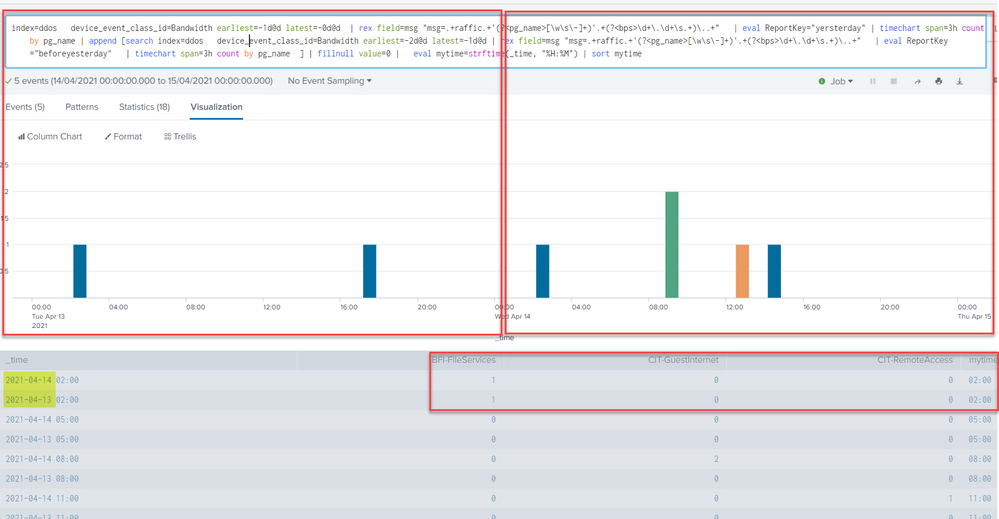
Thanks in advance.
1 Solution
- Mark as New
- Bookmark Message
- Subscribe to Message
- Mute Message
- Subscribe to RSS Feed
- Permalink
- Report Inappropriate Content

ITWhisperer

SplunkTrust
04-15-2021
05:40 AM
- Mark as New
- Bookmark Message
- Subscribe to Message
- Mute Message
- Subscribe to RSS Feed
- Permalink
- Report Inappropriate Content
ITWhisperer
SplunkTrust
04-15-2021
05:40 AM
Try adding:
| timewrap d- Mark as New
- Bookmark Message
- Subscribe to Message
- Mute Message
- Subscribe to RSS Feed
- Permalink
- Report Inappropriate Content
dab55
Engager
04-15-2021
12:44 PM
Thanks a lot!
- Mark as New
- Bookmark Message
- Subscribe to Message
- Mute Message
- Subscribe to RSS Feed
- Permalink
- Report Inappropriate Content

richgalloway
SplunkTrust
04-15-2021
05:40 AM
Check out the timewrap command.
---
If this reply helps you, Karma would be appreciated.
If this reply helps you, Karma would be appreciated.

Get Updates on the Splunk Community!
Data Management Digest – December 2025
Welcome to the December edition of Data Management Digest!
As we continue our journey of data innovation, the ...
Index This | What is broken 80% of the time by February?
December 2025 Edition
Hayyy Splunk Education Enthusiasts and the Eternally Curious!
We’re back with this ...
Unlock Faster Time-to-Value on Edge and Ingest Processor with New SPL2 Pipeline ...
Hello Splunk Community,
We're thrilled to share an exciting update that will help you manage your data more ...
