
Join the Conversation
- Find Answers
- :
- Using Splunk
- :
- Splunk Search
- :
- Re: Token reference for TimeChart panel
- Subscribe to RSS Feed
- Mark Topic as New
- Mark Topic as Read
- Float this Topic for Current User
- Bookmark Topic
- Subscribe to Topic
- Mute Topic
- Printer Friendly Page
- Mark as New
- Bookmark Message
- Subscribe to Message
- Mute Message
- Subscribe to RSS Feed
- Permalink
- Report Inappropriate Content

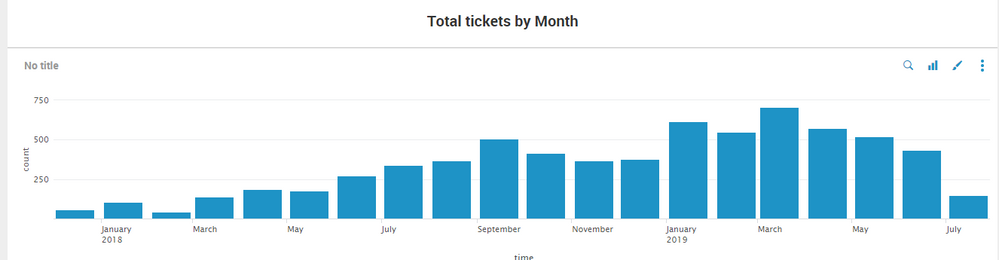
Hi,
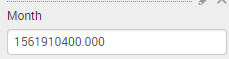
I am currently trying to do a drill down for my panel when i click on each month. However when I click on the month , the month retrieve was in epoch time format. How do i work around this so I can do drilldown for my timechart? Thanks
Best Regards,
Aloysius


- Mark as New
- Bookmark Message
- Subscribe to Message
- Mute Message
- Subscribe to RSS Feed
- Permalink
- Report Inappropriate Content

You can use an eval token instead of the native "set" that Splunk UI uses.
    <drilldown>
      <set token="t">$click.value$</set>
      <eval token="t">strftime($click.value$,"%m")</eval>
    </drilldown>
This will set your token to the month number. For more info on date and times formats:
https://docs.splunk.com/Documentation/Splunk/7.1.1/SearchReference/Commontimeformatvariables
- Mark as New
- Bookmark Message
- Subscribe to Message
- Mute Message
- Subscribe to RSS Feed
- Permalink
- Report Inappropriate Content
You can use an eval token instead of the native "set" that Splunk UI uses.
    <drilldown>
      <set token="t">$click.value$</set>
      <eval token="t">strftime($click.value$,"%m")</eval>
    </drilldown>
This will set your token to the month number. For more info on date and times formats:
https://docs.splunk.com/Documentation/Splunk/7.1.1/SearchReference/Commontimeformatvariables
- Mark as New
- Bookmark Message
- Subscribe to Message
- Mute Message
- Subscribe to RSS Feed
- Permalink
- Report Inappropriate Content
Thanks tiagofbmm,
this solved my question.

Join the Splunk Community Slack to learn, troubleshoot, and make connections with fellow Splunk practitioners in real time!
Join Splunk User Groups to connect and learn in-person by region or remotely by topic or industry.
Meet the .conf26 AI Agent Buildathon Winners
Trusted Autonomy in the SOC: A Maturity Journey
Supercharging Windows Security Detection Performance: Introducing Hybrid Field ...
