
Turn on suggestions
Auto-suggest helps you quickly narrow down your search results by suggesting possible matches as you type.
Splunk Search
×
Join the Conversation
Without signing in, you're just watching from the sidelines. Sign in or Register to connect, share, and be part of the Splunk Community.
- Find Answers
- :
- Using Splunk
- :
- Splunk Search
- :
- Re: Splunk eval if with wildcard
Options
- Subscribe to RSS Feed
- Mark Topic as New
- Mark Topic as Read
- Float this Topic for Current User
- Bookmark Topic
- Subscribe to Topic
- Mute Topic
- Printer Friendly Page
- Mark as New
- Bookmark Message
- Subscribe to Message
- Mute Message
- Subscribe to RSS Feed
- Permalink
- Report Inappropriate Content

sboogaar
Path Finder
01-31-2019
05:41 AM
Im trying to set a boolean based on a match in a string.
I want to set a value to 1 if it does not match ingestion* and set it to 0 if it does match.
The following example shows the problem:
index="balblableaw"
| append
    [| makeresults
    | eval app_name ="ingestion_something"]
| append
    [| makeresults
    | eval app_name ="should-match-only"]
| eval not_contains_ingestion = if(app_name!="ingestion*",1,0)
| table app_name, not_contains_ingestion
The expected result was that should-match-only would be 1 and the ingestion_something would be 0
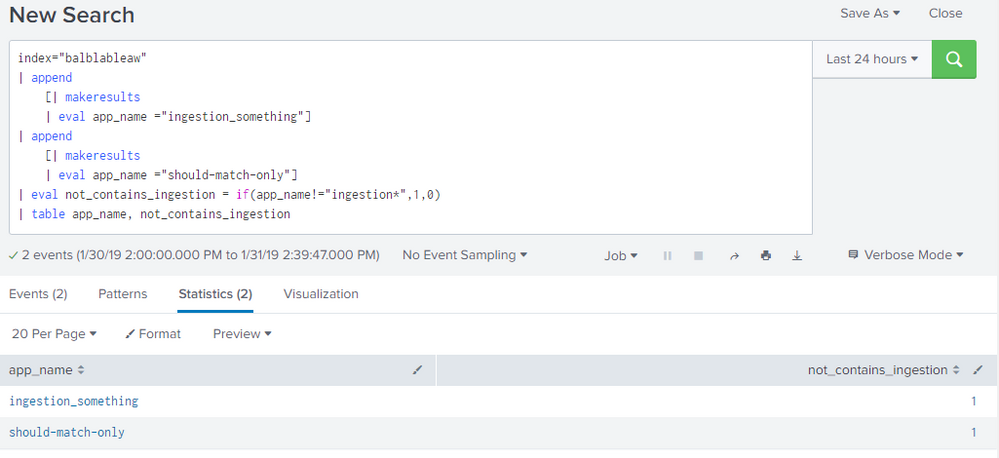

1 Solution
- Mark as New
- Bookmark Message
- Subscribe to Message
- Mute Message
- Subscribe to RSS Feed
- Permalink
- Report Inappropriate Content

renjith_nair
Legend
01-31-2019
05:45 AM
@sboogaar,
Use match
index="balblableaw"
 | append
     [| makeresults
     | eval app_name ="ingestion_something"]
 | append
     [| makeresults
     | eval app_name ="should-match-only"]
 | eval not_contains_ingestion = if(match(app_name,"ingestion"),0,1)
 | table app_name, not_contains_ingestion
---
What goes around comes around. If it helps, hit it with Karma 🙂
What goes around comes around. If it helps, hit it with Karma 🙂
- Mark as New
- Bookmark Message
- Subscribe to Message
- Mute Message
- Subscribe to RSS Feed
- Permalink
- Report Inappropriate Content

vishaltaneja070
Motivator
01-31-2019
05:47 AM
Try this:
index="balblableaw"
 | append
     [| makeresults
     | eval app_name ="ingestion_something"]
 | append
     [| makeresults
     | eval app_name ="should-match-only"]
 | eval not_contains_ingestion = if(app_name like "ingestion%" ,1,0)
 | table app_name, not_contains_ingestion
- Mark as New
- Bookmark Message
- Subscribe to Message
- Mute Message
- Subscribe to RSS Feed
- Permalink
- Report Inappropriate Content
renjith_nair
Legend
01-31-2019
05:45 AM
@sboogaar,
Use match
index="balblableaw"
 | append
     [| makeresults
     | eval app_name ="ingestion_something"]
 | append
     [| makeresults
     | eval app_name ="should-match-only"]
 | eval not_contains_ingestion = if(match(app_name,"ingestion"),0,1)
 | table app_name, not_contains_ingestion
---
What goes around comes around. If it helps, hit it with Karma 🙂
What goes around comes around. If it helps, hit it with Karma 🙂
- Mark as New
- Bookmark Message
- Subscribe to Message
- Mute Message
- Subscribe to RSS Feed
- Permalink
- Report Inappropriate Content
sboogaar
Path Finder
02-01-2019
04:30 AM
Thanks for the answer, can you explain why my own example was not working. I try to understand the disabilities from splunk.
- Mark as New
- Bookmark Message
- Subscribe to Message
- Mute Message
- Subscribe to RSS Feed
- Permalink
- Report Inappropriate Content
renjith_nair
Legend
02-02-2019
05:00 AM
In eval it doesn't treat * as wildcard but as literal
---
What goes around comes around. If it helps, hit it with Karma 🙂
What goes around comes around. If it helps, hit it with Karma 🙂

Got questions? Get answers!
Join the Splunk Community Slack to learn, troubleshoot, and make connections with fellow Splunk practitioners in real time!
Meet up IRL or virtually!
Join Splunk User Groups to connect and learn in-person by region or remotely by topic or industry.
Get Updates on the Splunk Community!
Data Outage Monitoring and Reporting
We’ve all been there, right? Living our best life, working on our Splunk environment, when out of nowhere a ...
Manage Datasets and Connections in Catalog on Splunk Cloud Platform
Set Up Data Where You Use It
Catalog already helps teams find and understand data across Splunk indexes, ...
Persistent Queue at TcpOut — One of Splunk's Most Practical Features
Splunk introduced persistent queueing at the tcpout layer as one of the most practical resilience features in ...
