
Join the Conversation
- Find Answers
- :
- Using Splunk
- :
- Splunk Search
- :
- Re: Split up multiline values
- Subscribe to RSS Feed
- Mark Topic as New
- Mark Topic as Read
- Float this Topic for Current User
- Bookmark Topic
- Subscribe to Topic
- Mute Topic
- Printer Friendly Page
- Mark as New
- Bookmark Message
- Subscribe to Message
- Mute Message
- Subscribe to RSS Feed
- Permalink
- Report Inappropriate Content

I am trying to run the following search:
index=tripwire LogCategory="Audit Event" AND "/etc/pki/rpm-gpg/RPM-GPG-KEY-shibboleth-7" AND "myserver.mydomain.com"
| rex max_match=0 field=_raw "(?<lineData>[^\n]+)"
| rex field=Msg "'(?<FilePath>.*)' accessed by"
| rex field=_raw "accessed\sby\s'(?<Audit_UserName>.*)'.\sType"
| table _time, FilePath, Audit_UserName
However, the way I am splitting the multiline data doesn't appear to be working with this data.
Here is a sample of the data as viewed in Notepad++ with symbols;
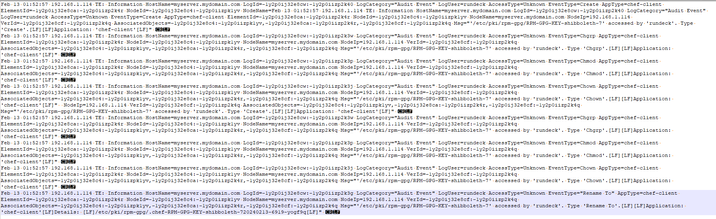
Every line ends in CR LF
However, in Splunk it isn't splitting up the events. What am I missing here? I have had this work with similar data but unsure what is different in this situation.
TIA!
- Mark as New
- Bookmark Message
- Subscribe to Message
- Mute Message
- Subscribe to RSS Feed
- Permalink
- Report Inappropriate Content


I can't quiet tell what is the input data and how Splunk is splitting.
Do you want separate events for each time you have Feb 13 etc? If so provide a props for your indexers to say that the event starts with the date at the beginning of the line etc.
- Mark as New
- Bookmark Message
- Subscribe to Message
- Mute Message
- Subscribe to RSS Feed
- Permalink
- Report Inappropriate Content
Not yet no
- Mark as New
- Bookmark Message
- Subscribe to Message
- Mute Message
- Subscribe to RSS Feed
- Permalink
- Report Inappropriate Content
I can't quiet tell what is the input data and how Splunk is splitting.
Do you want separate events for each time you have Feb 13 etc? If so provide a props for your indexers to say that the event starts with the date at the beginning of the line etc.
- Mark as New
- Bookmark Message
- Subscribe to Message
- Mute Message
- Subscribe to RSS Feed
- Permalink
- Report Inappropriate Content
Hi so how is are the events being split by Splunk? And do you have any props to tell splunk how to split the events?


Join the Splunk Community Slack to learn, troubleshoot, and make connections with fellow Splunk practitioners in real time!
Join Splunk User Groups to connect and learn in-person by region or remotely by topic or industry.
SOC4Kafka - New Kafka Connector Powered by OpenTelemetry
Rounding off the Splunk Dashboard Contest
A Four Part Event Series: AI + Observability: AI Agents, LLMs, Apps, & Infrastructure
