
Turn on suggestions
Auto-suggest helps you quickly narrow down your search results by suggesting possible matches as you type.
Splunk Search
×
Join the Conversation
Without signing in, you're just watching from the sidelines. Sign in or Register to connect, share, and be part of the Splunk Community.
- Find Answers
- :
- Using Splunk
- :
- Splunk Search
- :
- Re: Search Data 1 Minute Ago
Options
- Subscribe to RSS Feed
- Mark Topic as New
- Mark Topic as Read
- Float this Topic for Current User
- Bookmark Topic
- Subscribe to Topic
- Mute Topic
- Printer Friendly Page
- Mark as New
- Bookmark Message
- Subscribe to Message
- Mute Message
- Subscribe to RSS Feed
- Permalink
- Report Inappropriate Content

mathiasy123
Path Finder
07-03-2020
02:52 AM

1 Solution
- Mark as New
- Bookmark Message
- Subscribe to Message
- Mute Message
- Subscribe to RSS Feed
- Permalink
- Report Inappropriate Content

to4kawa
Ultra Champion
07-03-2020
03:27 AM
- Mark as New
- Bookmark Message
- Subscribe to Message
- Mute Message
- Subscribe to RSS Feed
- Permalink
- Report Inappropriate Content
to4kawa
Ultra Champion
07-03-2020
03:17 AM
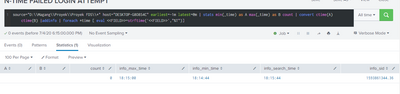
index=_internal earliest=-1m latest=@m | stats min(_time) as A max(_time) as B count | convert ctime(A) ctime(B) |addinfo | foreach *time [ eval <<FIELD>>=strftime('<<FIELD>>',"%T")]Maybe we should unify with @.
- Mark as New
- Bookmark Message
- Subscribe to Message
- Mute Message
- Subscribe to RSS Feed
- Permalink
- Report Inappropriate Content
mathiasy123
Path Finder
07-03-2020
03:24 AM
- Mark as New
- Bookmark Message
- Subscribe to Message
- Mute Message
- Subscribe to RSS Feed
- Permalink
- Report Inappropriate Content
to4kawa
Ultra Champion
07-03-2020
03:27 AM
your search has no result. your index or source are correct?
- Mark as New
- Bookmark Message
- Subscribe to Message
- Mute Message
- Subscribe to RSS Feed
- Permalink
- Report Inappropriate Content
mathiasy123
Path Finder
07-08-2020
03:20 AM
Hi, I finally found my mistake, it seems my _time was wrong, so the search returns an empty result, big thanks!
- Mark as New
- Bookmark Message
- Subscribe to Message
- Mute Message
- Subscribe to RSS Feed
- Permalink
- Report Inappropriate Content
to4kawa
Ultra Champion
07-08-2020
03:47 AM
good job @mathiasy123 happy splunking!
- Mark as New
- Bookmark Message
- Subscribe to Message
- Mute Message
- Subscribe to RSS Feed
- Permalink
- Report Inappropriate Content
mathiasy123
Path Finder
07-03-2020
06:57 AM
How to check if my index and source are correctly?
- Mark as New
- Bookmark Message
- Subscribe to Message
- Mute Message
- Subscribe to RSS Feed
- Permalink
- Report Inappropriate Content
to4kawa
Ultra Champion
07-03-2020
04:12 PM
check data summary on search
- Mark as New
- Bookmark Message
- Subscribe to Message
- Mute Message
- Subscribe to RSS Feed
- Permalink
- Report Inappropriate Content
mathiasy123
Path Finder
07-07-2020
12:35 AM
- Mark as New
- Bookmark Message
- Subscribe to Message
- Mute Message
- Subscribe to RSS Feed
- Permalink
- Report Inappropriate Content
to4kawa
Ultra Champion
07-07-2020
01:51 AM
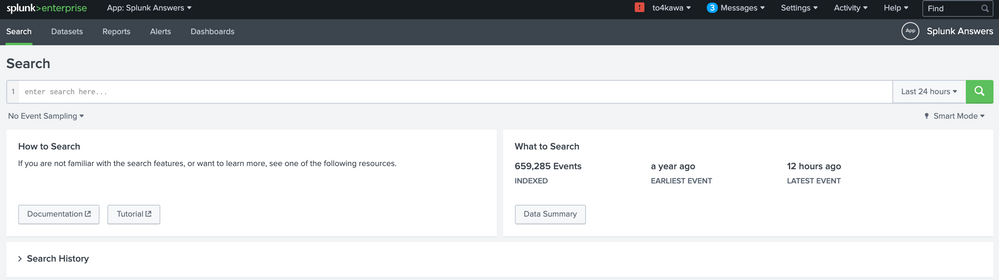
click "Data Summary"
- Mark as New
- Bookmark Message
- Subscribe to Message
- Mute Message
- Subscribe to RSS Feed
- Permalink
- Report Inappropriate Content
mathiasy123
Path Finder
07-07-2020
02:48 AM

Got questions? Get answers!
Join the Splunk Community Slack to learn, troubleshoot, and make connections with fellow Splunk practitioners in real time!
Meet up IRL or virtually!
Join Splunk User Groups to connect and learn in-person by region or remotely by topic or industry.
Get Updates on the Splunk Community!
Observability Simplified: Combining User Experience, Application Performance & ...
Tech Talk
Observability Simplified: Combining User Experience, Application Performance & Network ...
Event Series May & June: From Network Visibility to Service Intelligence
Unifying the Network: Moving from Alert Noise to Service Intelligence with Splunk ITSI
In today’s hybrid ...
Global Splunk User Group Events: May + June 2026
Your Splunk Community Awaits: Discover Upcoming User Group Events Worldwide
Staying ahead in the fast-paced ...
