
Join the Conversation
- Find Answers
- :
- Using Splunk
- :
- Splunk Search
- :
- Remove specific substrings from specific values
- Subscribe to RSS Feed
- Mark Topic as New
- Mark Topic as Read
- Float this Topic for Current User
- Bookmark Topic
- Subscribe to Topic
- Mute Topic
- Printer Friendly Page
- Mark as New
- Bookmark Message
- Subscribe to Message
- Mute Message
- Subscribe to RSS Feed
- Permalink
- Report Inappropriate Content

I have a query that looks for certain error messages and displays a list sorted by most common occurrence. My problem is that some of these error messages contain unique IDs, causing them to show as separate results.
The first 3 messages below end with unique values - how do I update this query to output those error messages without the unique values after the * mark, or even replace with another string like "redacted"?
index=mint event_name=APIServiceError appEnvironment=Release appVersionName>=3.0
  (
    extraData.message="Incorrect email or password for*"  OR
    extraData.message="Street address and/or city is too long*" OR
    extraData.message="The following address could not be found:*" OR
    extraData.message="We failed to authorize your payment card. Please verify your payment card is valid." OR
    extraData.message="The network connection was lost."
  )
| stats count by extraData.message | sort -count
- Mark as New
- Bookmark Message
- Subscribe to Message
- Mute Message
- Subscribe to RSS Feed
- Permalink
- Report Inappropriate Content
Try adding below to replace message with the one you are looking for.
index=mint event_name=APIServiceError appEnvironment=Release appVersionName>=3.0
(
extraData.message="Incorrect email or password for*" OR
extraData.message="Street address and/or city is too long*" OR
extraData.message="The following address could not be found:*" OR
extraData.message="We failed to authorize your payment card. Please verify your payment card is valid." OR
extraData.message="The network connection was lost."
)
| eval extraData.message=if(like(extraData.message, "Street address and/or city is too long*"), "Street address and/or city is too long",extraData.message) | stats count by extraData.message | sort -count
- Mark as New
- Bookmark Message
- Subscribe to Message
- Mute Message
- Subscribe to RSS Feed
- Permalink
- Report Inappropriate Content
Try adding below to replace message with the one you are looking for.
index=mint event_name=APIServiceError appEnvironment=Release appVersionName>=3.0
(
extraData.message="Incorrect email or password for*" OR
extraData.message="Street address and/or city is too long*" OR
extraData.message="The following address could not be found:*" OR
extraData.message="We failed to authorize your payment card. Please verify your payment card is valid." OR
extraData.message="The network connection was lost."
)
| eval extraData.message=if(like(extraData.message, "Street address and/or city is too long*"), "Street address and/or city is too long",extraData.message) | stats count by extraData.message | sort -count
- Mark as New
- Bookmark Message
- Subscribe to Message
- Mute Message
- Subscribe to RSS Feed
- Permalink
- Report Inappropriate Content
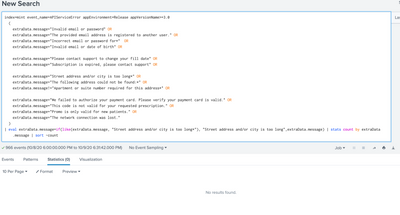
Thanks - what you suggested makes sense, but I used it exactly as you showed and get "no results found":
- Mark as New
- Bookmark Message
- Subscribe to Message
- Mute Message
- Subscribe to RSS Feed
- Permalink
- Report Inappropriate Content


https://docs.splunk.com/Documentation/Splunk/8.0.5/SearchReference/ConditionalFunctions
- Mark as New
- Bookmark Message
- Subscribe to Message
- Mute Message
- Subscribe to RSS Feed
- Permalink
- Report Inappropriate Content
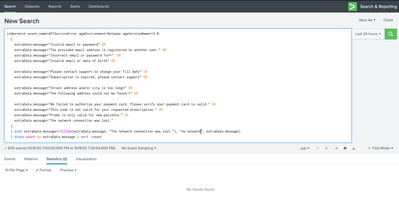
Thanks - still no luck. Even tried on an error message with no wildcards, just a simple match and replace:
- Mark as New
- Bookmark Message
- Subscribe to Message
- Mute Message
- Subscribe to RSS Feed
- Permalink
- Report Inappropriate Content
- Mark as New
- Bookmark Message
- Subscribe to Message
- Mute Message
- Subscribe to RSS Feed
- Permalink
- Report Inappropriate Content
That did it - thanks!
- Mark as New
- Bookmark Message
- Subscribe to Message
- Mute Message
- Subscribe to RSS Feed
- Permalink
- Report Inappropriate Content
Other option is use rex mode=sed
r. Ismo


Join the Splunk Community Slack to learn, troubleshoot, and make connections with fellow Splunk practitioners in real time!
Join Splunk User Groups to connect and learn in-person by region or remotely by topic or industry.
SOC4Kafka - New Kafka Connector Powered by OpenTelemetry
Event Series: Level up your SOC: Advancing with Splunk Enterprise Security
Announcing Modern Navigation: A New Era of Splunk User Experience
