
Join the Conversation
- Find Answers
- :
- Using Splunk
- :
- Splunk Search
- :
- Regex and Windows XML log events
- Subscribe to RSS Feed
- Mark Topic as New
- Mark Topic as Read
- Float this Topic for Current User
- Bookmark Topic
- Subscribe to Topic
- Mute Topic
- Printer Friendly Page
- Mark as New
- Bookmark Message
- Subscribe to Message
- Mute Message
- Subscribe to RSS Feed
- Permalink
- Report Inappropriate Content
Hi everyone,
I was attempting to utilize this dashboard, but am having difficulty populating the user accounts.
https://gosplunk.com/windows-dashboard-showing-who-was-logged-on-to/
This is what the dashboard currently looks like, as you can see, the user account section is not populated. My goal is to have either the TargetUserName or TargetUserSID populated in the account section with a regex that will catch all user accounts. Any help will be greatly appreciated.
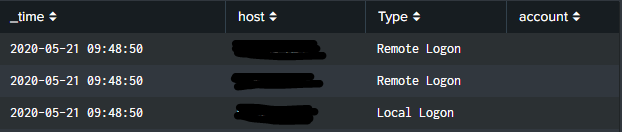
This is the search being performed
index="wineventlog" source="XmlWinEventLog:Security" EventCode=4624 (Logon_Type=10 OR Logon_Type=7 OR Logon_Type=2) host=$HostName$
| rex "New Logon:\s+Security ID:\s+(?<account>.*)"
| eval Type=case(Logon_Type=10,"Remote Logon",
Logon_Type=2,"Local Logon",
Logon_Type=7,"Screen Unlock")
| table _time host Type account
| sort _time desc
Here is an example of the Windows XML event
<Event xmlns='http://schemas.microsoft.com/win/2004/08/events/event'><System><Provider Name='Microsoft-Windows-Security-Auditing' Guid='{54849625-5478-4994-A5BA-3E3B0328C30D}'/><EventID>4624</EventID><Version>1</Version><Level>0</Level><Task>12544</Task><Opcode>0</Opcode><Keywords>0x8020000000000000</Keywords><TimeCreated SystemTime='2020-05-21T14:23:42.544642200Z'/><EventRecordID>20131980</EventRecordID><Correlation/><Execution ProcessID='560' ThreadID='872'/><Channel>Security</Channel><Computer>Computer.AD.computer.com</Computer><Security/></System><EventData><Data Name='SubjectUserSid'>NT AUTHORITY\SYSTEM</Data><Data Name='SubjectUserName'>Computer$</Data><Data Name='SubjectDomainName'>AD</Data><Data Name='SubjectLogonId'>0x3e7</Data><Data Name='TargetUserSid'>AD\admin-v</Data><Data Name='TargetUserName'>admin-v</Data><Data Name='TargetDomainName'>AD</Data><Data Name='TargetLogonId'>0x1f02e303</Data><Data Name='LogonType'>10</Data><Data Name='LogonProcessName'>User32 </Data><Data Name='AuthenticationPackageName'>Negotiate</Data><Data Name='WorkstationName'>Computer</Data><Data Name='LogonGuid'>{00000000-0000-0000-0000-000000000000}</Data><Data Name='TransmittedServices'>-</Data><Data Name='LmPackageName'>-</Data><Data Name='KeyLength'>0</Data><Data Name='ProcessId'>0x20b8</Data><Data Name='ProcessName'>C:\Windows\System32\winlogon.exe</Data><Data Name='IpAddress'>10.0.0.0</Data><Data Name='IpPort'>0</Data><Data Name='ImpersonationLevel'>%%1833</Data></EventData></Event>
- Mark as New
- Bookmark Message
- Subscribe to Message
- Mute Message
- Subscribe to RSS Feed
- Permalink
- Report Inappropriate Content


The problem (and there may be others) is your data does not match the regular expression. There is no "New Logon". Try this, instead.
| rex "TargetUserName'>(?<account>[^\<]+)"
If this reply helps you, Karma would be appreciated.
- Mark as New
- Bookmark Message
- Subscribe to Message
- Mute Message
- Subscribe to RSS Feed
- Permalink
- Report Inappropriate Content
The problem (and there may be others) is your data does not match the regular expression. There is no "New Logon". Try this, instead.
| rex "TargetUserName'>(?<account>[^\<]+)"
If this reply helps you, Karma would be appreciated.
- Mark as New
- Bookmark Message
- Subscribe to Message
- Mute Message
- Subscribe to RSS Feed
- Permalink
- Report Inappropriate Content
Hi Rich,
Thank you for your help, that did it!



Join the Splunk Community Slack to learn, troubleshoot, and make connections with fellow Splunk practitioners in real time!
Join Splunk User Groups to connect and learn in-person by region or remotely by topic or industry.
Announcing Modern Navigation: A New Era of Splunk User Experience
Analytics Workspace removal in Splunk 10.6
Vibe-coding, AI, and Splunkcraft: Highlights from the .conf26 Builder Bar
