
Join the Conversation
- Find Answers
- :
- Using Splunk
- :
- Splunk Search
- :
- Re: Pie Chart max value vs active value
- Subscribe to RSS Feed
- Mark Topic as New
- Mark Topic as Read
- Float this Topic for Current User
- Bookmark Topic
- Subscribe to Topic
- Mute Topic
- Printer Friendly Page
- Mark as New
- Bookmark Message
- Subscribe to Message
- Mute Message
- Subscribe to RSS Feed
- Permalink
- Report Inappropriate Content

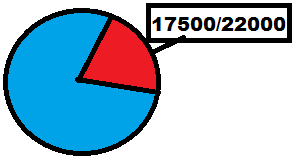
I want to create a pie chart that has a max value of 22000 (This is hard-coded in) then I have a variable list of Mac_Addresses that I want to total up and compare it to the 22000 (So like 19000/22000...14000/22000..17500/22000)
index=nitro_prod_store|rename mac as Mac_Address | stats count by Mac_Address as ActiveDevices |eval TotalCount = 22000|fields TotalCount ActiveDevices
- Mark as New
- Bookmark Message
- Subscribe to Message
- Mute Message
- Subscribe to RSS Feed
- Permalink
- Report Inappropriate Content

Run anywhere sample of one easy way to do it...
| makeresults | eval ActiveDevices=17500
| rename COMMENT as "The above line just creates one test data record like your stats output."

| rename COMMENT as "This next section takes your stats output and creates one record for Active, one for Inactive."
| eval mycount = mvappend("Active=".ActiveDevices, "Inactive=".tonumber(22000-ActiveDevices))
| mvexpand mycount
| rex field=mycount "(?<status>[^=]*)=(?<count>.*)"
| table status count

| rename COMMENT as "This renames the active status to have your desired format."
| rename COMMENT as "This could be done inside the first eval, but it would make the code less readable."
| eval status=if(status="Active",count."/22500 Active",status)
...or, if it's the "Inactive" slice that you want labeled with the "Active" numbers...
| eval status=if(status="Inactive",count."/22500",status)
- Mark as New
- Bookmark Message
- Subscribe to Message
- Mute Message
- Subscribe to RSS Feed
- Permalink
- Report Inappropriate Content
Run anywhere sample of one easy way to do it...
| makeresults | eval ActiveDevices=17500
| rename COMMENT as "The above line just creates one test data record like your stats output."

| rename COMMENT as "This next section takes your stats output and creates one record for Active, one for Inactive."
| eval mycount = mvappend("Active=".ActiveDevices, "Inactive=".tonumber(22000-ActiveDevices))
| mvexpand mycount
| rex field=mycount "(?<status>[^=]*)=(?<count>.*)"
| table status count

| rename COMMENT as "This renames the active status to have your desired format."
| rename COMMENT as "This could be done inside the first eval, but it would make the code less readable."
| eval status=if(status="Active",count."/22500 Active",status)
...or, if it's the "Inactive" slice that you want labeled with the "Active" numbers...
| eval status=if(status="Inactive",count."/22500",status)
- Mark as New
- Bookmark Message
- Subscribe to Message
- Mute Message
- Subscribe to RSS Feed
- Permalink
- Report Inappropriate Content
Thank you, this was incredibly helpful!
- Mark as New
- Bookmark Message
- Subscribe to Message
- Mute Message
- Subscribe to RSS Feed
- Permalink
- Report Inappropriate Content
Glad to oblige.
- Mark as New
- Bookmark Message
- Subscribe to Message
- Mute Message
- Subscribe to RSS Feed
- Permalink
- Report Inappropriate Content

Give this a try.
index=nitro_prod_store| stats count as ActiveDevices by mac |rename mac as Mac_Address | appendpipe [| stats sum(ActiveDevices) as ActiveDevices | eval Mac_Address=ActiveDevices."/22000"| eval ActiveDevices =22000-ActiveDevices ]
- Mark as New
- Bookmark Message
- Subscribe to Message
- Mute Message
- Subscribe to RSS Feed
- Permalink
- Report Inappropriate Content

what are you tryin gto rename as ActiveDevices? count or Mac_Address? the as ActiveDevices should go after count if you're renaming that. and you want the total of all Mac_Addresses divided by TotalCount?
try this:
index=nitro_prod_store|rename mac as Mac_Address | stats count as ActiveDevices by Mac_Address|stats sum(ActiveDevices) as ActiveDevices|eval TotalCount = 22000|fields TotalCount ActiveDevices



Join the Splunk Community Slack to learn, troubleshoot, and make connections with fellow Splunk practitioners in real time!
Join Splunk User Groups to connect and learn in-person by region or remotely by topic or industry.
SOC4Kafka - New Kafka Connector Powered by OpenTelemetry
Rounding off the Splunk Dashboard Contest
A Four Part Event Series: AI + Observability: AI Agents, LLMs, Apps, & Infrastructure
