
Join the Conversation
- Find Answers
- :
- Using Splunk
- :
- Splunk Search
- :
- On the visualization tab for the Search & Reportin...
- Subscribe to RSS Feed
- Mark Topic as New
- Mark Topic as Read
- Float this Topic for Current User
- Bookmark Topic
- Subscribe to Topic
- Mute Topic
- Printer Friendly Page
- Mark as New
- Bookmark Message
- Subscribe to Message
- Mute Message
- Subscribe to RSS Feed
- Permalink
- Report Inappropriate Content

On the visualization tab for the Search app, how do I remove the table? I just want to view the chart. Real goal is to make the chart larger on the y-axis to allow for more resolution when sharing screen shots.
This is just for ad-hoc work. I don't want to have to create a dashboard each time.
- Mark as New
- Bookmark Message
- Subscribe to Message
- Mute Message
- Subscribe to RSS Feed
- Permalink
- Report Inappropriate Content


Hi motobeats
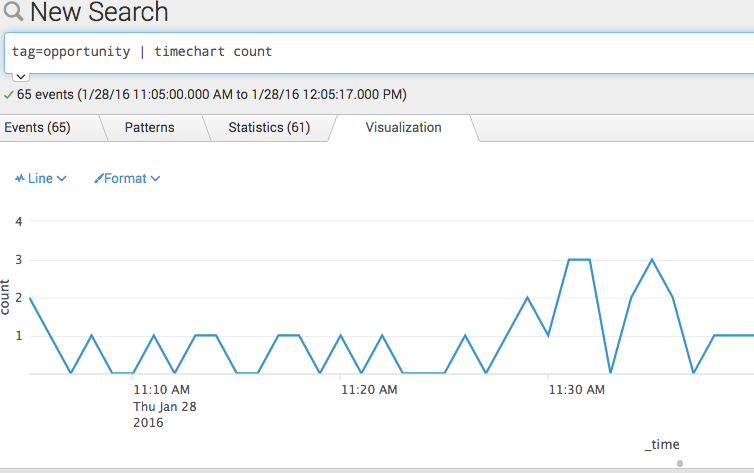
A solution might to be to just expand the chart section. You can do that by clicking on the little "dot" in the center at the bottom and just drag out the chart. It's just below _time in the screenshot.
If this is what you are looking for, please mark the questions as answered.
j
See screenshot:

- Mark as New
- Bookmark Message
- Subscribe to Message
- Mute Message
- Subscribe to RSS Feed
- Permalink
- Report Inappropriate Content
Hi motobeats
A solution might to be to just expand the chart section. You can do that by clicking on the little "dot" in the center at the bottom and just drag out the chart. It's just below _time in the screenshot.
If this is what you are looking for, please mark the questions as answered.
j
See screenshot:
- Mark as New
- Bookmark Message
- Subscribe to Message
- Mute Message
- Subscribe to RSS Feed
- Permalink
- Report Inappropriate Content
Don't know how I missed the dot. Thanks.

Join the Splunk Community Slack to learn, troubleshoot, and make connections with fellow Splunk practitioners in real time!
Join Splunk User Groups to connect and learn in-person by region or remotely by topic or industry.
Announcing Modern Navigation: A New Era of Splunk User Experience
Observability Simplified: Combining User Experience, Application Performance & ...
Event Series May & June: From Network Visibility to Service Intelligence
