
Join the Conversation
- Find Answers
- :
- Using Splunk
- :
- Splunk Search
- :
- Re: New Field REX HELP (API)
- Subscribe to RSS Feed
- Mark Topic as New
- Mark Topic as Read
- Float this Topic for Current User
- Bookmark Topic
- Subscribe to Topic
- Mute Topic
- Printer Friendly Page
- Mark as New
- Bookmark Message
- Subscribe to Message
- Mute Message
- Subscribe to RSS Feed
- Permalink
- Report Inappropriate Content

Hi all
I want to create a new AWS monitoring alert.
For the first step I checked the AWS fields and I saw that I need to parse the "principalId" field from the "_raw". (I want to create the rule based on principalID"
Part of the raw:
{\"type\": \"Root\", \"principalId\": \"444444444444\", \"arn\"
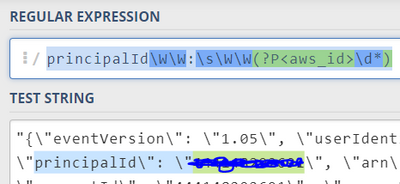
Im running this query:
"search index=aws userIdentity.type=Root eventName=ConsoleLogin earliest=-1d | rex field=_raw principalId\W\W:\s\W\W(?P<principalId>\d*)"
and getting results but without the "prinicpialId" new field.
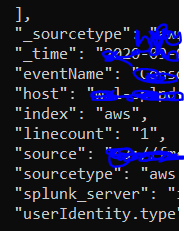
What am I missing in the query?
Thanks!
- Mark as New
- Bookmark Message
- Subscribe to Message
- Mute Message
- Subscribe to RSS Feed
- Permalink
- Report Inappropriate Content


Have you looked at the data in the splunk GUI? Are there really backslashes before the double quotes in the data?
Try this:
"search index=aws userIdentity.type=Root eventName=ConsoleLogin earliest=-1d | rex field=_raw principalId\\W+:\\s\\W+(?P<principalId>\\d*)"- Mark as New
- Bookmark Message
- Subscribe to Message
- Mute Message
- Subscribe to RSS Feed
- Permalink
- Report Inappropriate Content
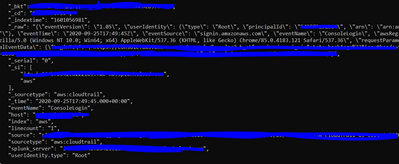
this it the raw data:
"_raw": "{\"eventVersion\": \"1.05\", \"userIdentity\": {\"type\": \"Root\", \"principalId\": \"11111111111\", \"arn\": \"arn:aws:iam::11111111111:root\", \"accountId\": \"11111111111\", \"accessKeyId\": \"\"}, \"eventTime\": \"2020-09-25T17:49:45Z\", \"eventSource\": \"signin.amazonaws.com\", \"eventName\": \"ConsoleLogin\", \"awsRegion\": \"us-east-1\", \"sourceIPAddress\": \"xxxxxxxxx\", \"userAgent\": \"Mozilla/5.0 (Windows NT 10.0; Win64; x64) AppleWebKit/537.36 (KHTML, like Gecko)
- Mark as New
- Bookmark Message
- Subscribe to Message
- Mute Message
- Subscribe to RSS Feed
- Permalink
- Report Inappropriate Content
Your second screenshot doesn't have any \ before the " although your test data (first screenshot) does. What is actually in your data? You could try
search index=aws userIdentity.type=Root eventName=ConsoleLogin earliest=-1d | rex field=_raw principalId\W+:\s\W+(?P<principalId>\d*)- Mark as New
- Bookmark Message
- Subscribe to Message
- Mute Message
- Subscribe to RSS Feed
- Permalink
- Report Inappropriate Content
Getting this error:

- Mark as New
- Bookmark Message
- Subscribe to Message
- Mute Message
- Subscribe to RSS Feed
- Permalink
- Report Inappropriate Content
You are using curl and ReST API? Try escaping the backslashes
"search index=aws userIdentity.type=Root eventName=ConsoleLogin earliest=-1d | rex field=_raw principalId\\W\\W:\\s\\W\\W(?P<principalId>\\d*)"
- Mark as New
- Bookmark Message
- Subscribe to Message
- Mute Message
- Subscribe to RSS Feed
- Permalink
- Report Inappropriate Content
The query should enter retro active on old events also? or should I wait for new ones?
- Mark as New
- Bookmark Message
- Subscribe to Message
- Mute Message
- Subscribe to RSS Feed
- Permalink
- Report Inappropriate Content
Yes.. its API .
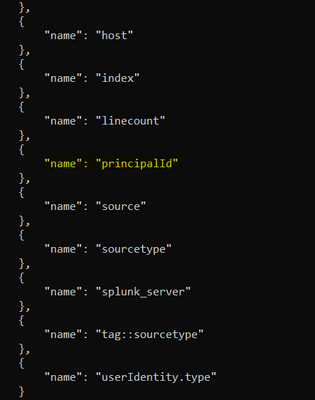
This query working great but im still getting the "principalId" empty
- Mark as New
- Bookmark Message
- Subscribe to Message
- Mute Message
- Subscribe to RSS Feed
- Permalink
- Report Inappropriate Content
Have you looked at the data in the splunk GUI? Are there really backslashes before the double quotes in the data?
Try this:
"search index=aws userIdentity.type=Root eventName=ConsoleLogin earliest=-1d | rex field=_raw principalId\\W+:\\s\\W+(?P<principalId>\\d*)"- Mark as New
- Bookmark Message
- Subscribe to Message
- Mute Message
- Subscribe to RSS Feed
- Permalink
- Report Inappropriate Content
You're right! My mistake
It working!! Thank you!
- Mark as New
- Bookmark Message
- Subscribe to Message
- Mute Message
- Subscribe to RSS Feed
- Permalink
- Report Inappropriate Content

Hi @havatz,
Are you sure that in your logs there's the back slash before quotes?
if not, please, try this regex:
| rex "\"principalId\":\s+\"(?<principalId>[^\"]+)\""that you can test at https://regex101.com/r/iS9NFl/1
Otherwise, please try this regex:
| rex "principalId\\\":\s+\\\"(?<principalId>[^\"]+)"that you can test at https://regex101.com/r/iS9NFl/2
Ciao.
Giuseppe
- Mark as New
- Bookmark Message
- Subscribe to Message
- Mute Message
- Subscribe to RSS Feed
- Permalink
- Report Inappropriate Content
curl -k -u "user pass" https://localhost:11111/services/search/jobs?output_mode=json -X POST -d search="search index=aws userIdentity.type=Root eventName=ConsoleLogin earliest=-30d | rex field=_raw "principalId\\\":\s+\\\"(?<principalId>[^\"]+)"
{"messages":[{"type":"ERROR","text":"Error in 'SearchParser': Missing a search command before '^'. Error at position '129' of search query 'search index=aws userIdentity.type=Root eventName=...{snipped} {errorcontext = ncipalId>[^\"] )}'.","help":""}]}

Join the Splunk Community Slack to learn, troubleshoot, and make connections with fellow Splunk practitioners in real time!
Join Splunk User Groups to connect and learn in-person by region or remotely by topic or industry.
Index This | What travels the world but is also stuck in place?
Discover New Use Cases: Unlock Greater Value from Your Existing Splunk Data
Continue Your Journey: Join Session 2 of the Data Management and Federation Bootcamp ...
