
Join the Conversation
- Find Answers
- :
- Using Splunk
- :
- Splunk Search
- :
- Re: Increase max time for a script alert
- Subscribe to RSS Feed
- Mark Topic as New
- Mark Topic as Read
- Float this Topic for Current User
- Bookmark Topic
- Subscribe to Topic
- Mute Topic
- Printer Friendly Page
- Mark as New
- Bookmark Message
- Subscribe to Message
- Mute Message
- Subscribe to RSS Feed
- Permalink
- Report Inappropriate Content
Increase max time for a script alert

I am running a script from a alert which takes around 30 mins to complete . But instead my script is getting fired within5 mins or so and there are multiple instances of same script running. Manually the script works just fine. Is there a way i can increase the time before my scripts get killed or restarted from Splunk. i am using V 7.1.2. PLease help
- Mark as New
- Bookmark Message
- Subscribe to Message
- Mute Message
- Subscribe to RSS Feed
- Permalink
- Report Inappropriate Content

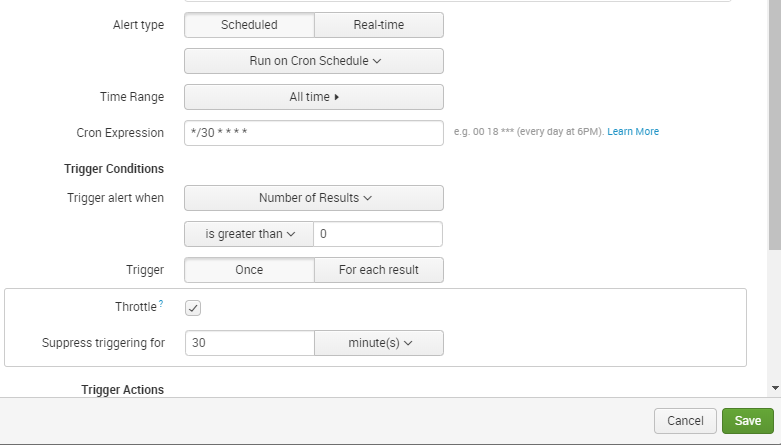
Hi, Plz Make it a schedule alert which runs on cron schedule and change its timing to every 30 minutes from Cron Expression. As shown in the screenshot:
- Mark as New
- Bookmark Message
- Subscribe to Message
- Mute Message
- Subscribe to RSS Feed
- Permalink
- Report Inappropriate Content
Thanks for your response , may be my question isn't clear. actually script takes 30 min to run and i have scheduled for every hour but splunk has limitation of running alert script for 5 mins. are you aware what changes i need to do in alerts_actions.conf file in that case.
- Mark as New
- Bookmark Message
- Subscribe to Message
- Mute Message
- Subscribe to RSS Feed
- Permalink
- Report Inappropriate Content
To avoid this we have throttle option in Splunk. When your alert condition is fired, it will wait for that number of minutes which u have set in the throttle. And only after the throttle period, the next alert is fired. So this will avoid multiple instances of the same script.


Join the Splunk Community Slack to learn, troubleshoot, and make connections with fellow Splunk practitioners in real time!
Join Splunk User Groups to connect and learn in-person by region or remotely by topic or industry.
Best Practices: Splunk auto adjust pipeline queue
Introducing the 2026 - 2027 SplunkTrust cohort!
Splunk Auto Ingestion Parallel Pipeline Scaling
