
Join the Conversation
- Find Answers
- :
- Using Splunk
- :
- Splunk Search
- :
- Re: Need help in a availability calculator
- Subscribe to RSS Feed
- Mark Topic as New
- Mark Topic as Read
- Float this Topic for Current User
- Bookmark Topic
- Subscribe to Topic
- Mute Topic
- Printer Friendly Page
- Mark as New
- Bookmark Message
- Subscribe to Message
- Mute Message
- Subscribe to RSS Feed
- Permalink
- Report Inappropriate Content

Hi Team,
I need a help in preparing a availability calculator.
Below graph is the requirement.

Current output form code below:
| DESCRIPTION | downtime | Time |
| QIT-LAG | 00:00:06 | 2022-07-31 |
| QIT-LAG | 00:00:09 | 2022-07-29 |
| QIT-LAG | 00:00:08 | 2022-07-29 |
| QIT-LAG | 00:00:10 | 2022-07-29 |
Current manual action:
1. Am extracting above table in excel,
2. converting all duration to seconds
3. grouing it with Day wise.
4. preparing a percentage loss out of 86400 (24*60*60) on each day is the graph.
CODE:
index=opennms
| search DESCRIPTION="QIT-LAG"

| transaction nodelabel startswith=eval(Status="DOWN") endswith=eval(Status="UP") keepevicted=true
| eval downtime=if(closed_txn=1,duration,null)
| eval downtime=tostring(downtime, "duration")
| fillnull value="" downtime
| eval Status=if(closed_txn=1,"UP","DOWN")
| rex field=downtime "(?P<downtime>[^.]+)"
| rename _time as Time
| fieldformat Time=strftime(Time,"%Y-%m-%d")

| table DESCRIPTION, downtime, Time,
Challenge:
how to convert the current downtime into seconds and also add it with day basis and prpeare a percentage basis graph.
Thanks In advance for guidance and help.
- Mark as New
- Bookmark Message
- Subscribe to Message
- Mute Message
- Subscribe to RSS Feed
- Permalink
- Report Inappropriate Content


You've done most the work already. Downtime was in seconds before it was converted to a string. Use the stats command to group results by day then use eval to compute the percentage loss.
index=opennms DESCRIPTION="QIT-LAG"
| transaction nodelabel startswith=eval(Status="DOWN") endswith=eval(Status="UP") keepevicted=true
| eval downtime=if(closed_txn=1,duration,null)
| fillnull value="" downtime
| rename _time as Time
| fieldformat Time=strftime(Time,"%Y-%m-%d")
| stats values(DESCRIPTION) as DESCRIPTION, sum(downtime) as total_downtime by Time
| eval pct_loss = (downtime * 100) / 86400
| table DESCRIPTION, downtime, Time, pct_loss
If this reply helps you, Karma would be appreciated.
- Mark as New
- Bookmark Message
- Subscribe to Message
- Mute Message
- Subscribe to RSS Feed
- Permalink
- Report Inappropriate Content
You've done most the work already. Downtime was in seconds before it was converted to a string. Use the stats command to group results by day then use eval to compute the percentage loss.
index=opennms DESCRIPTION="QIT-LAG"
| transaction nodelabel startswith=eval(Status="DOWN") endswith=eval(Status="UP") keepevicted=true
| eval downtime=if(closed_txn=1,duration,null)
| fillnull value="" downtime
| rename _time as Time
| fieldformat Time=strftime(Time,"%Y-%m-%d")
| stats values(DESCRIPTION) as DESCRIPTION, sum(downtime) as total_downtime by Time
| eval pct_loss = (downtime * 100) / 86400
| table DESCRIPTION, downtime, Time, pct_loss
If this reply helps you, Karma would be appreciated.
- Mark as New
- Bookmark Message
- Subscribe to Message
- Mute Message
- Subscribe to RSS Feed
- Permalink
- Report Inappropriate Content
@richgalloway , thanks a ton for that suggestion, that worked up to an extend.
but there was some challenge. I have attached the output.
Gouping of those dates are not happening.
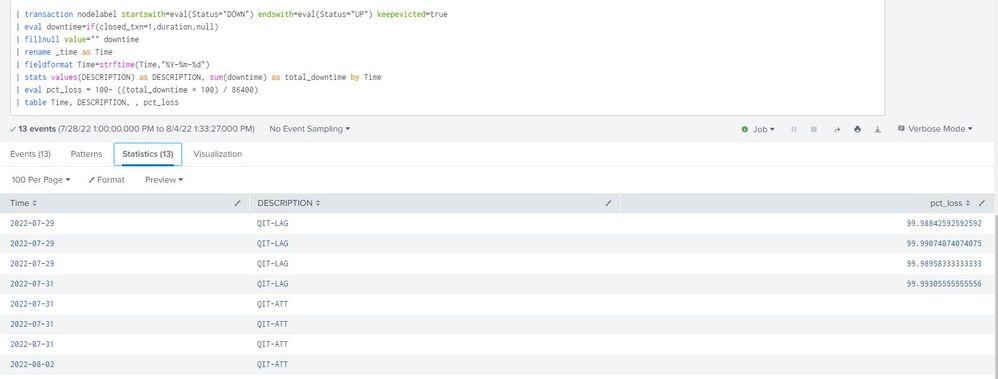
Expected output :
| 2022-07-29 | QIT-LAG | 99 |
| 2022-07-31 | QIT-LAG | 99 |
| 2022-07-31 | QIT-ATT | |
| 2022-08-02 | QIT-ATT | |
| 2022-08-02 | QIT-LAG | 98 |
| 2022-08-03 | QIT-LAG | 99 |
| 2022-08-04 | QIT-LAG | 97 |
ALso one more chalenge in removing the blank field, how can i Achieve it.
- Mark as New
- Bookmark Message
- Subscribe to Message
- Mute Message
- Subscribe to RSS Feed
- Permalink
- Report Inappropriate Content
I'm not sure why that didn't work. Let's try an alternative.
index=opennms DESCRIPTION="QIT-LAG"
| transaction nodelabel startswith=eval(Status="DOWN") endswith=eval(Status="UP") keepevicted=true
```Omit "blank" results```
| where closed_txn=1
| bin span=1d _time
| stats values(DESCRIPTION) as DESCRIPTION, sum(downtime) as total_downtime by _time
| eval pct_loss = (total_downtime * 100) / 86400
| rename _time as Time
| fieldformat Time=strftime(Time,"%Y-%m-%d")
| table DESCRIPTION, total_downtime, Time, pct_lossIf this reply helps you, Karma would be appreciated.


Join the Splunk Community Slack to learn, troubleshoot, and make connections with fellow Splunk practitioners in real time!
Join Splunk User Groups to connect and learn in-person by region or remotely by topic or industry.
Free Professional Services for .conf26 Attendees
Defend at Machine Speed: Your Guide to Security Sessions at .conf26
Where Innovation Takes Flight: The Splunk4Aviation Flight Sim Lands at .conf26
