
Turn on suggestions
Auto-suggest helps you quickly narrow down your search results by suggesting possible matches as you type.
Splunk Search
×
Join the Conversation
Without signing in, you're just watching from the sidelines. Sign in or Register to connect, share, and be part of the Splunk Community.
- Find Answers
- :
- Using Splunk
- :
- Splunk Search
- :
- Re: How to write custom Text for a Search result?
Options
- Subscribe to RSS Feed
- Mark Topic as New
- Mark Topic as Read
- Float this Topic for Current User
- Bookmark Topic
- Subscribe to Topic
- Mute Topic
- Printer Friendly Page
- Mark as New
- Bookmark Message
- Subscribe to Message
- Mute Message
- Subscribe to RSS Feed
- Permalink
- Report Inappropriate Content

tobi2k
Explorer
07-21-2019
11:22 PM
For my Dashboard I ping a Source and want to see to Text-States: UP or DOWN.
My search statement looks similar like this:
index="main" source="ping" dest="mydomain.com" | stats latest(packet_loss>=0)
A Result >=0 should output DOWN
A Result 0 should output UP
Any Ideas how to archive this?
Thank you!
1 Solution
- Mark as New
- Bookmark Message
- Subscribe to Message
- Mute Message
- Subscribe to RSS Feed
- Permalink
- Report Inappropriate Content

vnravikumar
Champion
07-21-2019
11:30 PM
Hi
Try this
[updated]:
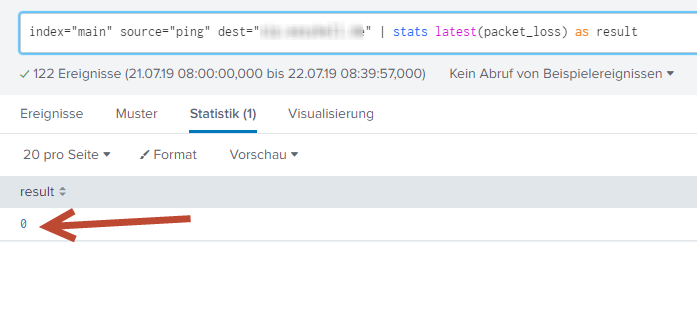
index="main" source="ping" dest="mydomain.com"|stats latest(packet_loss) as result |eval result = if(result>0,"DOWN","UP")
- Mark as New
- Bookmark Message
- Subscribe to Message
- Mute Message
- Subscribe to RSS Feed
- Permalink
- Report Inappropriate Content
tobi2k
Explorer
07-21-2019
11:41 PM

- Mark as New
- Bookmark Message
- Subscribe to Message
- Mute Message
- Subscribe to RSS Feed
- Permalink
- Report Inappropriate Content
vnravikumar
Champion
07-21-2019
11:52 PM
Hi
I had updated the query above, try it. If it works please accept the answer.
- Mark as New
- Bookmark Message
- Subscribe to Message
- Mute Message
- Subscribe to RSS Feed
- Permalink
- Report Inappropriate Content
tobi2k
Explorer
07-21-2019
11:56 PM
Awesome! Thank you! Works like a charm!
- Mark as New
- Bookmark Message
- Subscribe to Message
- Mute Message
- Subscribe to RSS Feed
- Permalink
- Report Inappropriate Content
vnravikumar
Champion
07-21-2019
11:30 PM
Hi
Try this
[updated]:
index="main" source="ping" dest="mydomain.com"|stats latest(packet_loss) as result |eval result = if(result>0,"DOWN","UP")




Got questions? Get answers!
Join the Splunk Community Slack to learn, troubleshoot, and make connections with fellow Splunk practitioners in real time!
Meet up IRL or virtually!
Join Splunk User Groups to connect and learn in-person by region or remotely by topic or industry.
Get Updates on the Splunk Community!
From Data to Insight: Announcing the Winners of the Splunk Dashboard Contest
Hi Splunkers,
First off, thank you to everyone who participated in our very first From Data to Insight: The ...
Splunk Developers: Construct Your Future at the .conf26 Builder Bar
Calling all Splunk architects, platform admins, and app developers: the site is open, and the blueprints are ...
Quick connection discovery mode for forwarders
When a Splunk forwarder loses connectivity to its indexers, it does not always reconnect immediately. In many ...
