
Turn on suggestions
Auto-suggest helps you quickly narrow down your search results by suggesting possible matches as you type.
Splunk Search
×
Join the Conversation
Without signing in, you're just watching from the sidelines. Sign in or Register to connect, share, and be part of the Splunk Community.
- Find Answers
- :
- Using Splunk
- :
- Splunk Search
- :
- How to stack all error codes per endpoints from a ...
Options
- Subscribe to RSS Feed
- Mark Topic as New
- Mark Topic as Read
- Float this Topic for Current User
- Bookmark Topic
- Subscribe to Topic
- Mute Topic
- Printer Friendly Page
- Mark as New
- Bookmark Message
- Subscribe to Message
- Mute Message
- Subscribe to RSS Feed
- Permalink
- Report Inappropriate Content
How to stack all error codes per endpoints from a table?

dotekien
New Member
05-18-2019
11:21 AM
Context:
Each or transactions has its unique RequestId, and in Splunk search, we will have multiple rows with the same RequestId to describe all the activities of a given transaction.
Goal:
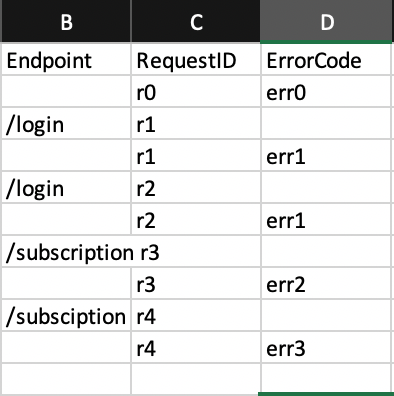
stack all error codes per endpoints so we can have a chart with the x-axis is endpoints and the y-axis are a count of errorCodes per endpoint
Here is my solution which I feel very close but still cannot get what I want 😞 Looking for your advice on either my solution or any other solutions. Thanks
Search query:
index=xyz sourcetype=tomcat_epf_app
[search index=xyz sourcetype=tomcat_epf_app "ERROR ControllerAdvice" OR "ERROR Reporter" | fields + RequestId | fields - _* | rename RequestId as search | format "" "" "OR" "" "OR" "" ]
| rex "ErrorCode\-(?<code>\d{3,3})\-"
| eval endpoints=case(searchmatch("/login"),"/login", searchmatch("/subscription"),"/subscription",searchmatch("/email"),"/email")
| table endpoints, RequestId, code | where isnotnull(code) OR isnotnull(endpoints) | sort str(RequestId)
Result:
- Mark as New
- Bookmark Message
- Subscribe to Message
- Mute Message
- Subscribe to RSS Feed
- Permalink
- Report Inappropriate Content

koshyk
Super Champion
05-19-2019
01:08 AM
If you could put sample data, we could have put exactly as you requested, but assuming from your SPL, please try below (i've changed your SPL to be better performing)
index=xyz sourcetype=tomcat_epf_app ("ERROR ControllerAdvice" OR "ERROR Reporter" )
 | rex "ErrorCode\-(?<code>\d{3,3})\-"
 | eval endpoints=case(searchmatch("/login"),"/login", searchmatch("/subscription"),"/subscription",searchmatch("/email"),"/email")
 | stats count(endpoints)  by RequestId
you can do chart also instead of stats



Got questions? Get answers!
Join the Splunk Community Slack to learn, troubleshoot, and make connections with fellow Splunk practitioners in real time!
Meet up IRL or virtually!
Join Splunk User Groups to connect and learn in-person by region or remotely by topic or industry.
Get Updates on the Splunk Community!
Announcing Modern Navigation: A New Era of Splunk User Experience
We are excited to introduce the Modern Navigation feature in the Splunk Platform, available to both cloud and ...
Analytics Workspace removal in Splunk 10.6
In Splunk Cloud Platform and Splunk Enterprise 10.6, Analytics Workspace is removed from product and no longer ...
Vibe-coding, AI, and Splunkcraft: Highlights from the .conf26 Builder Bar
If you stopped by the Builder Bar at .conf26, thank you! This year, we brought ...
