
Join the Conversation
- Find Answers
- :
- Using Splunk
- :
- Splunk Search
- :
- Re: How to show Error inputs gracefully
- Subscribe to RSS Feed
- Mark Topic as New
- Mark Topic as Read
- Float this Topic for Current User
- Bookmark Topic
- Subscribe to Topic
- Mute Topic
- Printer Friendly Page
- Mark as New
- Bookmark Message
- Subscribe to Message
- Mute Message
- Subscribe to RSS Feed
- Permalink
- Report Inappropriate Content
How to show Error inputs gracefully

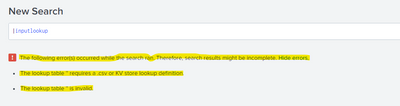
How to display the error input or value errors in a pop up? I am trying to build a custom command and want to show errors raised or returned in a pop up or modal.
For example: In the inputlookup , if no csv name is provided, it will return below error. How to show it in form of an pop up or modal? Also how to remove the First line and display only the 2nd and 3rd line?
@splunk @niketnilay
- Mark as New
- Bookmark Message
- Subscribe to Message
- Mute Message
- Subscribe to RSS Feed
- Permalink
- Report Inappropriate Content


You can achieve this with Custom Search Bar using JavaScript Extensions.
You can find the code for Custom Search Bar in Niket's answer in the below link.
And find the code for Custom Modal in my answer in the below link.
https://community.splunk.com/t5/Dashboards-Visualizations/Modal-Drill-down/m-p/555986
I hope this will help you.
Thanks
KV
If any of my reply helps you to solve the problem Or gain knowledge, an upvote would be appreciated.


Join the Splunk Community Slack to learn, troubleshoot, and make connections with fellow Splunk practitioners in real time!
Join Splunk User Groups to connect and learn in-person by region or remotely by topic or industry.
ATTENTION: We’re Moving! (AGAIN!)
Deep Dive: Optimizing Telemetry Pipelines in Splunk Observability Cloud
Announcing Modern Navigation: A New Era of Splunk User Experience
