
Join the Conversation
- Find Answers
- :
- Using Splunk
- :
- Splunk Search
- :
- Re: Separate string with regex
- Subscribe to RSS Feed
- Mark Topic as New
- Mark Topic as Read
- Float this Topic for Current User
- Bookmark Topic
- Subscribe to Topic
- Mute Topic
- Printer Friendly Page
- Mark as New
- Bookmark Message
- Subscribe to Message
- Mute Message
- Subscribe to RSS Feed
- Permalink
- Report Inappropriate Content
How to separate string with regex?

Hi!
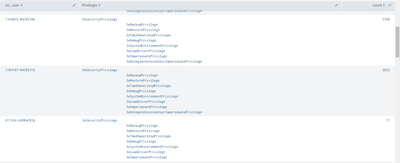
I would like to separate the field Privilegio
|---------------------------|-------------------------------------------------------------------------------------------|-------------|
| src_user | Privilegio | count |
|---------------------------|-------------------------------------------------------------------------------------------|-------------|
| user-RAC0308$ | SeSecurityPrivilege | 8127 |
| | SeBackupPrivilege | |
| | SeRestorePrivilege | |
| | SeTakeOwnershipPrivilege | |
| | SeDebugPrivilege | |
| | SeSystemEnvironmentPrivilege | |
| | SeLoadDriverPrivilege | |
| | SeImpersonatePrivilege | |
| | SeDelegateSessionUserImpersonatePrivilege | |
| | SeEnableDelegationPrivilege | |
| | SeCreateTokenPrivilege | |
| | SeAssignPrimaryTokenPrivilege | |
|---------------------------|--------------------------------------------------------------------------------------------|--------------|
Since it only counts the first value and the others are put with a tab, they are the windows privileges of the EventID 4672, my query is the following:
index=oswinsec EventCode=4672
| stats values(PrivilegeList) as Privilegio count by src_user
- Mark as New
- Bookmark Message
- Subscribe to Message
- Mute Message
- Subscribe to RSS Feed
- Permalink
- Report Inappropriate Content


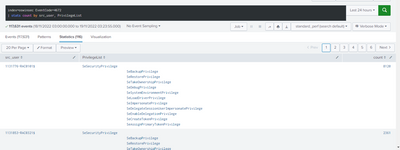
Does this help?
index=oswinsec EventCode=4672
| stats count by src_user PrivilegeList- Mark as New
- Bookmark Message
- Subscribe to Message
- Mute Message
- Subscribe to RSS Feed
- Permalink
- Report Inappropriate Content
- Mark as New
- Bookmark Message
- Subscribe to Message
- Mute Message
- Subscribe to RSS Feed
- Permalink
- Report Inappropriate Content
In that case, you need to split PrivilegeList first.
index=oswinsec EventCode=4672
| eval PrivilegeList = split(PrivilegeList, "
       ") ``` include the proper indentation characcter(s) ```
| eval SeSecurityPrivilege = mvindex(PrivilegeList, 1, mvcount(PrivilegeList))
``` the first line, SeSecurityPrivilege, is a mere header ```
| stats values(SeSecurityPrivilege) as Privilegio count by src_user



Join the Splunk Community Slack to learn, troubleshoot, and make connections with fellow Splunk practitioners in real time!
Join Splunk User Groups to connect and learn in-person by region or remotely by topic or industry.
Preparing your Splunk Environment for OpenSSL3
Self-Healing Pipeline Is Now Generally Available: AI-Powered CIM Compliance
[Puzzles] Solve, Learn, Repeat: Family Trees
