
Join the Conversation
- Find Answers
- :
- Using Splunk
- :
- Splunk Search
- :
- How to multiply one event value by another event v...
- Subscribe to RSS Feed
- Mark Topic as New
- Mark Topic as Read
- Float this Topic for Current User
- Bookmark Topic
- Subscribe to Topic
- Mute Topic
- Printer Friendly Page
- Mark as New
- Bookmark Message
- Subscribe to Message
- Mute Message
- Subscribe to RSS Feed
- Permalink
- Report Inappropriate Content
How to multiply one event value by another event value?

Might be simple, but i run a search for tags and values and i get the information. What is the proper syntax to multiply one event value by another event value?
Thanks in advance.
- Mark as New
- Bookmark Message
- Subscribe to Message
- Mute Message
- Subscribe to RSS Feed
- Permalink
- Report Inappropriate Content


There isn't one. Events are treated separately so Splunk can't work with values from different events. Exceptions exist for certain functions (range, for instance) in aggregating commands.
Tell us more about the problem you're trying to solve and perhaps we can suggest a solution.
If this reply helps you, Karma would be appreciated.
- Mark as New
- Bookmark Message
- Subscribe to Message
- Mute Message
- Subscribe to RSS Feed
- Permalink
- Report Inappropriate Content
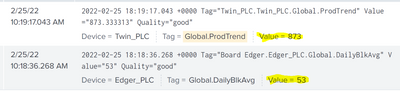
I just want to be able to multiply these two values without needing to do it at the PLC level
- Mark as New
- Bookmark Message
- Subscribe to Message
- Mute Message
- Subscribe to RSS Feed
- Permalink
- Report Inappropriate Content
Those two events will have to be combined into a single event so Splunk can "see" both values at the same time and work with them. One problem, however, is there appears to be nothing in common between the events that would tell Splunk they should be joined. Can you elaborate on the use case, please?
If this reply helps you, Karma would be appreciated.
- Mark as New
- Bookmark Message
- Subscribe to Message
- Mute Message
- Subscribe to RSS Feed
- Permalink
- Report Inappropriate Content
Only 2 tags from the plc to multiply to get "production per hour"
- Mark as New
- Bookmark Message
- Subscribe to Message
- Mute Message
- Subscribe to RSS Feed
- Permalink
- Report Inappropriate Content
If there are only 2 results then this should do the job.
index=foo Tag="Twin_PLC.Twin_PLC.Global.ProdTrend"
| rename Value was ProdTrend
| appendcols [ index=foo Tag="Board Edger.Edger_PLC.Global.DailyBlkAvg" | rename Value as DailyBlkAvg ]
| eval product=ProdTrend * DailyBlkAvg
| table ProdTrend DailyBlkAvg product
If there are more than 2 results then Splunk will need to know how to pair them so the calculations are accurate.
If this reply helps you, Karma would be appreciated.
- Mark as New
- Bookmark Message
- Subscribe to Message
- Mute Message
- Subscribe to RSS Feed
- Permalink
- Report Inappropriate Content
this one didnt quite work...
- Mark as New
- Bookmark Message
- Subscribe to Message
- Mute Message
- Subscribe to RSS Feed
- Permalink
- Report Inappropriate Content
I can't see your screen from here so you'll have to write down what results you got and what results you expected to get.
If this reply helps you, Karma would be appreciated.


Join the Splunk Community Slack to learn, troubleshoot, and make connections with fellow Splunk practitioners in real time!
Join Splunk User Groups to connect and learn in-person by region or remotely by topic or industry.
SOC4Kafka - New Kafka Connector Powered by OpenTelemetry
Event Series: Level up your SOC: Advancing with Splunk Enterprise Security
Announcing Modern Navigation: A New Era of Splunk User Experience
