
Join the Conversation
- Find Answers
- :
- Using Splunk
- :
- Splunk Search
- :
- How to get eventstats count with dynamic parameter...
- Subscribe to RSS Feed
- Mark Topic as New
- Mark Topic as Read
- Float this Topic for Current User
- Bookmark Topic
- Subscribe to Topic
- Mute Topic
- Printer Friendly Page
- Mark as New
- Bookmark Message
- Subscribe to Message
- Mute Message
- Subscribe to RSS Feed
- Permalink
- Report Inappropriate Content

Hello!
I would like to count from a field based on another field.
I have a events with following 2 fields (Doors_Order & RQM_Order). I would like to count based on Doors_Order field from entire RQM_Order fields.
In excel this look like this:
=COUNTIF(E:E;C9)
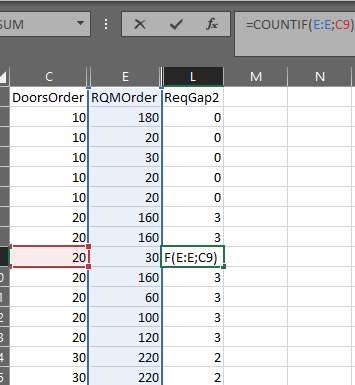
I have tried with this:
| basesearch
| eventstats count(eval(RQMOrder_NotValidated=RQMOrder)) as ReqGap2
But this will count only if the 2 field is same in 1 event, not in entire events lists. I have tired lots of another things, but non of them worked. In excel this looks easy. Is there any solution in splunk?
- Mark as New
- Bookmark Message
- Subscribe to Message
- Mute Message
- Subscribe to RSS Feed
- Permalink
- Report Inappropriate Content


@Kislac - Can you try something like this?
<your-search>
| join type=left DoorsOrder [| search <your search> | stats count by RQMOrder | rename RQMOrder AS DoorsOrder]
| fillnull count value=0
| rename count as ReqGap2
(I'm using field names as shown in the excel screenshots if some fields need to change please do so.)
I hope this helps!!!
- Mark as New
- Bookmark Message
- Subscribe to Message
- Mute Message
- Subscribe to RSS Feed
- Permalink
- Report Inappropriate Content
@Kislac - Can you try something like this?
<your-search>
| join type=left DoorsOrder [| search <your search> | stats count by RQMOrder | rename RQMOrder AS DoorsOrder]
| fillnull count value=0
| rename count as ReqGap2
(I'm using field names as shown in the excel screenshots if some fields need to change please do so.)
I hope this helps!!!


Join the Splunk Community Slack to learn, troubleshoot, and make connections with fellow Splunk practitioners in real time!
Join Splunk User Groups to connect and learn in-person by region or remotely by topic or industry.
Recap | Agentic Operations Start with Context: Build the Right Data Foundation
Recap | Assisted, Augmented or Agentic? Choose Your Splunk Starting Point
Session 2 | Beyond the Thread: Operationalizing AI with Confidence
