
Turn on suggestions
Auto-suggest helps you quickly narrow down your search results by suggesting possible matches as you type.
Splunk Search
×
Join the Conversation
Without signing in, you're just watching from the sidelines. Sign in or Register to connect, share, and be part of the Splunk Community.
- Find Answers
- :
- Using Splunk
- :
- Splunk Search
- :
- Re: How to create a new field after using the char...
Options
- Subscribe to RSS Feed
- Mark Topic as New
- Mark Topic as Read
- Float this Topic for Current User
- Bookmark Topic
- Subscribe to Topic
- Mute Topic
- Printer Friendly Page
- Mark as New
- Bookmark Message
- Subscribe to Message
- Mute Message
- Subscribe to RSS Feed
- Permalink
- Report Inappropriate Content

lukeh
Contributor
03-19-2015
05:32 PM
Hi Ninjas,
I have a search which produces a bar chart comparing four different fields week over week:
index=foo conversion_source=Online OR conversion_source=Offline
| bin span=1w _time
| chart sum(ABC) AS ABC sum(DEF) AS DEF sum(GHI) AS GHI sum(JKL) AS JKL over _time by conversion_source
| transpose
| search column!=_*
| rename "row 1" AS "Current Week" "row 2" AS "Past Week" column AS "Conversion Source"
Here is the bar chart:
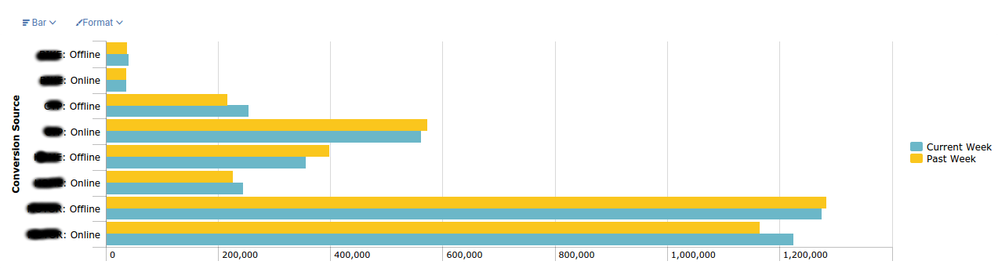
It is ok but the customer wants something a little fancier, like a Bubble Chart or a Punchcard, e.g.
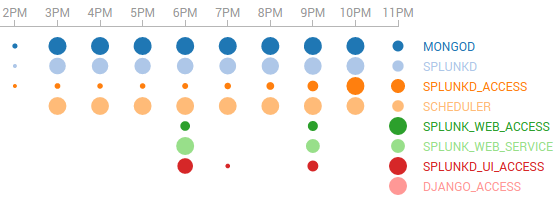
To use the Punchard viz, I need to re-format the output from the following:
Conversion Source   Current Week    Past Week
ABC: Offline         40262         37334
ABC: Online       36997        36233
DEF: Offline         253865       216674
DEF: Online       561871          572597
GHI: Offline         356971       398079
GHI: Online       243909          226444
JKL: Offline         1275880         1284603
JKL: Online       1225050        1165302
to this:
date            type            count
Current Week    ABC: Offline    40262
Current Week    ABC: Online  36997
Current Week    DEF: Offline    253865
Current Week    DEF: Online  561871
Current Week    GHI: Offline    356971
Current Week    GHI: Online  243909
Current Week    JKL: Offline    1275880
Current Week    JKL: Online  1225050
Past Week      ABC: Offline 37334
Past Week      ABC: Online   36233
Past Week      DEF: Offline 216674
Past Week      DEF: Online   572597
Past Week      GHI: Offline 398079
Past Week      GHI: Online   226444
Past Week      JKL: Offline 1284603
Past Week      JKL: Online   1165302
I would greatly appreciate any tips on how to achieve this new tabular output.
Thanks in advance,
Luke.
1 Solution
- Mark as New
- Bookmark Message
- Subscribe to Message
- Mute Message
- Subscribe to RSS Feed
- Permalink
- Report Inappropriate Content

sideview

SplunkTrust
03-19-2015
07:38 PM
EDIT - second time's the charm.
index=foo conversion_source=Online OR conversion_source=Offline
 | bin span=1w _time
 | chart sum(ABC) AS ABC sum(DEF) AS DEF sum(GHI) AS GHI sum(JKL) AS JKL over _time by conversion_source
 | untable date type count
- Mark as New
- Bookmark Message
- Subscribe to Message
- Mute Message
- Subscribe to RSS Feed
- Permalink
- Report Inappropriate Content
sideview
SplunkTrust
03-19-2015
07:38 PM
EDIT - second time's the charm.
index=foo conversion_source=Online OR conversion_source=Offline
 | bin span=1w _time
 | chart sum(ABC) AS ABC sum(DEF) AS DEF sum(GHI) AS GHI sum(JKL) AS JKL over _time by conversion_source
 | untable date type count
- Mark as New
- Bookmark Message
- Subscribe to Message
- Mute Message
- Subscribe to RSS Feed
- Permalink
- Report Inappropriate Content
lukeh
Contributor
03-19-2015
10:06 PM
Thank you Nick!!!11!!!!!1!!!
untable did the trick, which reminds me of the undead 😉




Got questions? Get answers!
Join the Splunk Community Slack to learn, troubleshoot, and make connections with fellow Splunk practitioners in real time!
Meet up IRL or virtually!
Join Splunk User Groups to connect and learn in-person by region or remotely by topic or industry.
Get Updates on the Splunk Community!
SOC4Kafka - New Kafka Connector Powered by OpenTelemetry
The new SOC4Kafka connector, built on OpenTelemetry, enables the collection of Kafka messages and forwards ...
Event Series: Level up your SOC: Advancing with Splunk Enterprise Security
AI has fundamentally raised the stakes for security operations, and this three-part series is your guide to ...
Announcing Modern Navigation: A New Era of Splunk User Experience
We are excited to introduce the Modern Navigation feature in the Splunk Platform, available to both cloud and ...
