
Join the Conversation
- Find Answers
- :
- Using Splunk
- :
- Splunk Search
- :
- How to compare/graph two searches?
- Subscribe to RSS Feed
- Mark Topic as New
- Mark Topic as Read
- Float this Topic for Current User
- Bookmark Topic
- Subscribe to Topic
- Mute Topic
- Printer Friendly Page
- Mark as New
- Bookmark Message
- Subscribe to Message
- Mute Message
- Subscribe to RSS Feed
- Permalink
- Report Inappropriate Content

Hello All -
I need to be able to compare/graph regression test results from two different models. The search command to create a table for one of the searches is:
index="frontEnd" source="regress_rpt" pipeline="my_pipe" version="23ww10b" dut="*" (testlist="*") (testName="*") status="*" | table cyclesPerCpuSec wall_hz testPath rpt
This returns a table with 6 rows (As there are 6 tests per version).
Is there a way to compare the cyclesPerCpuSec of this search to a new search which has a different version?
I.e.
index="frontEnd" source="regress_rpt" pipeline="my_pipe" version="23ww10a" dut="*" (testlist="*") (testName="*") status="*" | table cyclesPerCpuSec wall_hz testPath rpt
Thanks,
Pip
- Mark as New
- Bookmark Message
- Subscribe to Message
- Mute Message
- Subscribe to RSS Feed
- Permalink
- Report Inappropriate Content

Hi @Pip9ball
Yes, the best way would be to transpose the output (switch columns and rows) and then diff the versions. here's a run anywhere example using your result table example
| makeresults
| eval _raw="version test1 test2 test3 test4 test5
23ww10a 890.76 616.56 877.73 884.68 936.69
23ww10b 631.68 1400.73 659.00 741.34 742.44"
| multikv forceheader=1
| table version test*
``` ignore above - just creating dummy events ```
``` add the bit below to your search results ```
| transpose header_field=version column_name=test_run
| eval cycles_version_delta=('23ww10b' - '23ww10a')
,diff_percentage=round('cycles_version_delta'/'23ww10a' * 100, 1)
,status=if(diff_percentage < 10, "PASS", "FAIL")
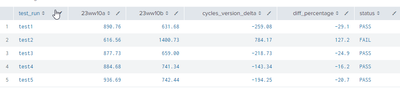
If this answers your question, then please mark this with solution provided
- Mark as New
- Bookmark Message
- Subscribe to Message
- Mute Message
- Subscribe to RSS Feed
- Permalink
- Report Inappropriate Content
Hi @Pip9ball
Give this a go...
index="frontEnd" source="regress_rpt" pipeline="my_pipe" version IN("23ww10a", "23ww10b") dut="*"  (testlist="*") (testName="*") status="*"
| timechart max(cyclesPerCpuSec) AS cyclesPerCpuSec BY version
Hope it helps
- Mark as New
- Bookmark Message
- Subscribe to Message
- Mute Message
- Subscribe to RSS Feed
- Permalink
- Report Inappropriate Content
Thanks for the quick reply.
This appears to be partially working. I'm only getting results for one of the tests.
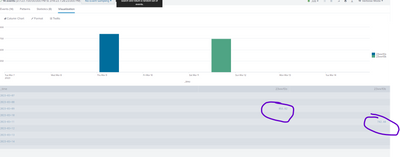
Whereas my original search to generate the table is showing much more.
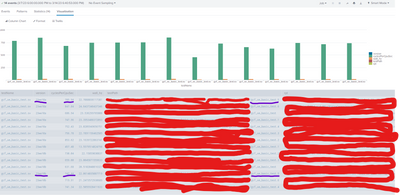
Sorry for marking it up so much, but there is some stuff I can't share. Basically it should be comparing cyclesPerCpuSec on the same testPath name across the two version. Perhaps it's because the fullpath in the testPath is non-unique?
Is there a way to just extract and compare just the last element of the testPath? This way the names will be the same.
Thanks!
- Mark as New
- Bookmark Message
- Subscribe to Message
- Mute Message
- Subscribe to RSS Feed
- Permalink
- Report Inappropriate Content
Hi @Pip9ball
Yeah, you can strip the the last element out and use that to group over time
index="frontEnd" source="regress_rpt" pipeline="my_pipe" version IN("23ww10a", "23ww10b") dut="*"  (testlist="*") (testName="*") status="*"
| eval lastTestPathElement=replace(testPath, ".*/" ,"")
| eval grouping=version.":".lastTestPathElement
| timechart
     max(cyclesPerCpuSec) AS max:cyclesPerCpuSec
     avg(cyclesPerCpuSec) AS avg:cyclesPerCpuSec
  BY grouping
OR, if not interested in over time graph you can just chart the results
index="frontEnd" source="regress_rpt" pipeline="my_pipe" version IN("23ww10a", "23ww10b") dut="*"  (testlist="*") (testName="*") status="*"
| eval lastTestPathElement=replace(testPath, ".*/" ,"")
| chart
     max(cyclesPerCpuSec) AS max:cyclesPerCpuSec
     avg(cyclesPerCpuSec) AS avg:cyclesPerCpuSec
  BY version lastTestPathElement
- Mark as New
- Bookmark Message
- Subscribe to Message
- Mute Message
- Subscribe to RSS Feed
- Permalink
- Report Inappropriate Content
@yeahnah - Thank you so much!
Is it possible to now perform some calculations on the results?
The result of the search produces a table like:
| version | test1 | test2 | test3 | test4 | test5 |
| 23ww10a | 890.76 | 616.56 | 877.73 | 884.68 | 936.69 |
| 23ww10b | 631.68 | 1400.73 | 659.00 | 741.34 | 742.44 |
What I'm trying to do is generate an alert if the test cyclesPerCpuSec increases by 10% from the latest version to the previous.
So is there a way to iterate over the table and do a comparison?
Thanks for all your help, Splunk is rather new to me 🙂
-Phil
- Mark as New
- Bookmark Message
- Subscribe to Message
- Mute Message
- Subscribe to RSS Feed
- Permalink
- Report Inappropriate Content
Hi @Pip9ball
Yes, the best way would be to transpose the output (switch columns and rows) and then diff the versions. here's a run anywhere example using your result table example
| makeresults
| eval _raw="version test1 test2 test3 test4 test5
23ww10a 890.76 616.56 877.73 884.68 936.69
23ww10b 631.68 1400.73 659.00 741.34 742.44"
| multikv forceheader=1
| table version test*
``` ignore above - just creating dummy events ```
``` add the bit below to your search results ```
| transpose header_field=version column_name=test_run
| eval cycles_version_delta=('23ww10b' - '23ww10a')
,diff_percentage=round('cycles_version_delta'/'23ww10a' * 100, 1)
,status=if(diff_percentage < 10, "PASS", "FAIL")
If this answers your question, then please mark this with solution provided
- Mark as New
- Bookmark Message
- Subscribe to Message
- Mute Message
- Subscribe to RSS Feed
- Permalink
- Report Inappropriate Content
@yeahnah - Thanks again for your help!


Join the Splunk Community Slack to learn, troubleshoot, and make connections with fellow Splunk practitioners in real time!
Join Splunk User Groups to connect and learn in-person by region or remotely by topic or industry.
SOC4Kafka - New Kafka Connector Powered by OpenTelemetry
Rounding off the Splunk Dashboard Contest
A Four Part Event Series: AI + Observability: AI Agents, LLMs, Apps, & Infrastructure
