
Join the Conversation
- Find Answers
- :
- Using Splunk
- :
- Splunk Search
- :
- Re: How to combine two searches
- Subscribe to RSS Feed
- Mark Topic as New
- Mark Topic as Read
- Float this Topic for Current User
- Bookmark Topic
- Subscribe to Topic
- Mute Topic
- Printer Friendly Page
- Mark as New
- Bookmark Message
- Subscribe to Message
- Mute Message
- Subscribe to RSS Feed
- Permalink
- Report Inappropriate Content

Hi All,
I want to combine "LogonIP" in two different searches and get 1 result.
Query 1
index=testindex | table LogonIP Event_Date Event_Title Event_Severity UPN MFAStatus
Query 2
index=o365 ClientIPAddress=* |stats count by ClientIPAddress |dedup ClientIPAddress |rename ClientIPAddress as "LogonIP"
If the Query 2 "LogonIP" count is greater than 20 (LogonIP>20) then, I want to join the result with Query 1 and ignore the result.
But if the search Query 2 LogonIP<20 then, I want to join the result with Query 1 and get the result.
@ITWhisperer @scelikok @soutamo @saravanan90 @thambisetty @gcusello @bowesmana @to4kawa @woodcock Please help here.
- Mark as New
- Bookmark Message
- Subscribe to Message
- Mute Message
- Subscribe to RSS Feed
- Permalink
- Report Inappropriate Content


Hi @alexspunkshell,
in addition to the previous answer, you have to add the distinct count of users (UPN) so you can filter results on this value, please, try something like this:
index=testindex OR (index=o365 ClientIPAddress=*)
| eval LogonIP=coalesce(LogonIP,ClientIPAddress)
| stats values(Event_Date) AS Event_Date values(Event_Title) AS Event_Title values(Event_Severity) AS Event_Severity dc(UPN) AS dc_UPN values(UPN) AS UPN values(MFAStatus) AS MFAStatus count(eval(index=o365)) AS Count by LogonIP
| where dc_UPN>0
Ciao.
Giuseppe
- Mark as New
- Bookmark Message
- Subscribe to Message
- Mute Message
- Subscribe to RSS Feed
- Permalink
- Report Inappropriate Content
Hi @alexspunkshell,
you have to correlate events using the common fields, something like this:
index=testindex OR (index=o365 ClientIPAddress=*)
| eval LogonIP=coalesce(LogonIP,ClientIPAddress)
| stats values(Event_Date) AS Event_Date values(Event_Title) AS Event_Title values(Event_Severity) AS Event_Severity values(UPN) AS UPN values(MFAStatus) AS MFAStatus count(eval(index=o365)) AS Count by LogonIP
Ciao.
Giuseppe
- Mark as New
- Bookmark Message
- Subscribe to Message
- Mute Message
- Subscribe to RSS Feed
- Permalink
- Report Inappropriate Content
@gcusello Thanks for your reply.
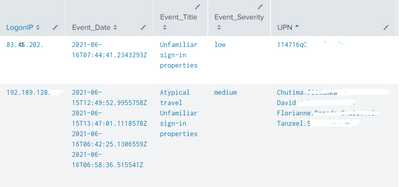
I am getting results like the below screenshot.
Now I want the Query-1 "LogonIP" results (index=testindex ), need to check with Query2 (index=o365) "LogonIP".
And if the LogonIP are already used by 20+ users means, I want to filter in the results.
- Mark as New
- Bookmark Message
- Subscribe to Message
- Mute Message
- Subscribe to RSS Feed
- Permalink
- Report Inappropriate Content
Hi @alexspunkshell,
in addition to the previous answer, you have to add the distinct count of users (UPN) so you can filter results on this value, please, try something like this:
index=testindex OR (index=o365 ClientIPAddress=*)
| eval LogonIP=coalesce(LogonIP,ClientIPAddress)
| stats values(Event_Date) AS Event_Date values(Event_Title) AS Event_Title values(Event_Severity) AS Event_Severity dc(UPN) AS dc_UPN values(UPN) AS UPN values(MFAStatus) AS MFAStatus count(eval(index=o365)) AS Count by LogonIP
| where dc_UPN>0
Ciao.
Giuseppe
- Mark as New
- Bookmark Message
- Subscribe to Message
- Mute Message
- Subscribe to RSS Feed
- Permalink
- Report Inappropriate Content

Can you try if this works for you,
index=testindex
    [ search index=o365 ClientIPAddress=*
    | stats count by ClientIPAddress
    | dedup ClientIPAddress
    | rename ClientIPAddress as "LogonIP"
    | where count < 20
    | return 1000 LogonIP]
| table LogonIP Event_Date Event_Title Event_Severity UPN MFAStatus
----
An upvote would be appreciated if it helps!

Join the Splunk Community Slack to learn, troubleshoot, and make connections with fellow Splunk practitioners in real time!
Join Splunk User Groups to connect and learn in-person by region or remotely by topic or industry.
Announcing Modern Navigation: A New Era of Splunk User Experience
Modernize your Splunk Apps – Introducing Python 3.13 in Splunk
Step into “Hunt the Insider: An Splunk ES Premier Mystery” to catch a cybercriminal ...
