
Join the Conversation
- Find Answers
- :
- Using Splunk
- :
- Splunk Search
- :
- Re: How to combine two different time source field...
- Subscribe to RSS Feed
- Mark Topic as New
- Mark Topic as Read
- Float this Topic for Current User
- Bookmark Topic
- Subscribe to Topic
- Mute Topic
- Printer Friendly Page
- Mark as New
- Bookmark Message
- Subscribe to Message
- Mute Message
- Subscribe to RSS Feed
- Permalink
- Report Inappropriate Content

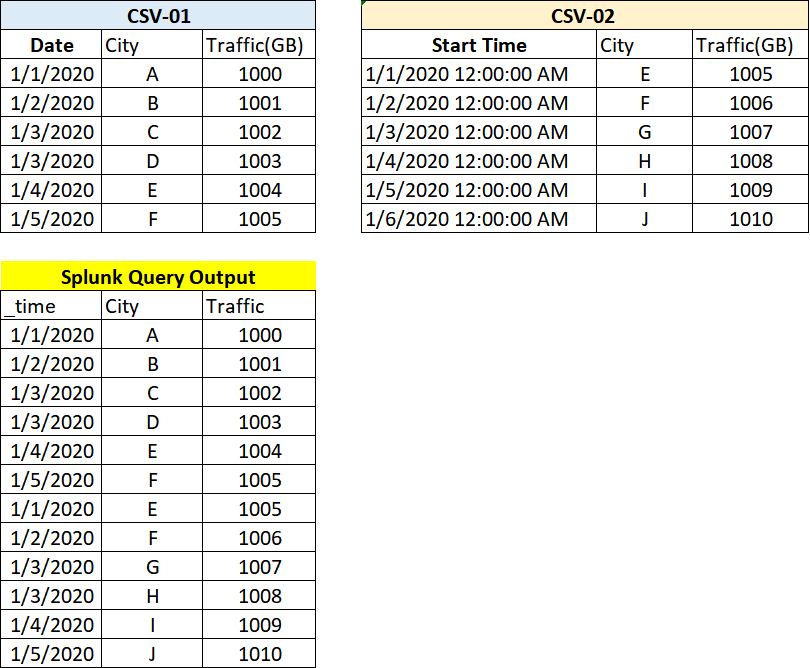

- Mark as New
- Bookmark Message
- Subscribe to Message
- Mute Message
- Subscribe to RSS Feed
- Permalink
- Report Inappropriate Content

UPDATED:
index="CSV-01" OR index="CSV-02"
| eval Date=coalesce(Date, mvindex(split('Start Time'," "),0))
| eval Date=strptime(Date,"%d/%m/%Y")
| fieldformat Date=strftime(Date,"%d/%m/%Y")
| table Date City "Traffic(GB)"
| rename "Traffic(GB)" as Traffic
| sort Traffic
Previous Answer:
| inputlookup csv_01
| append [ | inputlookup csv_02
| eval Date = mvindex(split('Start Time'," "),0)
| table Date City "Traffic(GB)" ]
| eval _time = strptime(Date,"%d/%m/%Y")
| rename "Traffic(GB)" as Traffic
| table _time City Traffic
Hi, @kaungset
How about this?
P.S. It is better not to use a field name with spaces (ex. Start Time)in CSV.
if my query doesn't work, maybe field name problem occurs.
- Mark as New
- Bookmark Message
- Subscribe to Message
- Mute Message
- Subscribe to RSS Feed
- Permalink
- Report Inappropriate Content
UPDATED:
index="CSV-01" OR index="CSV-02"
| eval Date=coalesce(Date, mvindex(split('Start Time'," "),0))
| eval Date=strptime(Date,"%d/%m/%Y")
| fieldformat Date=strftime(Date,"%d/%m/%Y")
| table Date City "Traffic(GB)"
| rename "Traffic(GB)" as Traffic
| sort Traffic
Previous Answer:
| inputlookup csv_01
| append [ | inputlookup csv_02
| eval Date = mvindex(split('Start Time'," "),0)
| table Date City "Traffic(GB)" ]
| eval _time = strptime(Date,"%d/%m/%Y")
| rename "Traffic(GB)" as Traffic
| table _time City Traffic
Hi, @kaungset
How about this?
P.S. It is better not to use a field name with spaces (ex. Start Time)in CSV.
if my query doesn't work, maybe field name problem occurs.
- Mark as New
- Bookmark Message
- Subscribe to Message
- Mute Message
- Subscribe to RSS Feed
- Permalink
- Report Inappropriate Content
hi @to4kawa
Thank You!
when i try first SPL command line
1.| eval Date=coalesce(Date, mvindex(split('Start Time'," "),0)) was work
but 2nd & 3rd doesn't work well.
I try like this first line;
1. index="main"
| eval d=coalesce(Date,mvindex(split('Start Time'," "),0))
| starts count by d
but when I put 2nd & 3rd line it's show us No results found;
1. index="main"
| eval d=coalesce(Date,mvindex(split('Start Time'," "),0))
| eval Date=strptime(d,"%d/%m/%Y")
| fieldformat Date=strftime(Date,"%d/%m/%Y")
| starts count by Date
- Mark as New
- Bookmark Message
- Subscribe to Message
- Mute Message
- Subscribe to RSS Feed
- Permalink
- Report Inappropriate Content
before stats, if Date is, the problem is stats.
if Date isn't, the problem is strptime.
but, I think no need strptime
- Mark as New
- Bookmark Message
- Subscribe to Message
- Mute Message
- Subscribe to RSS Feed
- Permalink
- Report Inappropriate Content
Hi,
Thank You for your reply!
Both source CSV format file 01 & 02 was already input to splunk and indexed.
It was indexed as 3 time values as follow;
_time(only system default), Date(1/30/2020), Start Time(1/30/2020 12:00:00 AM)
I want to combine values of Date & Start Time as only Date field
Date City Traffic
1/30/2020 A 102039
- Mark as New
- Bookmark Message
- Subscribe to Message
- Mute Message
- Subscribe to RSS Feed
- Permalink
- Report Inappropriate Content
@kaungset
I see. my answer is updated. please confirm.
- Mark as New
- Bookmark Message
- Subscribe to Message
- Mute Message
- Subscribe to RSS Feed
- Permalink
- Report Inappropriate Content

index = blah sourcetype = blah source IN ("*CSV-01","*CSV-02") |stats count by _time City "Traffic(GB)"|rename "Traffic(GB)" as Traffic| fields - count

Join the Splunk Community Slack to learn, troubleshoot, and make connections with fellow Splunk practitioners in real time!
Join Splunk User Groups to connect and learn in-person by region or remotely by topic or industry.
Meet the .conf26 AI Agent Buildathon Winners
Trusted Autonomy in the SOC: A Maturity Journey
Supercharging Windows Security Detection Performance: Introducing Hybrid Field ...
