
Join the Conversation
- Find Answers
- :
- Using Splunk
- :
- Splunk Search
- :
- How to add two fields using regex in transforms.co...
- Subscribe to RSS Feed
- Mark Topic as New
- Mark Topic as Read
- Float this Topic for Current User
- Bookmark Topic
- Subscribe to Topic
- Mute Topic
- Printer Friendly Page
- Mark as New
- Bookmark Message
- Subscribe to Message
- Mute Message
- Subscribe to RSS Feed
- Permalink
- Report Inappropriate Content

Hi everyone,
I need help to create a better regex in my transforms.conf. I am filtering checkpoint data in my Splunk.
In this case, I don't want collect the following event
sourcetype=opsec action=allowed src=172.20.1.1
OR
sourcetype=opsec action=allowed src=172.20.1.2
I created the props.conf and transforms.conf:
props.conf:
[opsec]
TRANSFORMS-t1 = eliminate_opsec

transforms.conf
[eliminate_opsec]
REGEX = (src\=172.20.1.1|src\=172.20.1.2)
DEST_KEY = queue
FORMAT = nullQueue
I need add in the regex, the field action=allowed.
How do I do add this function ?
- Mark as New
- Bookmark Message
- Subscribe to Message
- Mute Message
- Subscribe to RSS Feed
- Permalink
- Report Inappropriate Content

- Mark as New
- Bookmark Message
- Subscribe to Message
- Mute Message
- Subscribe to RSS Feed
- Permalink
- Report Inappropriate Content
- Mark as New
- Bookmark Message
- Subscribe to Message
- Mute Message
- Subscribe to RSS Feed
- Permalink
- Report Inappropriate Content


What I see is an event that was indexed because it did not match the regex string in the eliminate_opsec stanza. The match failed because the IP address was not one of the two in the regex. If that is not the expected behavior then please restate the requirements.
If this reply helps you, Karma would be appreciated.
- Mark as New
- Bookmark Message
- Subscribe to Message
- Mute Message
- Subscribe to RSS Feed
- Permalink
- Report Inappropriate Content
Hi richgalloway,
It just example, because I can't show real address ip.
I am changing the values (address ip) in transforms.conf, according with requirements.
Tks,
- Mark as New
- Bookmark Message
- Subscribe to Message
- Mute Message
- Subscribe to RSS Feed
- Permalink
- Report Inappropriate Content
I believe there is a stray backslash in the regex string. Try this one:
(action=allowed(.*)(src=172\.20\.1\.1|src=172\.20\.1\.2))
If this reply helps you, Karma would be appreciated.
- Mark as New
- Bookmark Message
- Subscribe to Message
- Mute Message
- Subscribe to RSS Feed
- Permalink
- Report Inappropriate Content
Hi Richgalloway!
it worked really well!
Thanks a lot.
- Mark as New
- Bookmark Message
- Subscribe to Message
- Mute Message
- Subscribe to RSS Feed
- Permalink
- Report Inappropriate Content
This matches the examples you gave.
REGEX = action=allowed\s+(src=172.20.1.1|src=172.20.1.2)
If this reply helps you, Karma would be appreciated.
- Mark as New
- Bookmark Message
- Subscribe to Message
- Mute Message
- Subscribe to RSS Feed
- Permalink
- Report Inappropriate Content
Hi Richgalloway,
I tried but not works.
REGEX = action=allowed\s+(src=172.20.1.1|src=172.20.1.2)
and then i tried this:
REGEX = action\=allowed\s+(src\=172.20.1.1|src\=172.20.1.2)
Cheers!
- Mark as New
- Bookmark Message
- Subscribe to Message
- Mute Message
- Subscribe to RSS Feed
- Permalink
- Report Inappropriate Content

Try this as well
REGEX = action=allowed(.*)(src=172\.20\.\1\.1|src=172\.20\.1\.2)
- Mark as New
- Bookmark Message
- Subscribe to Message
- Mute Message
- Subscribe to RSS Feed
- Permalink
- Report Inappropriate Content
Thanks a lot too Somesoni2.
:)
- Mark as New
- Bookmark Message
- Subscribe to Message
- Mute Message
- Subscribe to RSS Feed
- Permalink
- Report Inappropriate Content
Unfortunately no.
When I remove action=allowed, my regex works well.
Any idea?
- Mark as New
- Bookmark Message
- Subscribe to Message
- Mute Message
- Subscribe to RSS Feed
- Permalink
- Report Inappropriate Content
Try this:
REGEX = (action=allowed(.*)(src=172\.20\.\1\.1|src=172\.20\.1\.2))
If this reply helps you, Karma would be appreciated.
- Mark as New
- Bookmark Message
- Subscribe to Message
- Mute Message
- Subscribe to RSS Feed
- Permalink
- Report Inappropriate Content
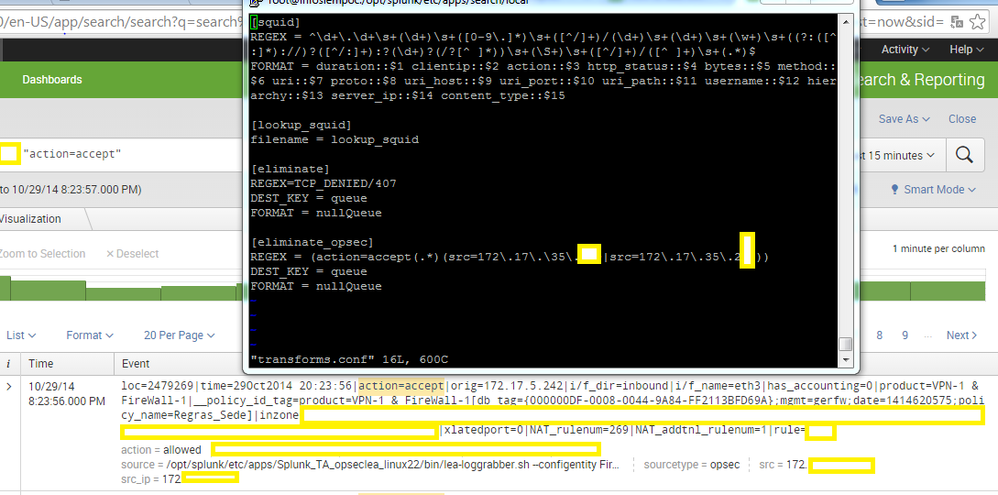
Unfortunately no.
Look above the picture:
Cheers!
- Mark as New
- Bookmark Message
- Subscribe to Message
- Mute Message
- Subscribe to RSS Feed
- Permalink
- Report Inappropriate Content
Did 2nd option work?
- Mark as New
- Bookmark Message
- Subscribe to Message
- Mute Message
- Subscribe to RSS Feed
- Permalink
- Report Inappropriate Content
Hi Somesoni2,
No.
:(
- Mark as New
- Bookmark Message
- Subscribe to Message
- Mute Message
- Subscribe to RSS Feed
- Permalink
- Report Inappropriate Content
Can you post some sample raw data?
- Mark as New
- Bookmark Message
- Subscribe to Message
- Mute Message
- Subscribe to RSS Feed
- Permalink
- Report Inappropriate Content
Sure.
loc=17389746|time=29Oct2014 16:28:39|action=allowed|orig=172.20.1.1|i/f_dir=inbound|i/f_name=eth3|has_accounting=0|product=VPN-1 & FireWall-1|__policy_id_tag=product=VPN-1 & FireWall-1[db_tag={000000E0-003F-0046-93C9-1F533951F91E};mgmt=gerfw;date=1414530153;policy_name=example1]|inzone=Internal|outzone=External|service_id=http|src=172.20.1.1|s_port=58077|dst=173.xxx.yyy.57|service=80|proto=tcp|xlatesrc=172.20.1.xx|xlatesport=29365|xlatedport=0|NAT_rulenum=267|NAT_addtnl_rulenum=1|rule=781
Cheers!

Join the Splunk Community Slack to learn, troubleshoot, and make connections with fellow Splunk practitioners in real time!
Join Splunk User Groups to connect and learn in-person by region or remotely by topic or industry.
Index This | What travels the world but is also stuck in place?
Discover New Use Cases: Unlock Greater Value from Your Existing Splunk Data
Continue Your Journey: Join Session 2 of the Data Management and Federation Bootcamp ...
