
Join the Conversation
- Find Answers
- :
- Using Splunk
- :
- Splunk Search
- :
- How extract field using rex?
- Subscribe to RSS Feed
- Mark Topic as New
- Mark Topic as Read
- Float this Topic for Current User
- Bookmark Topic
- Subscribe to Topic
- Mute Topic
- Printer Friendly Page
- Mark as New
- Bookmark Message
- Subscribe to Message
- Mute Message
- Subscribe to RSS Feed
- Permalink
- Report Inappropriate Content

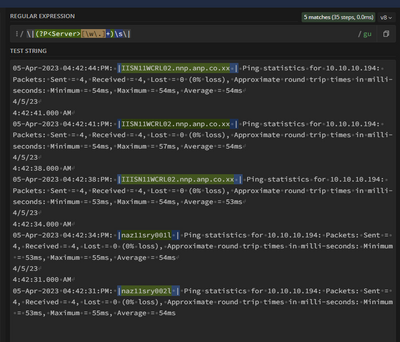
How to extract fields in between | servername |
Which i am using in rex
^[^\|\n]*\|(?P<Server>\w+\.\w+\.\w+\.\w+\s+)
But its not extracting the all the servers
05-Apr-2023 04:42:44:PM: |IISN11WCRL02.nnp.anp.co.xx | Ping statistics for 10.10.10.194: Packets: Sent = 4, Received = 4, Lost = 0 (0% loss), Approximate round trip times in milli-seconds: Minimum = 54ms, Maximum = 54ms, Average = 54ms
4/5/23
4:42:41.000 AM
05-Apr-2023 04:42:41:PM: |IISN11WCRL02.nnp.anp.co.xx | Ping statistics for 10.10.10.194: Packets: Sent = 4, Received = 4, Lost = 0 (0% loss), Approximate round trip times in milli-seconds: Minimum = 54ms, Maximum = 57ms, Average = 54ms
4/5/23
4:42:38.000 AM
05-Apr-2023 04:42:38:PM: |IIISN11WCRL02.nnp.anp.co.xx | Ping statistics for 10.10.10.194: Packets: Sent = 4, Received = 4, Lost = 0 (0% loss), Approximate round trip times in milli-seconds: Minimum = 53ms, Maximum = 54ms, Average = 53ms
4/5/23
4:42:34.000 AM
05-Apr-2023 04:42:34:PM: |naz11sry001l | Ping statistics for 10.10.10.194: Packets: Sent = 4, Received = 4, Lost = 0 (0% loss), Approximate round trip times in milli-seconds: Minimum = 53ms, Maximum = 55ms, Average = 54ms
4/5/23
4:42:31.000 AM
05-Apr-2023 04:42:31:PM: |naz11sry002l | Ping statistics for 10.10.10.194: Packets: Sent = 4, Received = 4, Lost = 0 (0% loss), Approximate round trip times in milli-seconds: Minimum = 53ms, Maximum = 55ms, Average = 54ms
- Mark as New
- Bookmark Message
- Subscribe to Message
- Mute Message
- Subscribe to RSS Feed
- Permalink
- Report Inappropriate Content

@karthi2809 you can try something like this....
| rex field=_raw "\|(?P<Server>[\w\.]+)\s\|"
~ If the reply helps an upvote would be appreciated.
- Mark as New
- Bookmark Message
- Subscribe to Message
- Mute Message
- Subscribe to RSS Feed
- Permalink
- Report Inappropriate Content
@karthi2809 you can try something like this....
| rex field=_raw "\|(?P<Server>[\w\.]+)\s\|"
~ If the reply helps an upvote would be appreciated.
- Mark as New
- Bookmark Message
- Subscribe to Message
- Mute Message
- Subscribe to RSS Feed
- Permalink
- Report Inappropriate Content


Try this
| rex "^[^\|\n]*\|(?P<Server>[^\|]+)"

Join the Splunk Community Slack to learn, troubleshoot, and make connections with fellow Splunk practitioners in real time!
Join Splunk User Groups to connect and learn in-person by region or remotely by topic or industry.
SOC4Kafka - New Kafka Connector Powered by OpenTelemetry
Rounding off the Splunk Dashboard Contest
A Four Part Event Series: AI + Observability: AI Agents, LLMs, Apps, & Infrastructure
