
Join the Conversation
- Find Answers
- :
- Using Splunk
- :
- Splunk Search
- :
- Re: How do you use a range with the where command?
- Subscribe to RSS Feed
- Mark Topic as New
- Mark Topic as Read
- Float this Topic for Current User
- Bookmark Topic
- Subscribe to Topic
- Mute Topic
- Printer Friendly Page
- Mark as New
- Bookmark Message
- Subscribe to Message
- Mute Message
- Subscribe to RSS Feed
- Permalink
- Report Inappropriate Content
How do you use a range with the where command?
TransactionName=WPP* | stats count(TransactionStatus) as TOTAL count(eval(TransactionStatus == "true")) as SUCCESS count(eval(TransactionStatus == "false")) as FAILURE by TotalNoOfThreadsInGroup | where TotalNoOfThreadsInGroup=25 OR TotalNoOfThreadsInGroup=50 OR TotalNoOfThreadsInGroup=75
The above query gives the data for Thread groups 25,50,75 in each row.
Ideally, the data i need should be like Threadgroup 1 to 25 as one row , 25 to 50 as another and 50 to 75 so on.
Any Insight will be helpful.
Thanks for looking.

- Mark as New
- Bookmark Message
- Subscribe to Message
- Mute Message
- Subscribe to RSS Feed
- Permalink
- Report Inappropriate Content
Hi DalJeanis ,
Thanks for the help
Tried both options, Its still Not consolidating the data
Here is the screenshot with the bin option " bin TotalNoOfThreadsInGroup span=25" All 0-25 should consolidate to a single row
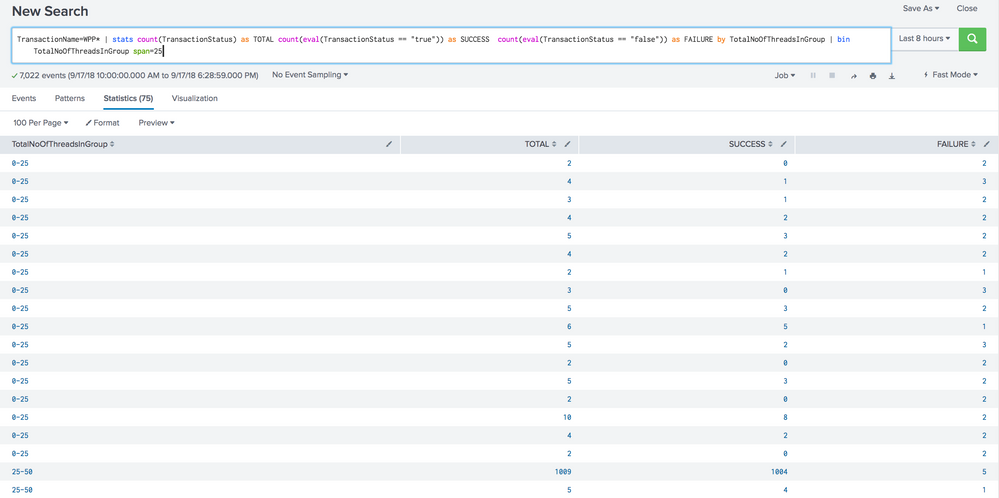
Since i don't have privileges to respond you with the image. I am replying here.
- Mark as New
- Bookmark Message
- Subscribe to Message
- Mute Message
- Subscribe to RSS Feed
- Permalink
- Report Inappropriate Content

See the bin command.
https://docs.splunk.com/Documentation/Splunk/latest/SearchReference/Bin
| bin TotalNoOfThreadsInGroup span=25
Alternately, you could do plain math...
| eval TotalNoOfThreadsInGroup = 25*ceiling(TotalNoOfThreadsInGroup/25.00)
- Mark as New
- Bookmark Message
- Subscribe to Message
- Mute Message
- Subscribe to RSS Feed
- Permalink
- Report Inappropriate Content


Hi rsm1444,
have you tried:
    TransactionName=WPP*
   | stats count(TransactionStatus) as TOTAL count(eval(TransactionStatus == "true")) as SUCCESS  count(eval(TransactionStatus == "false")) as FAILURE by TotalNoOfThreadsInGroup
   | where  (TotalNoOfThreadsInGroup>=1 OR TotalNoOfThreadsInGroup<=25) OR (TotalNoOfThreadsInGroup>=26 OR TotalNoOfThreadsInGroup<=50)  OR (TotalNoOfThreadsInGroup>=51 OR TotalNoOfThreadsInGroup<=75)
Note that this does not overlap the thresholds like you asked for.
cheers, MuS
- Mark as New
- Bookmark Message
- Subscribe to Message
- Mute Message
- Subscribe to RSS Feed
- Permalink
- Report Inappropriate Content
Hi Mus,
Thanks for the response. but Each threadgroup is showing up as 1 row. I need thread groups 1 to 25 consolidate to 1 row and 25 to 50 to another row and so on. Shown below is the attachment with the updated query you provided.
Incase if you can't see the screen shot below. Please use the link
https://drive.google.com/file/d/1kcRez42vRb6ysb-kuDPoNqjRHW-ADosc/view?usp=sharing
- Mark as New
- Bookmark Message
- Subscribe to Message
- Mute Message
- Subscribe to RSS Feed
- Permalink
- Report Inappropriate Content
okay, got the question wrong. Look at the options @DalJeanis posted below vvv - I reckon bin will be the best option.
cheers, MuS




Join the Splunk Community Slack to learn, troubleshoot, and make connections with fellow Splunk practitioners in real time!
Join Splunk User Groups to connect and learn in-person by region or remotely by topic or industry.
Persistent Queue at TcpOut — One of Splunk's Most Practical Features
Skip the Awkward Silence: Have a .conf-ersation at .conf26
Rethinking Zero Trust: From Product Purchases to Logical Control Evidence
